A small team can have a strong product, a clear landing page, and almost no time to produce video consistently. The usual response is to plan a polished brand film, wait for scripts and edits, then discover that the launch has moved on before the asset is ready.
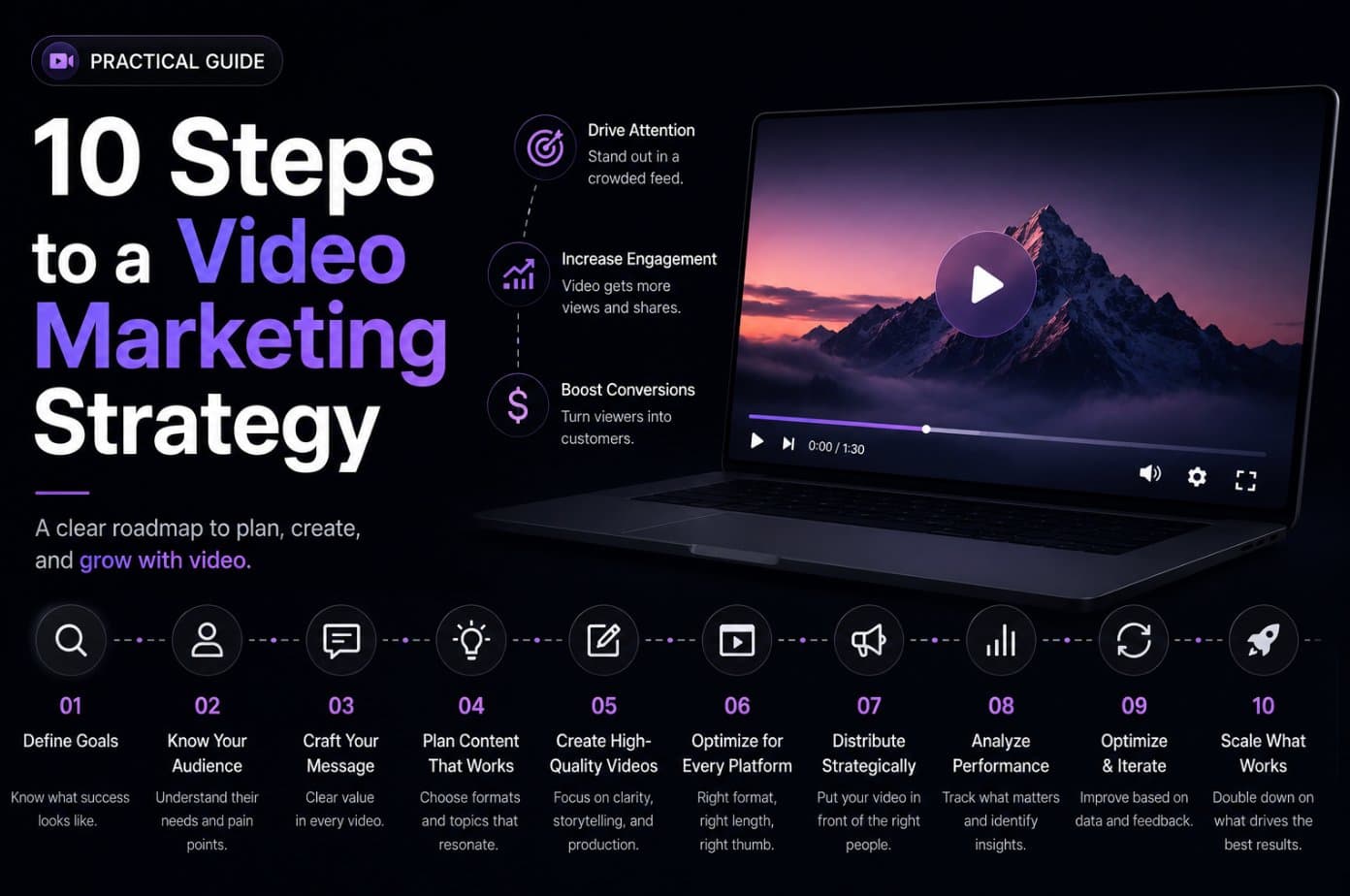
A workable video marketing strategy treats video as a lightweight content system, not a pile of disconnected formats. Start with one audience problem, turn the message into a focused asset, adapt it to the channel, measure a useful signal, and reuse what earns another iteration. Video is now a mainstream baseline, with 91% of businesses using it as a marketing tool in 2026, according to HubSpot's marketing statistics. The advantage for an early-stage team comes from operating the system more consistently, not from producing the most elaborate video.
The ten tactics below cover teasers, walkthroughs, launches, founder narratives, email, proof, education, and culture. Each one ends with something concrete: a video, a distribution workflow, a measurement decision, or a change to the next production cycle.
1. Short-Form Product Teaser Videos
A short product teaser earns attention before a visitor commits to a full demo or landing page. It should make one promise clear, show enough of the product to create recognition, and give the viewer a direct next step. Short-form video is a practical starting point because 69% of video marketers prefer social videos, according to Vidico's video marketing statistics.
Use the landing page as the source of truth. Pull the headline, problem statement, product screenshots, and call to action into a compact script so the teaser reinforces the page instead of introducing a different claim. A URL-driven workflow such as ShipTeaser's can reduce production friction when the page already contains the required message and visual cues.

Build one message, then test the hook
Don't cram every feature into a short asset. Choose the most urgent problem, open with the consequence of leaving it unsolved, and show the product as the response. Test different opening lines and visual sequences, then review where viewers stop watching, whether they click, and whether the landing page receives qualified traffic.
A useful teaser workflow looks like this:
- Choose one audience pain: Build the video around the problem your page already prioritizes.
- Keep the CTA visible: Put the next action in the overlay and the post copy.
- Create channel variations: Adjust framing and captions rather than reposting an unsuitable master.
- Reuse the winning hook: Carry the strongest opening into email, launch posts, and product-page video.
Practical rule: If the viewer needs a second explanation to understand the teaser, the message is carrying too much.
2. Landing Page Video Walk-Through
A landing page walk-through turns static copy and screenshots into a guided product experience. It works best when the visitor has understood the problem but still needs to answer a practical question: how does this product fit into my workflow?
Start with the page, not the video editor. The headline should state the outcome, the body copy should explain the use case, and the video should demonstrate the path from problem to result. If the page is unclear, generating a video will only make the confusion move faster.
For teams that need a concise asset built from existing page material, this landing page video guide explains the relationship between page content and product demonstration. The video can sit above the fold when the product is easy to grasp visually, or lower on the page when visitors need more context first.
Demonstrate the decision, not every feature
Show the first meaningful action, the interface response, and the benefit that follows. Avoid a tour of every menu. A product-led startup might show a user submitting a URL, receiving a generated asset, and downloading the result. That sequence answers a buying question more effectively than a catalogue of controls.
Use captions because many visitors browse without sound. Add a short text summary below the player for people who prefer scanning, and update the video when the workflow or interface changes materially. Track the video's relationship to the page action, not just its play count. If visitors watch but don't start a trial or request a demo, the asset may be explaining the product without resolving the objection that blocks conversion.
3. Social Media Campaign Launch Strategy
A launch video becomes more useful when distribution is planned before production. Create one core message, then adapt the introduction, caption, aspect ratio, and CTA for each channel. A founder posting to LinkedIn may need a context-rich caption, while a short-form feed needs the product value to appear immediately in the video itself.
Native uploads should be the default. External links can add friction, and platform feeds reward content that keeps the viewer in the environment. Prepare vertical, square, or other channel-appropriate versions from the same approved script and visual set. The team shouldn't create five unrelated videos. It should create one campaign with controlled variations.

Adapt the distribution layer
Keep the product promise consistent, but change the wrapper around it. On LinkedIn, explain the business problem and invite informed discussion. On a visual discovery platform, lead with the interface or transformation. On a video search platform, write a descriptive title and include the product category in the description.
Build a small launch kit:
- Approved master: Store the final script, visuals, CTA, and brand treatment together.
- Platform copy: Write captions in the audience's normal language for each channel.
- Reply plan: Prepare answers to questions about pricing, setup, integrations, or availability.
- Performance record: Note retention, comments, clicks, and qualified responses by channel.
Paid distribution should come after an organic signal gives you a reason to extend a specific variant. Don't pay to rescue a vague message.
4. Founder-Led Narrative and Personal Brand
A founder-led video can explain why the product exists in a way a feature list can't. Early-stage buyers often want to understand the problem the team cares about, the trade-off it made, and the kind of customer it intends to serve. The founder's voice provides that context without requiring a large production setup.
Lead with the problem solved, not with a company biography. A founder might explain how repeated launch delays exposed a need for faster product video creation, then show the workflow built in response. That story gives the audience a reason to care before the product appears.
Keep the story specific
Authenticity doesn't mean publishing an unedited monologue. Remove repeated points, clarify the opening sentence, add captions, and preserve the founder's natural delivery. A single conversation can produce a longer narrative plus several focused clips, each built around one question or decision.
Founder content works when it has a point of view. Share a difficult product decision, explain why a common workflow fails, or describe what the team refuses to optimize for. Avoid turning every clip into a sales pitch. Viewers can accept a product mention when the insight arrives first.
Use recurring visual cues so the series feels connected, but don't over-brand it. A consistent title treatment, caption style, and closing action are enough. The workflow should make publishing easier for the founder, not create another approval process that stops the series after the first post.
5. Product Hunt Launch and Feature Announcement
A Product Hunt launch video has a narrow job. It must help a visitor understand what the product does quickly enough to decide whether to explore, discuss, or support it. The asset belongs inside a wider launch plan that includes the product page, founder post, community communication, and follow-up answers.
Create the first version before launch day so you can review the message with people who don't know the product. If they describe the product differently from the intended positioning, fix the teaser rather than adding more explanation. A launch video for a URL-to-video product, for example, should show the submitted page, the generated teaser, and the downloadable result, not a long account of the underlying automation.
This Product Hunt launch video use case is relevant when the team needs a concise, repeatable asset for a product announcement. The fixed scope of a short teaser also makes review easier when several launch materials need approval.
Coordinate the launch assets
Publish the teaser in the product post and reuse its central hook in the founder's announcement. Adapt the copy for social posts rather than pasting the same paragraph everywhere. Prepare answers to predictable questions before launch, especially around who the product serves, how it works, and what someone receives after signing up.
Don't treat upvotes or views as the only outcome. Record visits, signups, meaningful comments, and the objections people raise. Those responses can improve the landing page and the next product video.
6. Email Marketing Video Integration
Email gives a product video a more deliberate setting than a fast-moving social feed. A thumbnail above the fold can break up a text-heavy announcement and give subscribers a clear visual reason to click. The email still needs a useful subject line, concise context, and a destination that continues the story.
Most email clients won't provide a dependable in-email viewing experience, so use a clickable thumbnail linked to the landing page or full demo. Include a fallback image, accessible alternative text, and a short summary below the visual. A reader should understand the offer even if the image doesn't load or the video isn't played.
For launch announcements, this launch email resource can help connect a short teaser with the surrounding email message. The thumbnail should promise the same benefit as the subject line, not introduce a separate campaign angle.
Match the email to the funnel stage
A new-product email can use a teaser to create curiosity. A feature announcement should show the new workflow. A retention email should help an existing user complete a task. Don't send the same asset to every segment just because it already exists.
Measure the click to the relevant page and the action that follows. A high click rate with little product engagement may mean the thumbnail is compelling but the landing page doesn't fulfill the promise. Add a text CTA for subscribers who prefer not to use the image, and keep the email's explanation short enough that the video remains an optional accelerator rather than a requirement.
7. Comparison and Competitive Positioning Videos
Comparison content belongs close to the buying decision. The viewer isn't asking what your product is in the abstract. They're asking whether it handles a particular workflow better than the tools or process they already know.
Show the difference through a use case. A workflow comparison might contrast scattered manual steps with a single URL submission and downloadable output. A positioning video for a SaaS product might show how a team completes one recurring task, where the alternative requires handoffs, and what changes for the user.
Be precise without becoming adversarial
Focus on your strengths and the customer's requirements. You don't need to attack another company or make claims you can't verify. Phrases such as “for teams that need a lightweight launch asset” are more credible than broad statements about being best for everyone.
Build the script around decision criteria:
- Setup effort: Explain what the user must provide before the workflow starts.
- Output: Show exactly what the customer receives.
- Control: Clarify which parts can be reviewed or changed.
- Fit: State who benefits and who needs a more hands-on process.
Comparison videos can support search discovery when their titles and descriptions use the language buyers type. They should also appear on comparison pages, where viewers already have enough context to evaluate the details. If pricing is a genuine advantage, state it accurately and keep the claim current. If it isn't, lead with workflow fit instead.
8. User Testimonial and Social Proof Video Series
Customer video earns trust when the speaker describes a real problem in concrete language. A generic statement that a product is “easy to use” gives a prospect little to evaluate. Ask what the customer tried before, what task they needed to complete, and what changed after adoption.
You can request precise outcomes when the customer is comfortable sharing them, but never pressure someone to invent a result or disclose sensitive business information. A credible testimonial can focus on the workflow, time saved qualitatively, reduced coordination, or a clearer launch process. Specific context matters more than polished lighting.

Design a repeatable interview
Send customers a short set of prompts in advance, then let them answer in their own words. Ask them to describe the initial problem, the first successful use, the part that required adjustment, and the reason they kept using the product. Cut the conversation into clips that each support one claim.
Feature customers from different industries or use cases when the product serves more than one segment. Place the resulting clips on the homepage, product pages, and comparison pages where the relevant objection appears. Keep the edits simple. Clear audio, captions, and an honest answer will do more for credibility than excessive transitions.
Get permission for the intended channels and confirm any numerical claim before publishing. Social proof loses value when the audience suspects the company selected or edited the story to hide important context.
9. Behind-the-Scenes and Team Culture Videos
Behind-the-scenes video shows how a team works when the product isn't being presented as a finished promise. It can introduce the people building the service, explain a design decision, or show the messy path from an early idea to a usable release. That perspective helps customers and prospective hires understand the company's operating style.
The strongest material usually comes from real work. Record a product review, a release preparation session, a remote planning ritual, or a developer explaining a trade-off at the right level of detail. Don't stage a generic office tour if the team is distributed and the actual culture happens in documents, calls, and async decisions.
Make authenticity manageable
Unpolished doesn't mean careless. Use natural light, clean audio, captions, and a clear opening. Let different team members host the series so the company isn't represented by one repeating voice. A short explanation of why a feature changed can be more distinctive than a posed team introduction.
Publish the most relevant clips on social channels, then place stronger culture pieces on the careers page. Keep customer data, private roadmap details, and personal information out of frame. Establish a lightweight review rule so people know what can be published without turning every informal recording into a legal or brand meeting.
Culture content shouldn't pretend every day is effortless. Showing how the team handles constraints can make the company more believable, provided the video respects the people involved and gives the audience something useful to understand.
10. Educational Content and Feature How-To Series
Educational video helps customers reach value after the initial click. It also gives the marketing team durable material for search, documentation, onboarding, and customer conversations. The subject should be narrow enough to answer one question clearly, such as how to prepare a landing page for a generated teaser or how to adapt a product video for a launch post.
Start with the user's task, not the feature name. “How to turn a product page into a launch teaser” describes an outcome. A feature-only title often assumes that the viewer already understands why the feature matters.
Build a useful learning library
Organize related videos into playlists and embed them in help documentation where the question arises. Add captions, descriptive titles, and supporting text so people can search and scan around the video. When a landing page or product workflow changes, use that update as a prompt to review the related tutorial.
An effective how-to usually follows a simple sequence:
- Define the starting state: Tell viewers what they need before beginning.
- Show the action: Demonstrate the interface or process without unnecessary detours.
- Explain the decision: Clarify why the step matters.
- Confirm the result: Show what success looks like and what to do next.
Educational content shouldn't disguise a sales pitch as instruction. Mention the product where it solves the task, then keep the rest focused on helping the viewer complete it. That approach supports adoption and gives future promotional assets a trustworthy source of explanation.
10-Point Video Marketing Strategy Comparison
| Title | 🔄 Implementation Complexity | ⚡ Resource Requirements | 📊 Expected Outcomes | 💡 Ideal Use Cases | ⭐ Key Advantages |
|---|---|---|---|---|---|
| Short-Form Product Teaser Videos | Low, template-driven; fast iteration but needs strong hooks | Low, small team, basic editing tools, templates | High reach and CTR; drives clicks to landing pages; limited depth | Social feeds, product launches, quick announcements | Highly shareable, low cost, rapid testing |
| Landing Page Video Walk-Through | Medium, automated scripting + page analysis; review recommended | Medium, design assets, hosting, captioning | Strong conversion lift (30–80% reported); reduces bounce | Conversion pages, demo sections, A/B tests | Messaging-aligned demos; improves on-page SEO |
| Social Media Campaign Launch Strategy | Medium–High, cross-platform coordination and scheduling | Medium, asset variants, scheduling tools, minor paid spend | Multiplied reach across channels; consistent awareness over time | Coordinated multi-platform launches and announcements | Reusable assets; broad audience building |
| Founder-Led Narrative & Personal Brand | Medium, requires founder availability and authenticity | Low–Medium, simple production, teleprompter or script prep | High trust and emotional connection; builds long-term brand equity | Early-stage branding, investor engagement, thought leadership | Differentiates brand; personal credibility boosts adoption |
| Product Hunt Launch & Feature Announcement | High, precise timing, hook testing, team coordination | Medium, multiple teaser variants, community mobilization | Concentrated traffic/upvotes; press and acquisition spikes | ProductHunt launches, maker events, time-sensitive reveals | High-impact launch-day visibility if executed well |
| Email Marketing Video Integration | Low–Medium, thumbnail/link setup and responsive checks | Low, video file, thumbnail generation, email template work | Higher open and click rates (reports: +10–80% depending on metric) | Announcement emails, drip campaigns, re-engagement | Boosts email engagement; preview drives clicks to demos |
| Comparison & Competitive Positioning Videos | Medium, requires research, careful legal/brand framing | Medium, comparative visuals, data, neutral scripting | Influences high-intent buyers; good SEO for comparison queries | Mid/late-funnel content, competitor search traffic | Directly affects purchase decisions; clarifies differentiation |
| User Testimonial & Social Proof Video Series | Medium, coordinate users, capture consent, edit highlights | Medium, user outreach, editing, consent management | High conversion lift (30–50% vs written); builds trust | Homepage, case studies, social proof placement | Third-party credibility; relatable persuasion |
| Behind-the-Scenes & Team Culture Videos | Low–Medium, ongoing cadence, authenticity over polish | Low, smartphone capture, minimal editing | Strengthens employer brand; humanizes product and team | Recruiting, brand storytelling, culture marketing | Authenticity drives engagement; attracts talent |
| Educational Content & Feature How-To Series | Medium–High, consistent production and curriculum planning | Medium–High, frequent content creation, editing, SEO work | Long-term organic traffic, better adoption, reduced churn | Onboarding, knowledge base, thought leadership | Builds authority and long-tail discovery via search |
Turn the Ten Tactics Into One Weekly Loop
A sustainable video marketing strategy doesn't require the team to produce every format every week. It requires a clear operating loop that turns one useful message into several controlled assets. Begin with one audience problem, such as a confusing launch workflow, slow feature adoption, or uncertainty about how the product works. Write the message in the same language used on the landing page, then choose the format that expresses it most efficiently.
For an early-stage product, a short product teaser is often the fastest starting asset. Use it to test whether the promise is clear in a compact format. If the teaser earns meaningful attention or prompts useful questions, reuse its hook and visuals in a landing page walk-through, an email thumbnail, a launch post, or a how-to video. Repurposing works when the core message remains stable while the explanation changes for the channel and funnel stage.
A practical weekly cadence
Choose a small set of decisions and assign an owner to each one:
- Select the problem: Agree on the audience, use case, and single promise.
- Create the source asset: Produce a focused teaser or walk-through from approved copy and visuals.
- Adapt by channel: Prepare native uploads, captions, thumbnails, and destination links.
- Record a baseline: Note the relevant starting signals, such as retention, clicks, signups, questions, or completed product actions.
- Review the evidence: Keep the hook, visual, or CTA that earned useful response, and change the weakest part before the next cycle.
The measurement should match the job of the video. Awareness content needs attention and qualified engagement. A landing page video needs to support product understanding and the page action. An educational clip should help users complete a task. Don't judge every asset by the same top-of-funnel number.
Where automation fits
Automation is most useful when the source material is already clear and the team needs more consistent output. ShipTeaser accepts a product URL, analyzes visible page copy, screenshots, and brand cues, then generates an approximately 15-second scripted and edited teaser designed for download and posting. That makes it relevant to teams that don't want to build every short asset through a manual editing pipeline.
Human review still matters. Check whether the generated script makes the right promise, whether the screenshots are current, whether the tone fits the audience, and whether the CTA makes sense on the selected channel. Automation can reduce the time between an approved page and a usable video, but it shouldn't replace judgment about brand trust or product accuracy.
Video has become a baseline marketing format, with 93% of video marketers saying it is important to their overall strategy, according to Digital Applied's 2026 video marketing data. That makes operational discipline more valuable than occasional creative intensity. Teams that connect message, format, distribution, measurement, and reuse can build a library without creating a new production problem every time they launch.
ShipTeaser turns an existing product landing page into a short promotional video by using its copy, screenshots, and visible brand cues, then provides a downloadable teaser for social and product announcement channels. Visit ShipTeaser to test a URL-driven workflow and add a repeatable short-form asset to your video marketing strategy.