Founders rarely lose a launch to a bad edit. They lose it to a link that strangers can't open. Production stopped being the hard part years ago. Wyzowl's 2025 video-marketing survey found that 89% of businesses used video as a marketing tool, which makes the file ordinary and the distribution address the scarce thing. Turning a video into link form is a settings problem, not a creative one.
To turn a video into a shareable link, upload the MP4 to a host such as YouTube, set visibility to Unlisted, wait until processing finishes, copy the short share URL, and open that URL in a signed-out private window to confirm it plays. An unlisted link stays out of search results and plays for anyone who holds it. Whether a recipient can download the file or forward it depends on the host's permission settings, not on the link itself.
What follows, in order:
- Choosing the link type and the access level that goes with it.
- Uploading and copying a URL that resolves.
- Placing that URL on each channel, with the right ratio for each one.
- Repairing a link that errors, stalls or goes silent.
- Shipping a first teaser today and linking it.
Choose the Link Type and Its Access Settings
For most software launches, an unlisted YouTube link is the right default. It plays in any browser without a plugin, it accepts a large upload, and it stays out of search results while still opening for anyone you send it to. Every other option on the list below is a deliberate exception, not a general upgrade.
| Link type | Plays in a browser | Recipient can download | Found in search |
|---|---|---|---|
| YouTube unlisted | Yes, in a full player | Not by default | No, only people with the link |
| YouTube public | Yes, in a full player | Not by default | Yes |
| Vimeo hidden link | Yes, in a full player | Only if the owner enables downloads | No |
| Cloud drive share link (Google Drive, Dropbox) | Often a file preview, not a player | Yes, if the owner allows it | No, unless the file sits in a public folder |
| Direct MP4 file on your own server | Yes, in a video tag | Yes | Only if you link to it |
The four controls, in order
Discoverability decides whether search or a channel page can surface the video, and it's the setting founders flip by accident when they move a file from Unlisted to Public on launch morning. Playback decides who can open the link at all: anyone with the URL, only named accounts, or only people who enter a password. Downloading decides whether a viewer can save a copy, and it lives in the host's permission settings rather than in the URL. Redistribution decides whether someone can repost the file somewhere else, and no link control touches it.
What no link setting can do
An unlisted link stays out of search, yet anyone holding it can play the video, and the owner can't see who forwarded it. Expiring links, offered by some hosts and cloud tools, stop a copied URL from working after a set period, which suits a press kit or a beta invite. The SaveMingo analysis of public link downloaders puts the limit plainly: a short-lived link reduces casual leakage, but it doesn't recall a file someone already downloaded and it doesn't stop a screen recording.
Practical rule: treat a link as an access lifecycle, not a lock. You're choosing who can watch now, not guaranteeing the video stays private later.
A viewer list or a password suits a partner who should see the video before launch. Say you send an unreleased feature teaser to an investor by unlisted link. That investor can forward it to anyone, and nothing in the file tells you who passed it on. Keep sensitive cuts behind a permission that names the viewer.
The rule of thumb
- Product pages and early sharing: unlisted YouTube.
- Product Hunt and open channels: public YouTube.
- A cleaner player: a hidden link on a host with less surrounding clutter.
- A partner or press contact who needs the raw file: a direct MP4.
- A small private group: a cloud drive share, and nothing wider.
Set the policy once so you stop re-deciding it per post: public on launch day, unlisted for early sharing, restricted for anything private. Keep your own copy of every file, because a host can remove a video or change its rules whenever it likes. Before any URL goes out, open it while signed out. That single test is the whole quality gate, and the ShipTeaser access settings guide walks through the same check when you're issuing links at volume.
How to Upload a Video and Copy a Working Link
Start with the file, not the platform. Export as an MP4 at 1080p with H.264 video, the combination every major host accepts without a transcode warning. MDN's codec selection guidance calls H.264 one of the most widely supported codecs and the pragmatic choice when a file has to play on someone else's device.
The path from export to a working address looks like this:
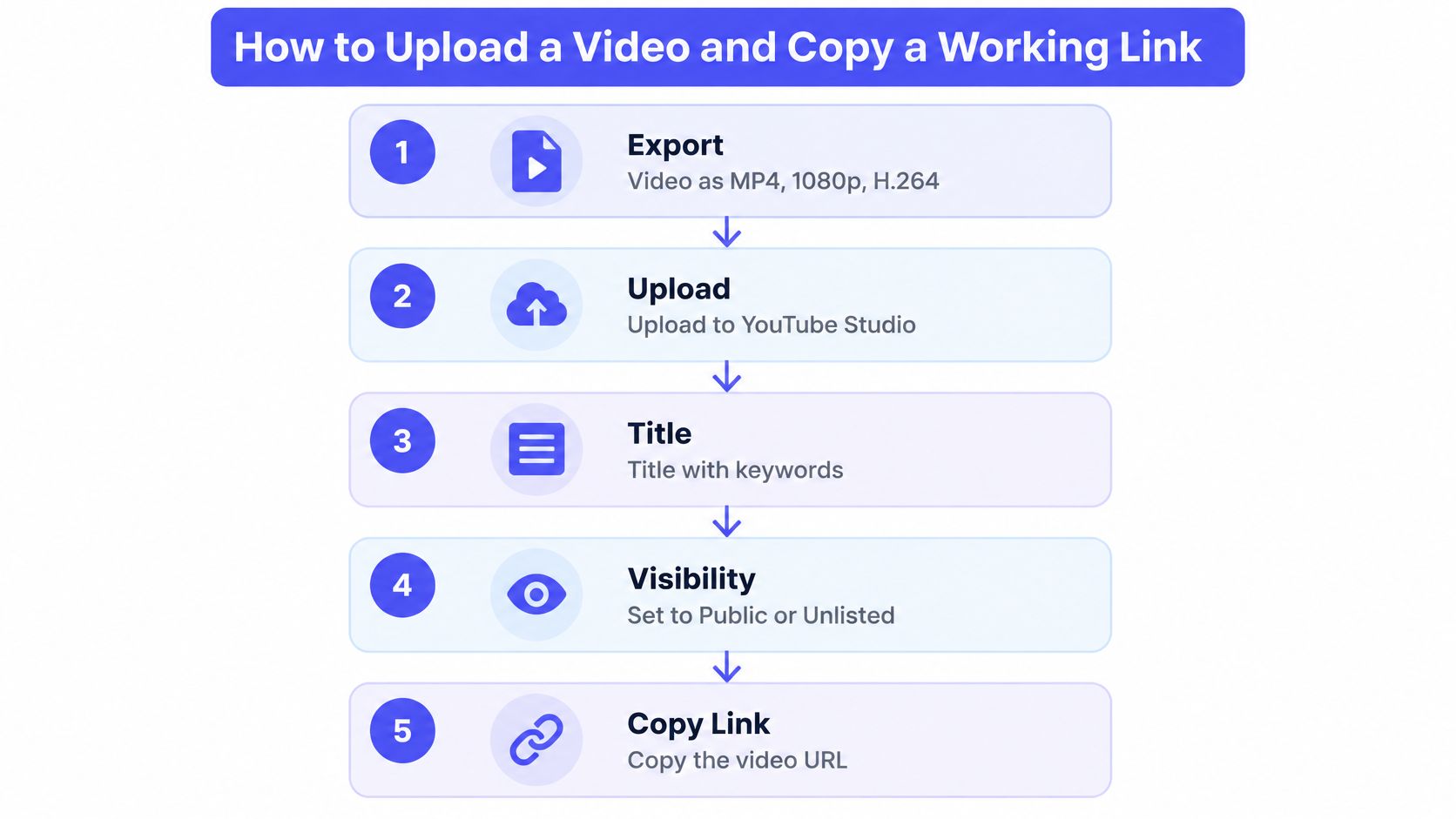
- Upload to the host and title it for the product. Use the product name plus the hook, not a filename like final_v3. A clear title means the link previews properly when someone pastes it into chat, a deck or a post.
- Set visibility to Unlisted. The URL works for anyone who has it and stays out of search, which is exactly what you want for the week before launch.
- Wait until processing reports finished. A link opened while the file is still transcoding shows a blank player, and the founder who tested it too early spends an hour debugging a video that was never broken.
- Copy the short share URL from the share panel rather than the browser address bar. The short form is the one that survives copy and paste into email, newsletters and slide decks.
- Open the copied link in a private window while signed out. Confirm it plays, the thumbnail looks right and there's no access request. This catches the restricted setting that would otherwise fail for every person you send it to.
- Switch to Public on launch day. On Product Hunt, paste the full YouTube URL into the first gallery slot, because the gallery takes video as a YouTube link rather than a file upload. The MP4 has to be on YouTube, public, and reachable before you hit submit.
If you don't have a file yet, ShipTeaser turns a product URL into a downloadable 1080p MP4 in about two minutes, and the six steps apply unchanged to that output.
Save the final URL in one note with the date you created it. Every post, deck and email then uses the same address, and a stale link is obvious the next time you audit them.
Where to Post Your Video Link for Each Channel
Pick one link type per channel and set its access on purpose before you paste it anywhere. A feed post needs the video file uploaded there so it can start inside the timeline. A landing page, a listing, or an email needs a URL whose visibility you chose for that audience.
| Channel | Best aspect ratio | Delivery | Practical note |
|---|---|---|---|
| X posts | 1:1 or 16:9 | Native upload | Plays muted in the timeline; anyone who can see the post can play the file |
| LinkedIn posts | 1:1 | Native upload | Square fills the feed without cropping; visibility follows the post itself |
| Product Hunt gallery | 16:9 | Public YouTube link | First gallery slot; set the video Public using the upload steps above |
| Vertical short-video feeds | 9:16 | Native upload | Fills the phone screen; the upload is public on that network |
| Landing page | 16:9 | Link to YouTube or your hosted MP4 | Unlisted works before launch when only people with the URL should watch; add a still frame as the poster |
| Email or newsletter | 16:9 | Link to a landing page | Use a still frame as the image, and confirm the page link plays while you are signed out |
Ratio decides whether the frame survives the crop. A 9:16 file fills a phone screen in vertical feeds, a 1:1 square suits feeds that render posts at full width, and a 16:9 file fits landing pages and players. Google Ads' guidance on video aspect ratios notes that vertical 9:16 video can cover about 75% of the screen in Shorts, and that adding vertical video to certain Shorts campaigns can increase conversions by more than 35%, improve view-through rate by more than 40% and raise viewability by more than 45% compared with horizontal video alone.
Demand is already there. In 2024, 89% of consumers said they wanted to see more videos from brands, according to HubSpot's consumer research. One master file can cover three placements in an afternoon: a square cut posted natively to LinkedIn, a 16:9 cut embedded on the landing page, and a 9:16 cut uploaded to vertical feeds.
I would not count on sound. A 2025 industry dataset reports that 85% of Facebook video views happen without sound, per Cropink's social media video statistics, so the hook has to work as on-screen text. A ShipTeaser video has no voice-over. The lines on screen come from the page you pasted, which is what a muted timeline shows.
Then separate the traffic. Append a different source parameter to each link, such as utm_source=linkedin or utm_source=producthunt, so click data shows which channel earned the visit. If you'd rather stretch one asset across a whole quarter, getting more from every published piece is a useful playbook for reworking the same master. Founders who sell through direct outreach can read the cold email video linking approach for the inbox version of the same link.
Fix a Link That Will Not Open or Play
The most common failure has a signature: the link plays fine for you and returns an access error for everyone else. That's almost always a private or restricted visibility setting, so check that before you touch the file. The rest of the failures arrive in a fairly predictable order.
| Symptom | Likely cause | Fix |
|---|---|---|
| Others see an access error | Visibility is private or restricted | Set Unlisted or Anyone with the link, then test while signed out, usually clears in minutes |
| Link opens to a blank player | Processing has not finished | Wait for processing to finish, then reload the link, usually clears in minutes |
| Video plays with no sound | Silent export with no audio track, or a muted track | Re-export with an audio track or add the optional music bed, and keep key messages on screen as text |
| Text is cut off in the feed | Wrong aspect ratio for the channel | Export a 1:1 or 9:16 version for that placement, which needs a re-render |
| Link stops working after days | An expiry date was set | Create a new link and replace every copy of the old one, usually clears in minutes |
| Product Hunt rejects the video | Unlisted, or uploaded as a file | Set it to Public and paste the full YouTube URL, usually clears in minutes |
| Mobile playback stalls | Large file with metadata at the end | Re-export as H.264 MP4 at a lower bitrate with metadata at the start, which needs a re-render |
Where the time goes
Visibility and processing problems clear in minutes because you're changing a setting. A clipped crop or a stalling phone player needs a re-export, which is a rendering job and runs as long as your slowest export. Budget for that rather than promising a five-minute fix.
Mobile stalls deserve their own note. A large file with its index written at the end forces the player to pull the whole thing before the first frame, which looks like a spinner followed by a stop. Re-export at a lower bitrate with the index at the start and the same address plays in a phone browser. If the link comes from a server-side job rather than a manual upload, the fault is usually upstream in the pipeline, and these notes on how to fix failed video URL uploads cover that path.
A repaired link isn't repaired until you've tested it as a stranger. Your own browser is signed in, cached and useless as evidence.
Cropping problems have a single cause: a square or vertical export cut down from a horizontal master. The video format guidance for Instagram spells out the safe zones that keep captions and your product name clear of the app's interface.
After any change, open the link in a signed-out private window on a phone and on a laptop. Two devices, one signed-out state, thirty seconds of checking.
Make Your First Teaser and Link It Today
A 15 to 30 second frame is the right length for a launch announcement: one hook, one problem, and one ask before the feed moves on. ShipTeaser reads the product page you paste and builds that video as five beat-cut scenes: hook, problem, solution, proof, and call to action. On-screen text carries the message. There is no editor, no prompt, no voice-over, and no faces, and every line of copy comes from the page, word for word or clearly derived from it.
Nielsen's analysis of short-form advertising reported that the number of 15-second television commercials increased by more than 80% between 2008 and 2012. In 2024, 83% of video marketers used short-form video, according to HubSpot's survey of more than 500 global video marketers. Buyers already meet a launch in that tight window.
Two rules before the link leaves your machine. Generated videos can contain factual errors or misread your brand, so review every frame against the page. The service is not a backup, so download the MP4 and keep your own copy. I would check the proof scene first: if the page never stated a number, the video should not invent one.
If the first frame needs work, start from this product video script structure before you generate anything. When the teaser has to hold attention past the hook, FindClout's short-form demo playbook covers the pacing that keeps viewers watching.
Here's the walkthrough for the generation step itself:
Pick one link type on purpose and set its access level before you share it. Post only the address you have opened while signed out. One video, one link, on the channel you already use this week.
Common Questions About Sharing a Video Link
1. Can I share a video link without making it public?
Pick one type and set it before you copy the address: unlisted on YouTube, or a viewer-list permission on a file host. Forwarding does not create a new permission. Whoever receives the URL can watch, and they can send that same URL on. They cannot retitle the video, replace the file, or open your account. They can save whatever the player already shows. I would not treat that setting as file protection. It only limits who finds the video by browsing.
2. Will my video autoplay with sound in a feed?
Most feeds start muted and ignore the audio track until the viewer taps. Put the point on screen as text in the opening seconds. Add a music bed only on a placement you control, such as your launch page, where you know sound is on. A silent teaser with readable lines survives that scroll. Narration that waits for an unmute does not.
3. Can I change the aspect ratio after I have posted a link?
The live file stays in the ratio you uploaded. Export a new MP4, upload it, and replace the URL in the post, the gallery, the launch page, and any email already sent. A Product Hunt gallery needs the MP4 on YouTube, set to public, with the full URL pasted in. An unlisted link will not fill that slot. Retire the old address and note every place it was used.
4. Does a video link keep working forever?
A host can remove a video, a closed account takes its links with it, and an expiring share stops on its date. Videos generated from an account are stored for as long as the account exists. Free demo videos have no retention guarantee and may be removed at any time. Keep your own MP4 and a list of every URL, so replacing one is a five-minute job instead of a hunt through old posts.
ShipTeaser turns the page you paste into a silent 30-second 1080p MP4: five beat-cut scenes (hook, problem, solution, proof, and call to action) for X, LinkedIn, Product Hunt, or a launch page. No editor and no voice-over. The first video is free, with no account and no card, and is ready in about five minutes. Start at ShipTeaser.