You're launching today. The landing page is live, but the announcement video still opens with a logo while the product's benefit stays offscreen. Check the draft on a phone with the sound off. If the point isn't clear, it isn't ready.
For a concise launch clip, use a 15-second editorial target and make every line work without sound. Let the public landing page supply the message and visuals; keep the product benefit visible by second three, then end on one action. ShipTeaser reads the product page you paste and renders a 30-second, 1080p MP4 that you can post today. A URL-to-download workflow takes about two minutes.
The 15-Second Beat Sheet Founders Should Ship
Start with the feed, not your company history. Someone scrolling past your launch doesn't owe you an introduction. A spinning logo tells that person who made the video before explaining why they should care.
Your opening needs movement and meaning. Google's mobile-app creative guidance recommends capturing attention within the first 2 to 3 seconds and reports that successful app video ads average at least two cut changes in the first five seconds. Apply that guidance inside the opening scene, not by adding more scenes.
Use the clock as the script
Treat this 15-second startup promo video beat sheet as an editorial constraint. Each scene gets one job, and unused detail stays on the landing page.
| Scene | Seconds | Job | On-screen rule |
|---|---|---|---|
| Hook | 0-3 | Stop the scroll with one claim or the product in action | No logo animation; benefit visible by second 3 |
| Problem | 3-6 | Name one pain the page already states | One short sentence in large type |
| Solution | 6-9 | Show the interface or the outcome | A real product screenshot, not a metaphor |
| Proof | 9-12 | Give one result or differentiator from the page | One number or quote, not a logo pile |
| CTA | 12-15 | Give one action and where it leads | Readable final frame and a single destination |
The boundaries describe the message sequence, not permission to hold every frame still. The hook can move from a frustrating state to a useful result while keeping the same short line visible.
For software, show something recognizable. A populated board, a completed report, or a resolved error gives the viewer something concrete to understand. Floating shapes around a browser window don't explain what changed.
Practical rule: Show the benefit before asking the viewer to remember the brand.
Keep the product name or a recognizable brand cue visible early without making the logo the story. A small wordmark beside a useful screen does both jobs.
The final frame isn't space for leftover features. Choose the action that matches the destination: start a trial, join the waitlist, or explore the product. Don't ask for all three.
Write the five lines before opening any production software. If those lines don't form a clear argument, faster rendering won't fix the message.
How to Pull One Message From the Landing Page
The public landing page is the only brief. Don't assemble a separate brand deck to compensate for a page that never says what the product does. Fix the source before generating the teaser.
ShipTeaser still crawls the product page for visuals and copy. Any context you supply enriches that extraction rather than replacing the page.
Extract what a stranger needs
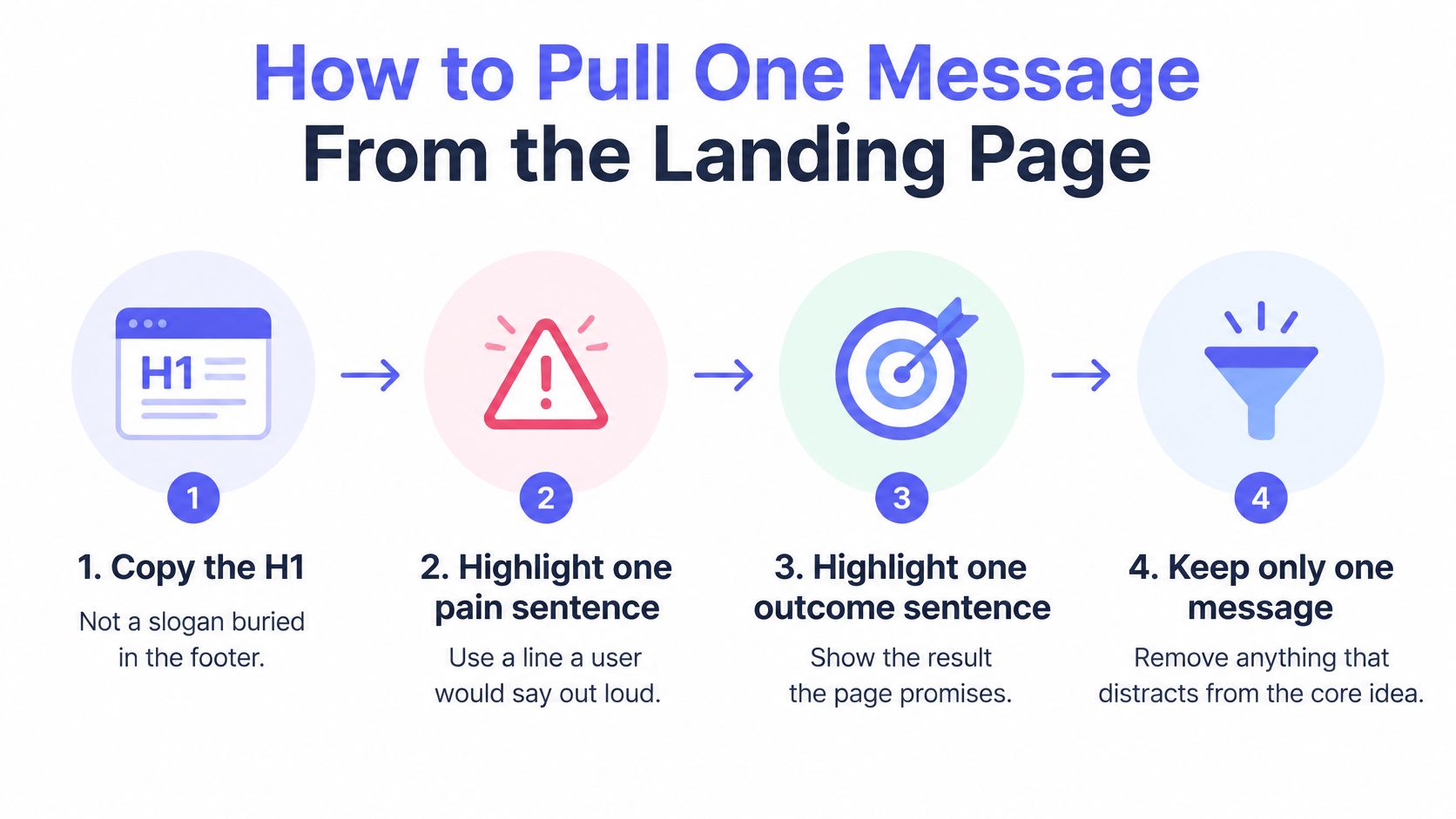
- Copy the H1. Start with the main headline, not a slogan buried in the footer. Check whether the headline describes a useful change.
- Highlight one pain sentence. Pick language a prospective user could say out loud. Replace internal category jargon with the actual frustration.
- Highlight one outcome sentence. Identify what changes after someone uses the product. An outcome isn't a list of integrations.
- Select existing visuals. Keep the main interface, a result state, and a relevant proof block if the page contains them.
- Record the brand cues. Copy the product name exactly and note the obvious colors.
- Cross out the distractions. Leave the founder biography, feature grid, and pricing comparison out of this teaser.
Use this extraction flow to keep the message narrow.
If you can't separate the outcome from the feature list, Silver Spoon Agency's value proposition guide is a useful resource for sharpening the promise before you turn that promise into scenes.
Fix a thin page before rendering
A login wall hides the material the teaser needs. A waitlist page with no product image leaves little to demonstrate. A headline consisting only of the company name doesn't provide a hook.
A thin page produces a thin teaser. Add meaning before adding motion.
Say you're building a ticket-management product. Your working hook could be Ship the ticket, not the meeting. The pain could be Status meetings eat the sprint, and the solution visual could be the board screenshot already on the page.
That's a hypothetical message, not permission to invent functionality. Keep the line only if the product and page support it. Finish with six compact notes: headline, pain, outcome, visuals, proof or differentiator, and destination.
How to Script Five Lines That Read Muted
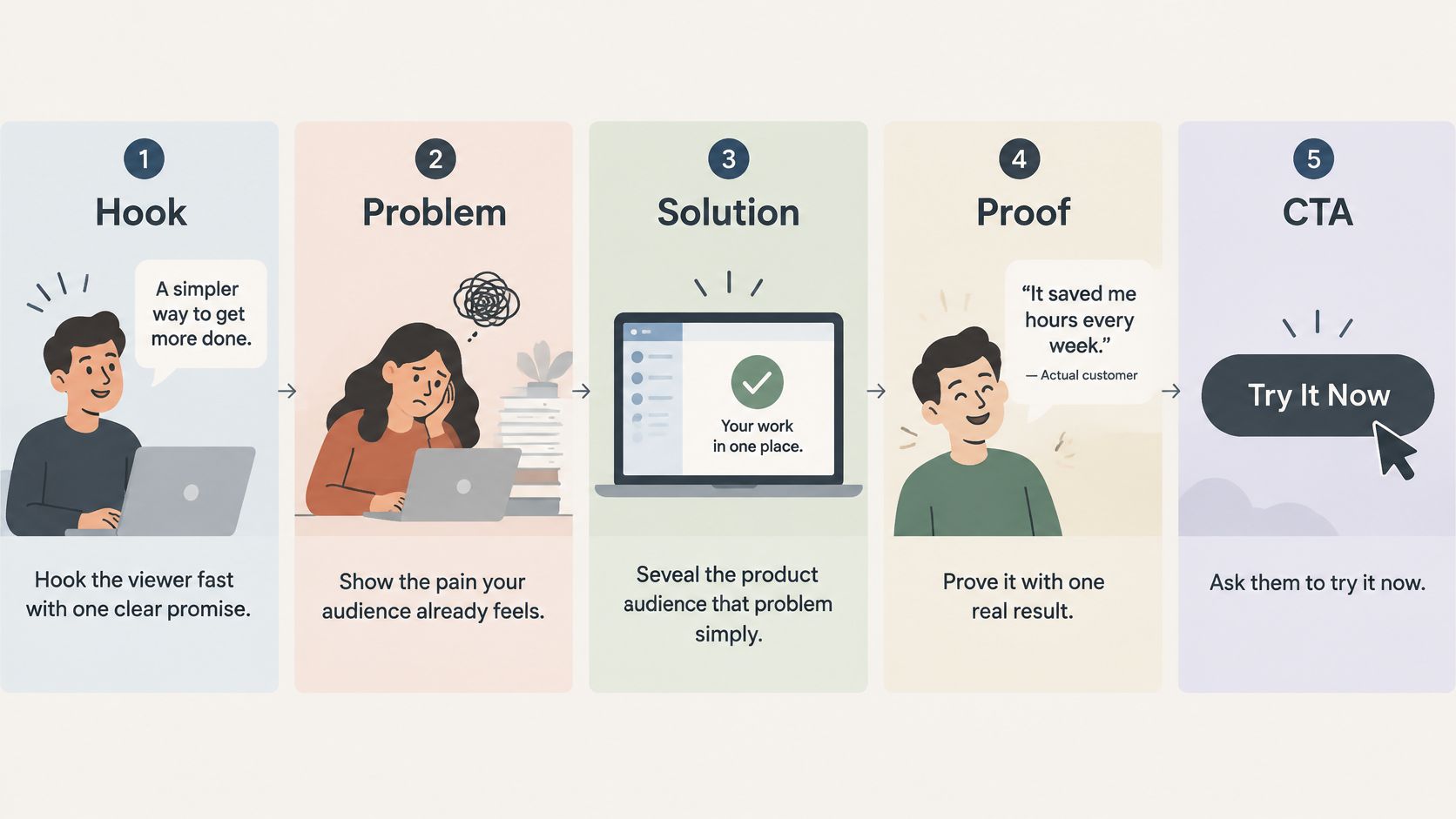
A viewer gives your teaser a few seconds on a phone, often with sound off. Write five lines that carry the message without narration: hook, problem, solution, proof, and call to action. Keep each line short enough to read while the scene moves. ShipTeaser videos are silent motion graphics with no voice-over, so on-screen text carries the full message.
Draft the message before polishing the language
For the hypothetical ticket product, a working script could look like this:
- Hook: Ship the ticket, not the meeting.
- Problem: Status meetings keep pulling builders away from work.
- Solution: Your board updates itself from the work.
- Proof: Name a specific result or differentiator stated on the page.
- CTA: Start free on the product page today.
The proof line needs a real detail from the landing page. If the page has no customer result, use a supported differentiator instead. And keep the solution line only if the product works that way. A polished claim still fails if it promises a feature the product does not have. Use this guide to writing a product video script to tighten the five lines without expanding the promise.
Check meaning and readability separately
Give each line one job. Put text over a quiet, contrasting part of the frame, not across a busy interface. Screenshots can show the product, but small interface labels cannot carry the main message.
Keep the brand recognizable early, then make the final action clear. “Visit the product page” gives the viewer a destination. A vague “Learn more” leaves them guessing.
If you need to explain the frame aloud, the frame isn't ready.
Read the full script aloud in under 15 seconds to catch tangled phrasing. Then check it on a muted phone screen. Cut words, not scenes.
How to Render the Teaser Without an Editor
The public landing page is the brief. Paste its URL into ShipTeaser, then review the rendered video on a phone with sound off. The page supplies the copy, visuals, and brand cues, so fix weak source material before you generate.
Follow a short render-and-review loop
- Paste the public product URL into ShipTeaser. Choose the page with the product promise and visuals the video should use.
- Allow about two minutes. ShipTeaser turns the page into a downloadable 30-second, 1080p MP4.
- Download the file. Review the finished video, not just a preview.
- Watch on a phone with sound off. Check that the message still makes sense.
- Pass or fail the essentials. Confirm the product is recognizable, the benefit is clear, the brand appears early, the type is readable, and the final call to action is specific.
- Correct the source and generate again. If a scene misrepresents the product, fix the relevant landing-page copy or add context to improve the extraction.
Expect silent motion graphics built from your screenshots, copy, and brand colors. ShipTeaser uses five beat-cut scenes: hook, problem, solution, proof, and call to action. The result needs no editor, prompt, or voice-over.
Keep the scope narrow
The 30-second clock is fixed. Every line must work without sound, so judge the video on a muted phone before it ships. Keep the message focused on one product promise and make the closing action clear.
For brand review, use the guide to making an on-brand video without a designer to check how the output carries the page's visual cues. For vertical placement checks, Shorts format guidance for agency teams offers useful format context.
Where to Post Each Ratio on Launch Day
A founder posts the launch clip to X, LinkedIn, and Product Hunt. The 15-second clock stays fixed, but the frame must fit each placement. ShipTeaser renders a 30-second 1080p MP4, so use its supplied format where it fits and avoid promising alternate ratios the service does not produce.
The launch video specifications guide helps you check platform requirements before posting. Keep the same central message across channels, and coordinate the announcement with coordinating launch content and email.
Give each frame a job
Use this ratio comparison to prepare your upload folder. These are common placement formats, not alternate ShipTeaser exports.
| Ratio | Typical size | Post it on | Note |
|---|---|---|---|
| 16:9 | 1920x1080 | X, LinkedIn, YouTube, launch page | Fits standard horizontal video placements |
| 1:1 | 1080x1080 | Feeds that crop wide video | Fills more of the mobile screen than a wide frame with letterboxing |
| 9:16 | 1080x1920 | Reels, Stories, Shorts, TikTok | Use when the platform calls for a vertical frame |
Publish the main announcement when your launch content is ready, then share it in the placements that suit the available format. Timing is a coordination choice. Check each composition independently: text and screenshots that read in a horizontal frame can become cramped in a square or vertical crop.
Prepare the gallery link before launch
Product Hunt gallery videos are added as YouTube links. Upload the MP4 to YouTube, set it to public, and paste its full URL into the gallery video slot. Check the current gallery rules before launch day.
Keep important text away from the edges of a vertical frame. Preview the final CTA with platform controls visible to catch anything that obscures the destination.
How to Iterate the Next Video This Week
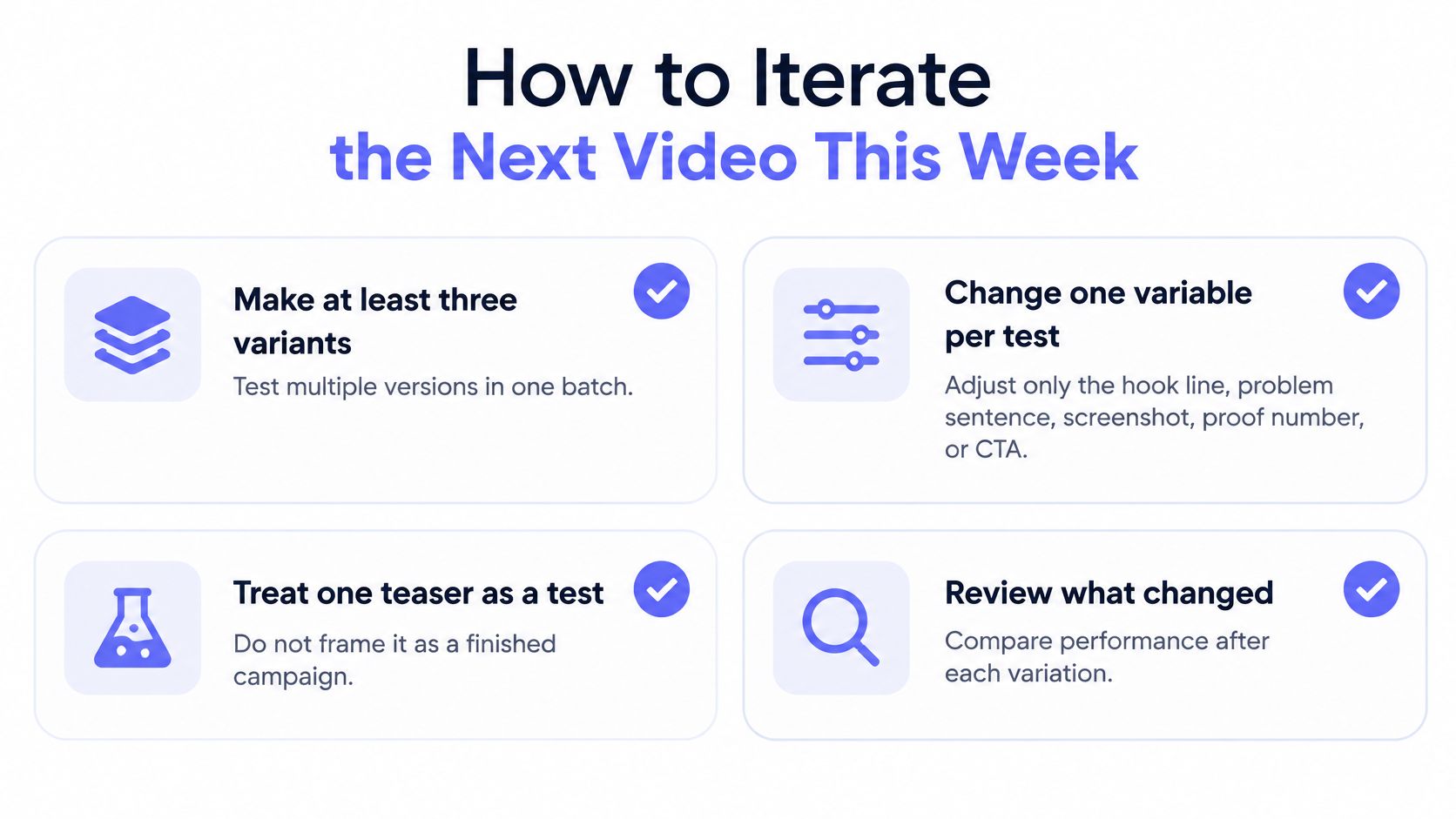
Change one variable per test. Make at least three variants in a batch, but vary only the hook, problem sentence, screenshot, proof point, or CTA. If every scene changes, you won't know which decision helped.
Google's awareness guidance recommends testing multiple creative versions and introducing the brand within the first five seconds. Keep that brand cue consistent while you test the message.
Use this checklist to separate a useful experiment from a collection of unrelated drafts.
Diagnose the scene before rewriting
Inspect retention around 2, 5, 10, and 15 seconds as practical checkpoints. These are diagnostic prompts, not guaranteed explanations for viewer behavior.
- Early exit: Examine whether the opening names a benefit or merely introduces the company.
- Middle exit: Check whether the product demonstration is legible and whether the viewer can connect the screen to the promise.
- Strong viewing, weak clicks: Inspect the CTA, destination, and fit between the promise and the audience.
Compare view-through rate, average watch time, landing-page clicks, and qualified signups. Use the product launch metrics guide to keep attention metrics separate from useful product interest.
Compliments in a group chat aren't evidence that the right person understood the product.
Review each variant muted before publishing. Keep distribution conditions reasonably consistent when comparing results, and record exactly what changed. Run an honest weekly test rather than waiting until after launch to finish a polished film.
FAQ
How long should a startup promo video be?
Keep a launch teaser to 15 seconds. Five scenes give the message a clear shape: hook, problem, solution, proof, and call to action. Use the public landing page as the brief, then check the finished video on a muted phone screen. Every line needs to make sense without sound.
Does a startup promo video need voice-over?
No. ShipTeaser videos are silent motion graphics made from your brand, with no voice-over, stock footage, or avatars. Put the key message in on-screen text and make sure the product visuals support it.
Which ratio should go up first?
Choose the ratio for the placement. Use 16:9 for the main announcement on X, LinkedIn, or YouTube. Prepare 9:16 for Reels, Stories, Shorts, or TikTok, and use 1:1 when a square composition fits the feed better. Preview the actual post before publishing.
What if a generated scene is wrong?
Hold the video until it is accurate. Check whether the landing page copy or visuals could have led to the mistake, then add context or correct the page and generate again. Review the new file for factual accuracy and brand fit before publishing.
What does ShipTeaser cost?
Your first video is free. There are no setup fees, and you can cancel any plan at any time. Starter costs $99 per month for 4 videos, Growth costs $199 per month for 8 videos, and Studio costs $299 per month for 16 videos.
ShipTeaser turns a product page into a 30-second, 1080p motion-graphics video for launch content. Paste your URL to get the first video free, then review it on a muted phone screen before publishing.