A startup explainer video is a short, silent-first motion graphic that hooks attention and communicates a single core product promise in under 60 seconds, not a feature demo. For a launch, a 15-second version does one job well. ShipTeaser states the point, shows one outcome, and sends the viewer to click.
Stop commissioning the two-minute voiced explainer as your first launch asset. Nobody asked for it in their feed, viewers will not turn the sound on, and you will change the product before the edit is final. Build the short teaser first, then earn the right to show a longer demo.
Redefining the Startup Explainer Video
The old model assumed a patient viewer. A narrator walked through the problem, the features, the pricing logic, and the roadmap. That assumption fails on X, on LinkedIn, and on a launch page where your video autoplays next to ten other launches.
A modern startup explainer video is silent-first, text-driven, and single-message. One product promise. One workflow or outcome. One call to action. If a viewer cannot repeat your promise after watching on mute, the video did not explain anything.
What changes when you drop the voice
Without narration, you cannot hide vague copy behind a confident voice. Your landing page headline has to survive as on-screen text. Your screenshots have to be legible at phone size. Your sequence has to make sense in order, with no audio cues to paper over a jump.
Treat sound as a bonus, never as the carrier of meaning. If the meaning disappears on mute, rewrite the scene.
That constraint is useful. It forces you to cut secondary features, shorten phrases, and show the product state that proves the claim. It also makes the asset reusable. The same clip works in a feed post, on a launch page, and inside an announcement, because none of those placements guarantee audio.
Founders who want a broader view of how short assets fit a launch calendar should read the guide to video content planning for startups and map each clip to one announcement, not to your entire pitch.
Your first explainer is not documentation. ShipTeaser is an attention filter that qualifies a click.
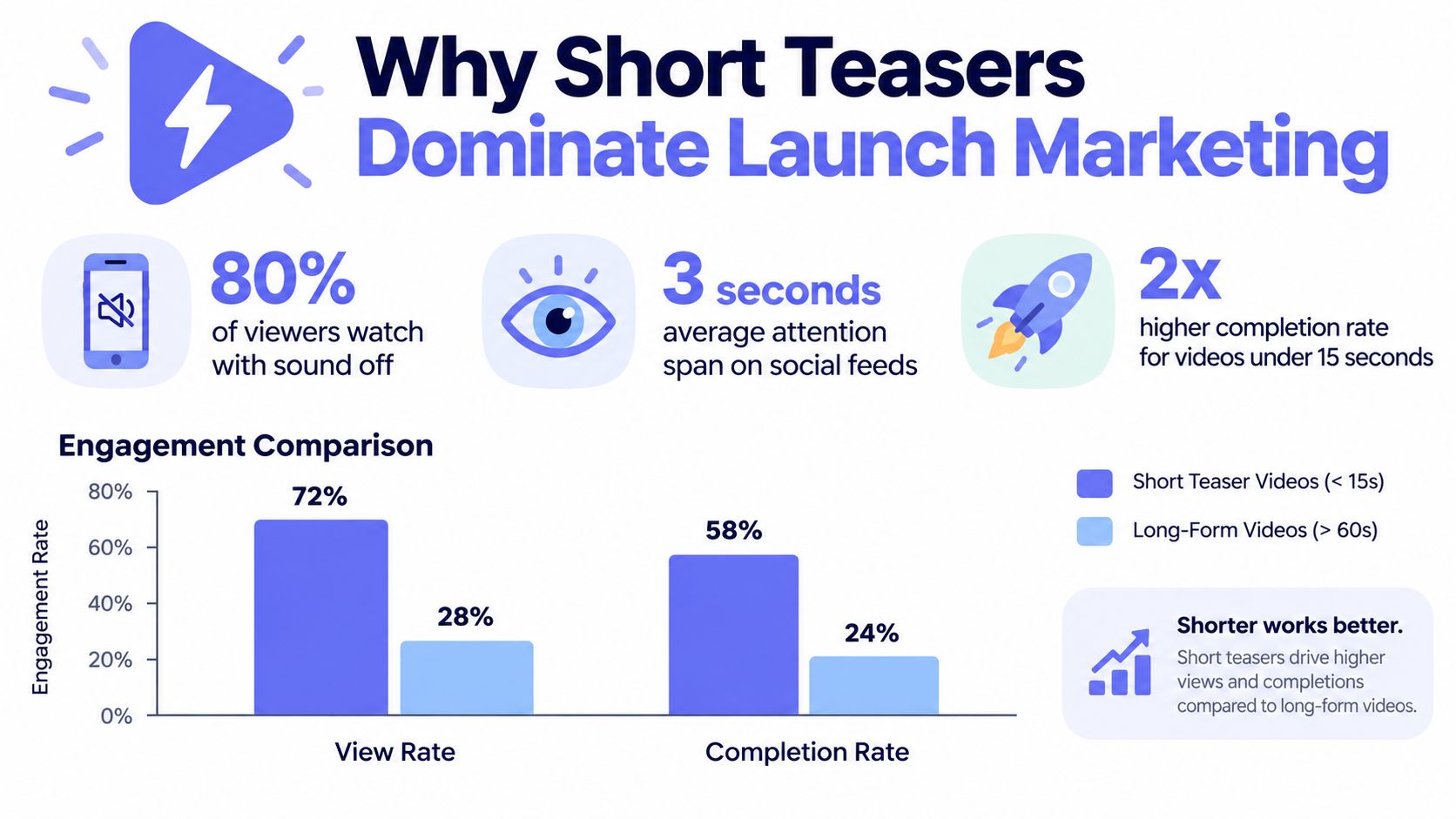
Why Short Teasers Dominate Launch Marketing
Video is not a special project anymore. HubSpot reported that 89% of businesses use video marketing and that 17.13% of marketers planned to invest more in short-form video, making short-form the leading format for planned additional investment, in HubSpot's summary of video marketing statistics. Among technology marketers, 49% said they create videos to explain complex products, which is exactly the early-stage software problem.
Explainers also lead what businesses produce. Wyzowl reported that 68% of businesses create explainer videos, ahead of testimonial videos at 57%, and that 96% of people have watched an explainer video to learn more about a product or service, in Wyzowl's video marketing survey data. The format is familiar to buyers. Your job is to make yours shorter and clearer than the long demo next to it.
Retention favors constraint
Shorter clips hold attention better as a share of runtime. Videos shorter than 60 seconds achieved 50% average engagement, compared with 48% for videos lasting 1 to 3 minutes and 38% for videos lasting 5 to 30 minutes, according to HubSpot's marketing statistics summary. That measures attention retention, not sales. Do not oversell it. Do use it to justify a tighter cut.
A short teaser also travels without paid distribution. Founders chasing word of mouth should understand buzz marketing beyond viral reach as a repeatable sharing mechanic, not a lottery ticket. A clear 15-second promise is easier for another person to forward, quote, and remember than a two-minute feature tour.
Budget is the secondary reason. Audience behavior is the primary one.
Ideal Length and Format Specifications
Pick 15 seconds as your default launch runtime. It is long enough for five short beats and short enough that a cold viewer will finish it. HubSpot reported that 51% of marketers consider 30-60 seconds the optimal length for an effective video and 91% said effective videos are shorter than two minutes. A 15-second teaser sits below that preferred range, so position ShipTeaser directly. ShipTeaser is a hook that sends viewers to a page, not a replacement for every longer asset.
Google gives you a technical reason to stay above 12 seconds. Google states that videos of at least 12 seconds count as TrueView views and populate remarketing lists, and Google recommends including a 15-second horizontal video for consideration campaigns, in Google Ads guidance on short-form creative. That does not guarantee conversions. It means your asset fits the measurement workflow.
Render three ratios from one story
Do not crop one master file and hope. Compose for each ratio so text stays inside safe margins and screenshots stay readable. The reference for practical launch video specs covers the export checks to run before launch day.
| Platform | Primary Aspect Ratio | Max Runtime for Teasers |
|---|---|---|
| X feed post | 16:9 or 1:1 | 15 seconds |
| LinkedIn feed post | 1:1 or 16:9 | 15 seconds |
| Product Hunt launch page | 16:9 | 15 seconds |
| YouTube Shorts and vertical feeds | 9:16 | 15 seconds |
| Google Ads consideration | 16:9 plus 9:16 | 15 seconds |
If you are checking platform limits before you post, the breakdown of how long can Twitter videos be is a useful reference for X specifically. Platform maximums are not targets. Your teaser should stay at 15 seconds even where longer uploads are allowed.
Export at 1080p, keep on-screen text large, and test every ratio at actual phone size. Tiny interface text is the most common failure. Crop to the relevant control or result. Do not shrink a full dashboard into a vertical frame and call it proof.
A Five-Scene Framework for Silent Viewing
Approximately 85% of mobile videos are watched without sound, making silent-first storytelling and readable on-screen text essential, according to Shno's summary of video marketing statistics. Build for that viewer first. Everyone else still understands the video.
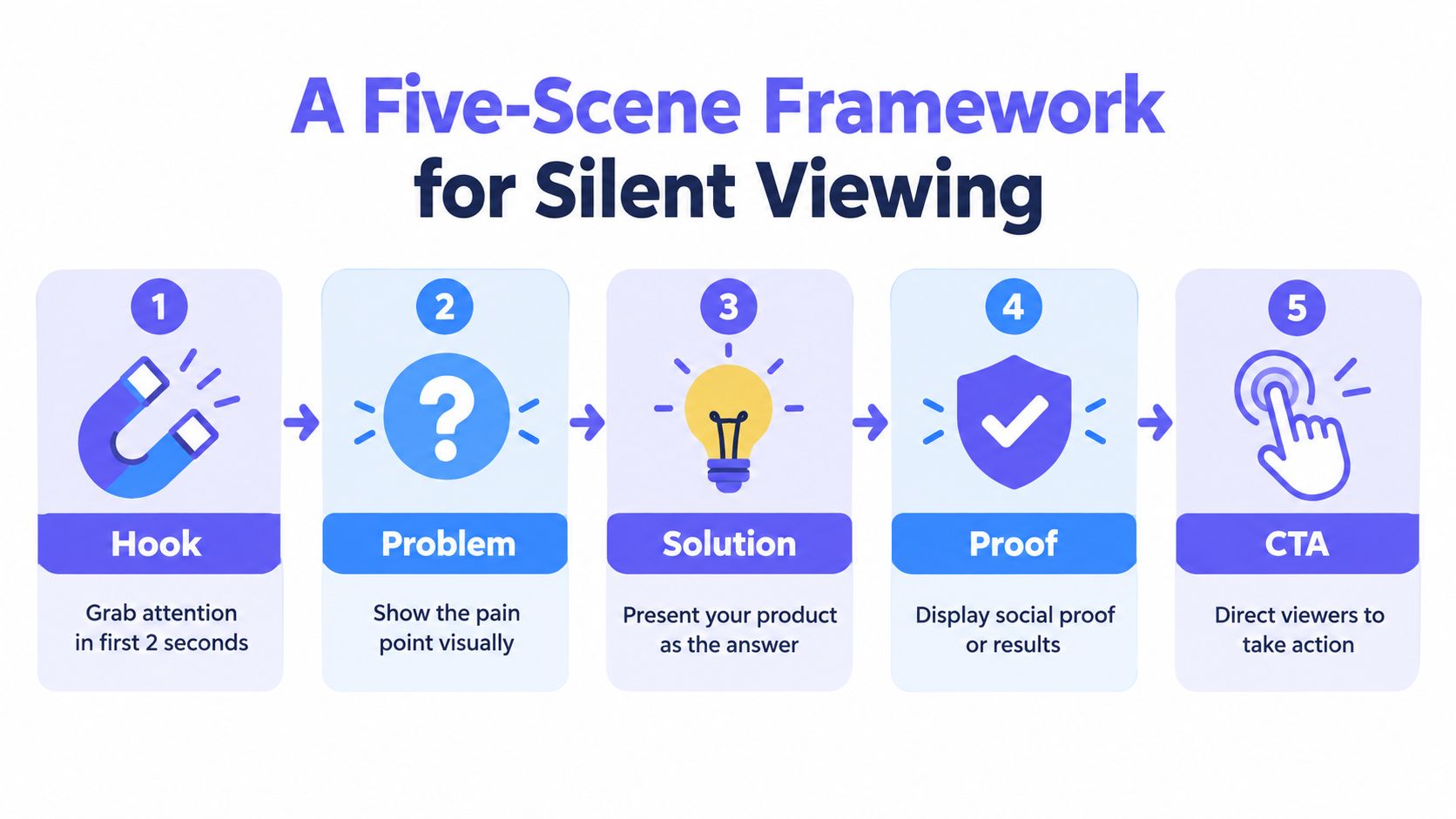
Use five scenes, in this order, with no extra feature scene inserted in the middle.
- Hook, 0-2 seconds: Name the product category or the painful result in plain words. No logo animation first.
- Problem, 2-5 seconds: Show the friction your buyer already recognizes. One phrase, one visual state.
- Solution, 5-10 seconds: Show one concrete workflow or outcome. This is the longest scene because it carries the mechanism.
- Proof, 10-13 seconds: Show an interface view, a result, or a quantified benefit you can defend. Do not invent a metric to fill the slot.
- CTA, 13-15 seconds: Brand name, URL, and one action. Hold it long enough to read.
Write for eyes, not ears
Shorter is not automatically clearer. A compressed teaser raises cognitive load if you stack the problem, mechanism, proof, and CTA into every frame. Put one idea on screen at a time. Keep phrases short enough to read at feed speed, maintain strong contrast, and never rely on color alone to carry meaning.
Founders who want stronger scene construction should study Visual Storytelling Techniques for how sequence and framing guide comprehension without narration. Then apply the copy rules in the guide to writing a product video script so your landing page language gets cut down before it reaches the video, not after.
Silent-first rule: Read only the on-screen text, in order, with the visuals covered. If the text alone does not state the promise, the script is not finished.
Disclose simulated visuals when you use them. A teaser that implies a shipped feature you have not built will cost you trust with exactly the early users you need.
When to Use a Teaser Versus a Full Explainer
Use both. In sequence. The teaser earns the click, the longer explainer answers the evaluation questions that follow. Founders get into trouble when they ask one asset to do both jobs.
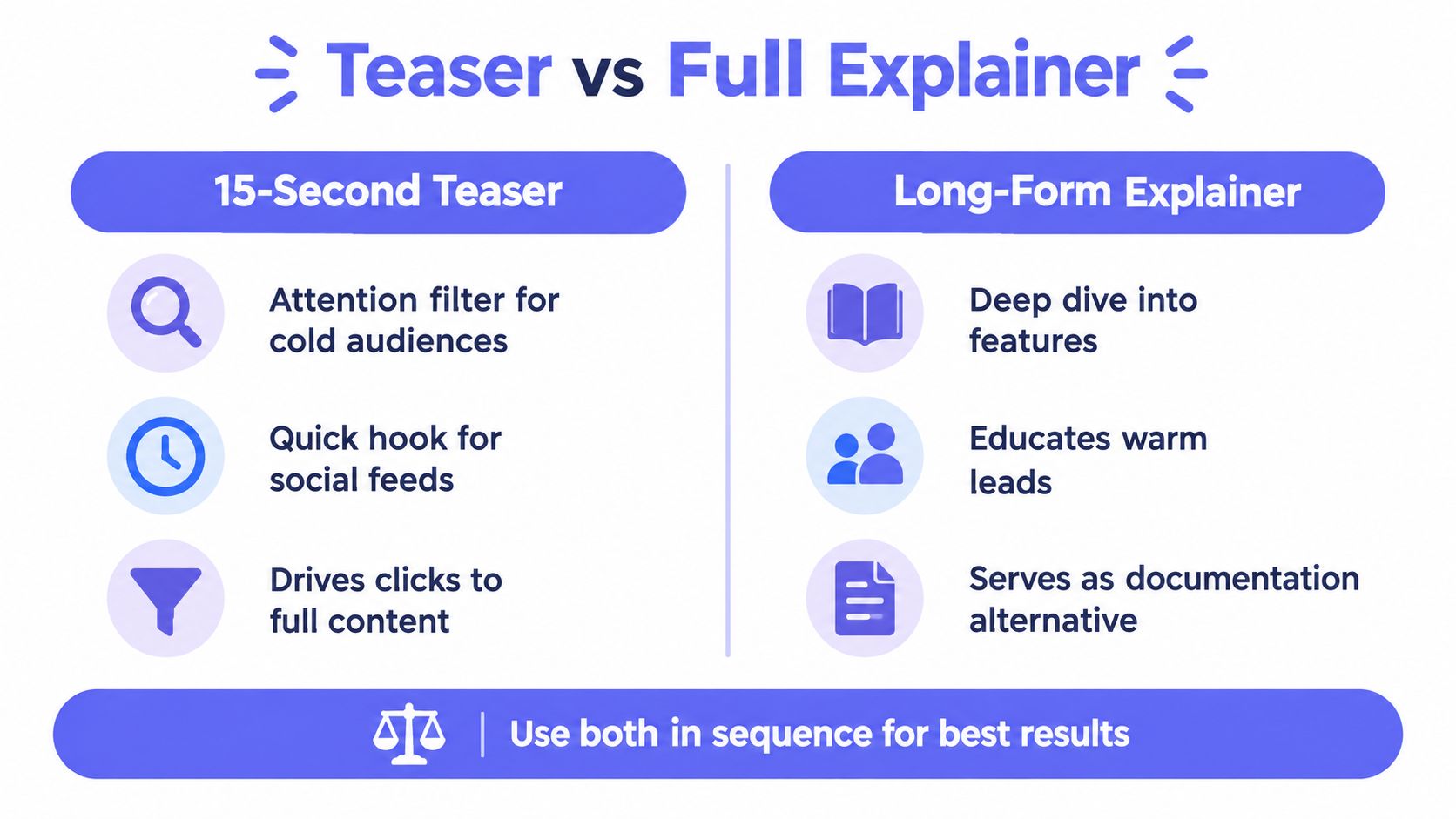
Use a 15-second teaser when the audience is cold
Deploy the teaser for feed posts, launch announcements, Product Hunt, and paid consideration placements. The viewer owes you nothing. Your only realistic goal is comprehension of one promise plus a click, a follow, or a remarketing signal.
- Cold feed viewer: ShipTeaser states the promise and stops.
- Launch day post: ShipTeaser makes the announcement scannable without sound.
- Feature release: ShipTeaser isolates one changed workflow instead of re-explaining the whole product.
Use a full explainer when intent is already high
Put the longer, voiced demo on your pricing page, your onboarding flow, and your help content. That viewer chose to be there and will tolerate depth. Walk through setup, edge cases, and integrations there, not in the teaser.
The comparison in product demo video versus teaser lays out which asset belongs on which surface. Follow that division strictly. Every feature you add to the teaser lowers the chance a cold viewer finishes it, and every teaser shortcut you leave in the full demo frustrates a buyer who is ready to evaluate.
Measure them separately too. Judge the teaser on completion and click-through. Judge the full explainer on activation and time to first value.
Automating Production with ShipTeaser
Manual editing is where solo builders lose launch week. Copy, screens, music, keyframes, every export ratio, then another pass after the landing page changes. That loop breaks the moment shipping speeds up.
The screenshot below shows the starting point for the automated workflow.
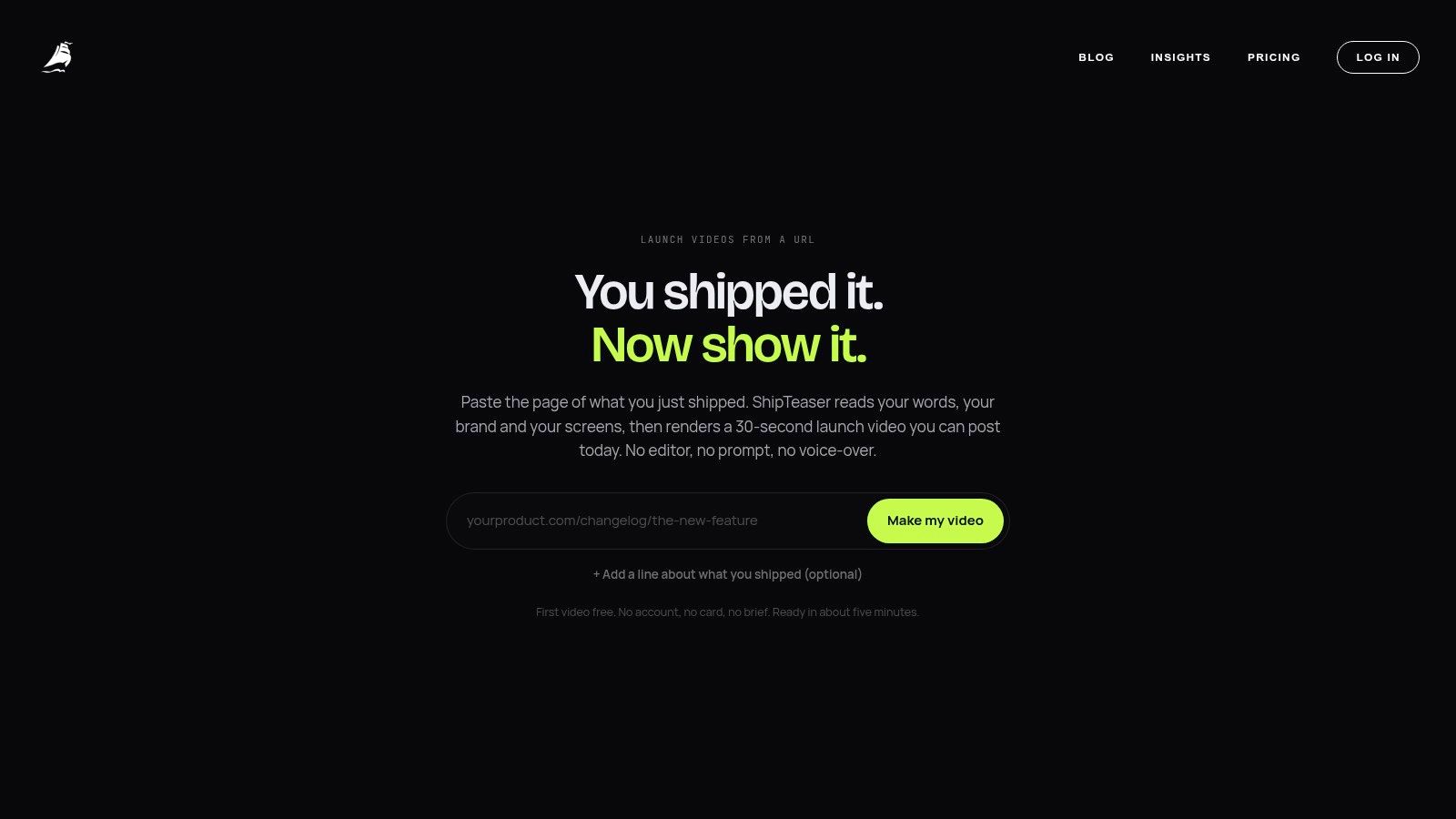
Paste the product URL and ShipTeaser builds a silent motion-graphics teaser you can review and post. It reads page copy, screenshots, and brand cues, then renders the five-scene structure described above rather than asking you to rebuild it in a timeline. For unrequested feed viewing, that speed matters more than polish. A URL-derived teaser you can regenerate beats a precious demo you are afraid to update.
Know the limits before you plan around it. No voice-over, no timeline editor, no screen recording. Optional music exists, but the text and product visuals still carry the claim when sound stays off.
Buy for cadence, not aspiration. If you ship one clip a week, pay for one clip a week. If launches cluster, scale then. The cost of a teaser tool is weak judgment: a fast video that says the wrong promise is still the wrong promise.
Frequently Asked Questions
Does a silent startup explainer video have any audio at all
Assume the feed never asked for your clip and never turns sound on. ShipTeaser exports with no narration, so claims, screen text, and product visuals have to carry the meaning. If a founder insists on voice, record it separately and layer it over the exported file during publishing; keep the on-screen text strong enough that muting it leaves the claim intact.
How long does ShipTeaser take to make a startup explainer video
Measure turnaround by whether it keeps pace with page edits. ShipTeaser is built for fast regeneration, so a late headline change should trigger a new render while the launch window is still open. Speed is useful only when the promise is right; a quick clip with a weak claim still wastes the impression.
What does ShipTeaser cost for a startup explainer video
ShipTeaser gives you your first startup explainer video free with no credit card required, and paid plans scale with how many videos you post per week, as listed above. Buy for cadence. Keep exported files in your launch folder, upgrade when launches cluster, and let regeneration handle message changes.
Can a 15-second startup explainer video handle a complex software product
Complex products need scope control. Pick one user, one workflow, and one result a skeptic can see. If the product serves three use cases, cut three teasers and point each click to a landing page demo that carries the detail.
What happens when my landing page copy changes after I make a video
Treat the teaser as a snapshot of the page, so regenerate when headlines, screenshots, colors, or CTA wording shift. A changed logo or brand cue should alter the render inputs, not become a hand-editing task. If the page says "save hours" and the clip says "close deals," update the clip before spending reach.
Paste your product URL into ShipTeaser when the page is ready, publish the short teaser, and regenerate the moment the offer moves.