You can spend a week polishing a launch video and still have nothing useful to show for it. The problem for most early-stage SaaS teams isn't taste, it's cadence. You need a way to ship video every week, learn fast, and keep the message tight enough that busy buyers watch.
SaaS video marketing works when it becomes a repeatable shipping habit, not a one-off creative project. The strongest starting point is a short, silent, fixed-format teaser that can be produced fast, posted often, and compared against the last version without rebuilding the whole process.
The Weekly Cadence Problem in SaaS Video Marketing
The first launch video always feels expensive. You write the script, tweak the visuals, ask for one more revision, and then the product changes before the next post goes live. That's why most founders stall after the first asset. The work becomes a production problem in their head, when the true bottleneck is weekly output.
Short-form is the right unit for a small team because the market already rewards it. HubSpot's 2024 Video Marketing Report found that 83% of video marketers said their organizations used short-form video, compared with 39% using long-form video and 14% using live video, and short-form ranked first for return on investment, lead generation, and audience engagement among the formats examined (HubSpot video marketing report). That matters for SaaS because your product keeps changing, your audience's attention is limited, and your team probably can't afford a studio habit.
Start with a fixed template, not a custom edit
A 15-second teaser is the lowest-friction unit that still forces clarity. It can carry one promise, one pain point, one proof point, and one action without turning into a mini-demo nobody finishes. That's enough to test positioning, and it's small enough to ship every week.
Practical rule: if a video takes longer to make than the cycle time of your product updates, it's already too heavy.
A fixed template also protects your time from endless aesthetic drift. Instead of asking, “What should the whole video look like?”, ask, “Which hook, which proof, and which CTA deserve this week's slot?” If you need a broader playbook for launch rhythm, the guide on marketing video strategy for SaaS teams is a useful companion, and the cadence piece at week one after launch shows why the first seven days matter so much.
The goal is not to make one perfect video. The goal is to ship twelve, compare them, and let the audience tell you which message deserves more attention.
Video Types That Earn Their Place in a SaaS Funnel
A small SaaS team does not need a dozen video formats. It needs a small set that each answer a different buyer question. If a video doesn't change what the viewer understands in the first three seconds, it probably belongs in documentation, not in your weekly launch stack.
Match the format to the question
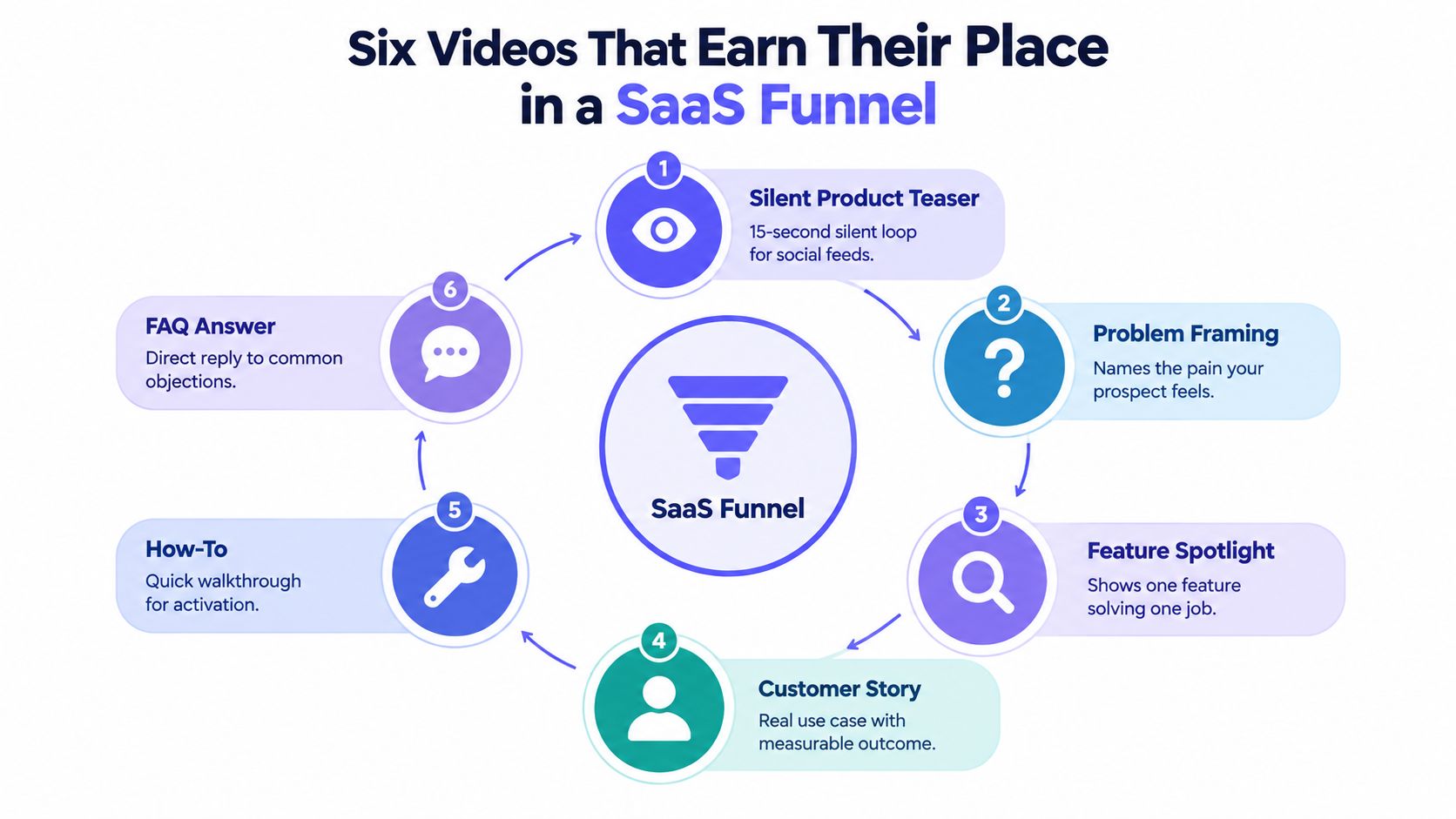
The six useful types are straightforward.
- Silent Product Teaser: Use this when you need fast social attention and a compact promise. It should show one problem, one solution, and one action.
- Problem Framing: Use this when buyers know the pain but haven't named it clearly. The opening should make them nod immediately.
- Feature Spotlight: Use this when you need to explain a single capability without burying it inside a tour.
- Customer Story: Use this when trust is the blocker. The opening should show a real situation, not a vague testimonial.
- How-To: Use this when activation or onboarding is the goal. The first seconds should show the exact task the user can complete.
- FAQ Answer: Use this when objections keep slowing down signups. The opening should answer one question directly.
The practical filter is simple. Ask four questions: Does the viewer understand the category? Do they see the pain? Do they see the fix? Do they know what to do next? If one format handles only one of those, that's fine. Don't force every video to do everything.
The easiest early wins are the teaser, the problem frame, and the FAQ answer. They're narrow by design. The heavier lifts are the customer story and the feature walkthrough, because those usually need more source material and more judgment. If you're deciding between a teaser and a fuller explanation, the comparison in product demo video vs teaser is worth reading before you spend time on the wrong format.
Distribution Channels and What Each One Actually Rewards
Distribution is where a lot of founders get lazy. They export one file, upload it everywhere, and act surprised when performance is uneven. The channel matters because each one rewards a different behavior, and the same creative won't always survive every feed.
Pick the channel for the behavior, not the vanity metric
A public landing-page embed rewards attention at the moment of intent. It works best when someone is already evaluating the product and wants a fast visual explanation. LinkedIn rewards native, professional, and concise posts that support founder-led launches. X tends to favor fast hooks and repeat exposure. YouTube is better when someone is willing to subscribe or search for a topic later. Product Hunt rewards launch context and fast comprehension.
A single master 16:9 file is no longer the safest default. Feeds increasingly favor vertical real estate, so a 9:16 cut often earns more screen space in mobile contexts. That doesn't mean every video has to be vertical, it means the upload format should match the feed instead of forcing one asset into every slot.
| Channel fit for short-form SaaS video | Best video type | Upload format | What it rewards |
|---|---|---|---|
| X | Silent product teaser, problem framing | 9:16 or 1:1 | Fast hooks, repeat posting |
| Problem framing, feature spotlight | 1:1 or 16:9 | Native posting, professional clarity | |
| YouTube | Feature spotlight, how-to | 16:9 | Search intent, longer attention |
| Product Hunt | Silent product teaser, launch announcement | 16:9 or 1:1 | Quick understanding during launch |
| Public landing page | Teaser, FAQ answer | 16:9 or 1:1 | Intent, click-through, evaluation |
For a tighter distribution map, the video distribution guide for short-form creators is a useful reference because it forces you to think about native upload versus link sharing and feed behavior instead of reach alone. The same logic applies when deciding how to announce on LinkedIn, where a native teaser often does more work than a polished external link.
A Repeatable Weekly Workflow for Small Teams
The best video program I've seen in a small team looked boring on paper. Same day each week, same input format, same review checklist, same distribution rhythm. That boredom is the point. It keeps the process light enough that the founder can do it alone, even during a product week that's already crowded.
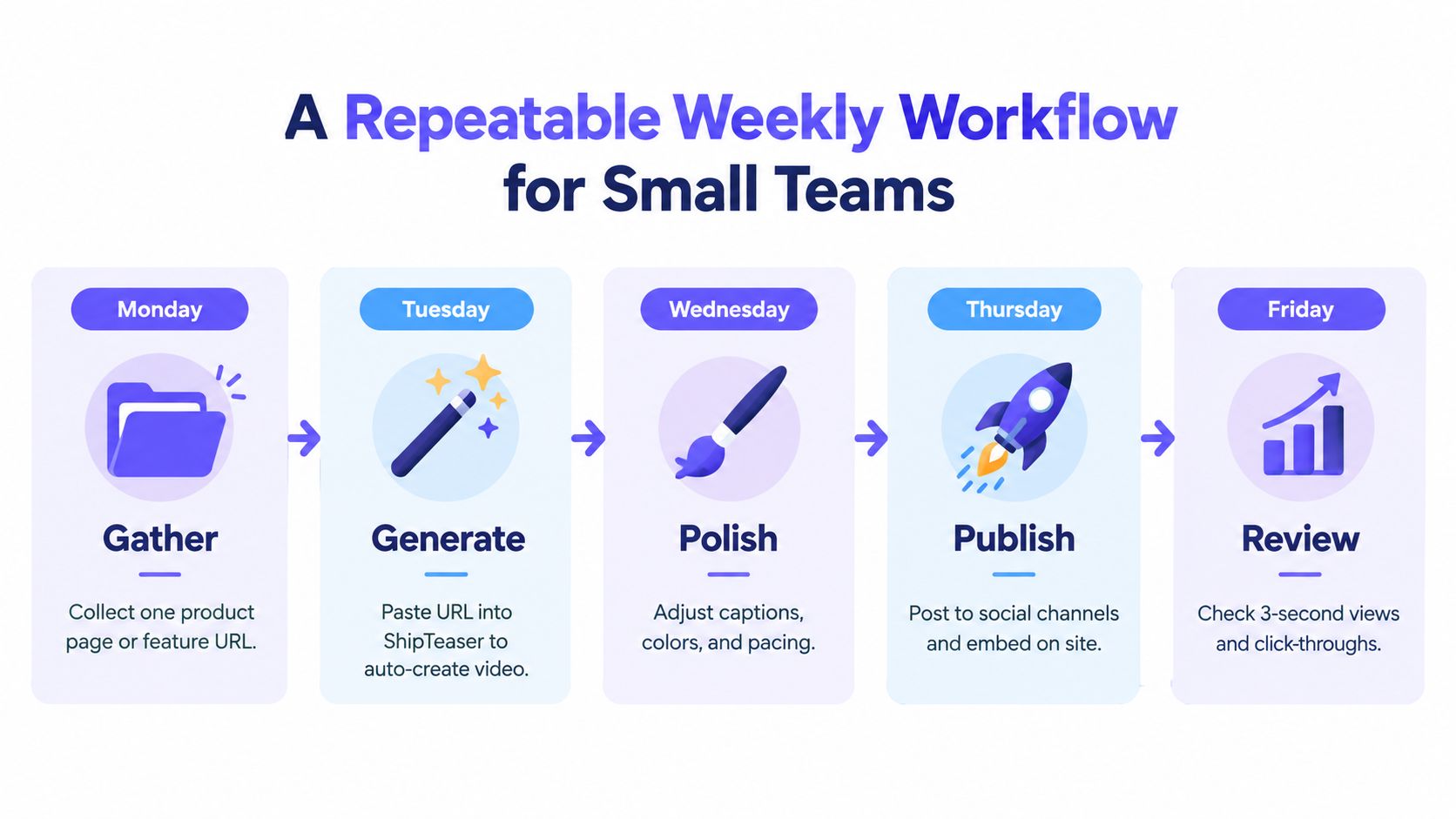
Monday to Friday without the waste
Monday is for collecting one usable source. That might be a customer call note, a feature page, a support complaint, or a launch draft. Don't brainstorm for an hour. Pick one pain point and one promise, then stop. That keeps the week anchored to a real user problem instead of internal enthusiasm.
Tuesday or Wednesday is the generation slot. A URL-paste workflow like ShipTeaser takes a product page and turns it into a 15-second, 1080p, silent motion-graphics teaser in about two minutes, with versions in 16:9, 1:1, and 9:16. That matters because the time sink in small teams is usually not the idea, it's the editing debt. A repeatable generator cuts the part where the founder starts moving boxes around a timeline and loses the point of the launch.
Thursday is for the only human judgment that really matters, tightening the opening, checking the brand cues, and making sure the CTA matches the landing page. If the first three seconds don't make sense with the page the viewer lands on, the teaser is just decoration.
Friday is distribution and review. Post the asset, embed it where visitors already land, and check what happened. The goal isn't to celebrate the post. It's to see which hook deserves another round and which one should be retired.
Useful constraint: one URL, one teaser, one week. Anything more and the workflow starts behaving like a mini agency project.
If you want a deeper operational lens on automation, the piece on automated content generation fits here because the win is not speed for its own sake, it's the number of useful iterations you can ship without hiring a production team.
Metrics That Matter Beyond Views and Likes
Views are the start of measurement, not the end. A teaser can get low attention and still help the business if it improves search behavior, accelerates consideration, or strengthens the later signup decision. If you only watch views, you'll end up favoring clips that entertain people who were never going to buy.
Track three layers, not one vanity number
The first layer is attention. Track 3-second views, completion rate, and the retention curve. These numbers tell you whether the opening is strong enough to stop the scroll. The second layer is intent, which includes link clicks, landing-page sessions, and signups that come through tagged URLs. The third layer is business impact, which includes activation, qualified trials, and cohort retention for users exposed to the video.
That split matters because video marketers often measure different things for different reasons. Wyzowl's survey data says 67% of video marketers measure performance through video views, 63% through engagement such as likes, shares, and reposts, and 52% through leads or clicks, while 40% track customer engagement and retention and 32% measure bottom-line sales (Wyzowl video marketing statistics). That mix is useful, but it also shows how easy it is to overfocus on the loudest metric and ignore the one tied to revenue.
A low-view teaser can still be commercially useful if it lifts branded search, drives direct traffic, or helps a buyer get to “yes” faster later. That's why the measurement stack has to include assisted conversion thinking, not just last-click reporting. For a broader breakdown of engagement measurement, the video engagement metrics guide is a strong companion because it keeps the focus on behavior instead of applause.
Build the stack in an afternoon
Start with tagged links so you know which post or page drove the visit. Add a landing-page variant so the teaser and the page can be tested together. Then compare the exposure cohort with the non-exposed cohort on activation and trial quality. That's enough to tell you whether the weekly teaser is creating real movement or just nice-looking noise.
Three Beliefs That Quietly Kill SaaS Video Programs
The biggest drag on SaaS video work is usually not budget. It's belief. Founders tell themselves that video has to look expensive, sound polished, and survive endless revision before anyone sees it. Those ideas are costly, and they're usually wrong for early-stage teams.

Cinematic is not the same as clear
A product teaser does not need film-school lighting to work. It needs readable motion, a clear promise, and a first frame that tells the viewer why to care. If the message is strong, the visual polish can stay modest.
Voice is optional, clarity isn't
Muted autoplay is common in feeds, and silent viewing is not a problem if the on-screen text does the job. In short-form SaaS clips, captions and visual hierarchy usually carry more weight than narration anyway. That's why a silent motion-graphics format is such a practical fit for launch work.
Perfect is a procrastination trap
The final belief is the most expensive one. Founders wait until the asset feels complete, then lose the week, then lose the next release window, then stop shipping entirely. Shipping twelve imperfect teasers teaches more than waiting for one polished edit because it gives you actual feedback from actual viewers.
A founder who treats video as a learning loop gets better faster than a founder chasing studio-level finish. The point is not to impress a peer in creative review. The point is to help a buyer understand the product faster.
Putting the First Thirty Days on the Calendar
The first month should feel controlled, not ambitious. Week one is for choosing two video types and one distribution channel. Week two is for generating the first batch with the same input pattern every time. Week three is for reading the attention, intent, and business metrics without overreacting. Week four is for pruning what didn't land and doubling down on the hook that did.
Keep the next month narrow
If you're posting once a week, don't spread across every channel. Pick one main placement and one backup placement, then keep the rest of your energy for the product. The point of the month is to find a message that repeats cleanly, not to cover the internet.
By the end of thirty days, you should know three things. Which opening gets the strongest first response. Which format fits your product's story. Which channel gives you the cleanest signal. If you don't know those three things yet, you probably need more consistent shipping, not more polish.
That's the test of saas video marketing. Not whether one teaser looked expensive, but whether the team can keep shipping the next one without friction. If you want a repeatable way to turn a product URL into a ready-to-post teaser, visit ShipTeaser and use it to build a weekly launch rhythm instead of another one-off asset.
FAQ
How often should a SaaS startup post video?
Once a week is enough to learn if the process is repeatable. The target is consistency, not volume. A steady weekly cadence gives you a clean comparison between versions and keeps the workload inside a founder's schedule.
Should the teaser sit on the landing page or stay on social?
Put it on both when the page is part of the evaluation flow. Social creates discovery, but the landing page is where intent turns into action. If the teaser and the page tell different stories, fix that before you post again.
When does a video deserve paid promotion?
Promote the versions that already show signs of strong first-frame attention and clean click behavior. Paying to amplify a weak hook usually just buys you more weak impressions. Start with the clip that already earned traction organically.
What should I do if the first week's numbers are small?
Don't judge the program on one post. Check whether the opening is clear, whether the CTA matches the landing page, and whether the distribution channel fits the format. Small numbers can still point to a useful message, especially at an early launch stage.
Can one teaser replace a full demo?
No. A teaser should create attention and move a prospect toward the next step. A full demo still has a job to do later, especially when a buyer needs detail before they act.