The usual advice is to compare templates, transitions, and visual polish. For a startup launch, judge the opening on a muted phone screen first. If the first three seconds do not earn attention, polish will not save the video.
For a founder with a live landing page and no editing time, a URL-to-video maker is the practical choice. ShipTeaser reads the product page you paste and renders a 30-second, 1080p silent motion-graphics video in about two minutes. Choose a recorder or designer when viewers need a narrated walkthrough rather than a concise reason to visit your product page.
Product Promo Video Makers by Use Case
The best maker is the one that fits the job your launch video needs to do. If your product page already explains the offer, ShipTeaser reads that page and turns it into a 30-second, 1080p MP4 with five beat-cut scenes: hook, problem, solution, proof and call to action. It takes about two minutes to generate, and the copy comes from your page.
Other formats serve different needs. A template editor lets you assemble scenes yourself. A screen recorder captures the product in use. A motion designer can build a custom visual explanation from a brief and brand assets.
Maker types by input, output and time to first video
| Maker type | What you provide | What you get back | Time to first video |
|---|---|---|---|
| URL-to-video teaser maker | Product page URL | 30-second 1080p MP4 with five beat-cut scenes | About 2 minutes with ShipTeaser |
| Template-based video editor | Footage, screenshots and text you assemble | Edited cut you finish yourself | Hours, depending on editing skill |
| Screen recording tool | A live product session | Demo walkthrough, narrated or silent | Recording, retakes and cutting time |
| Freelance motion designer | Creative brief and brand assets | Custom cut revised by hand | Days to weeks |
Treat manual-production timelines as planning allowances, not delivery guarantees. A straightforward recording takes less setup than a custom project that needs multiple rounds of revision.
Match the format to the launch job
A launch teaser gives viewers a reason to visit your product page. A walkthrough shows how the product works. Choose based on the next action you want from the viewer, not on which format looks more elaborate.
HubSpot's 2024 consumer video report found that 89% of consumers wanted more videos from brands, while 37% preferred discovering products through short-form video, compared with 8% for long-form video. The practical takeaway: favor a concise asset when discovery is the goal.
For picture-based production, photo video picks from Bulk Image Generation offer another approach to assembling visuals. Keep production tied to a publishing cadence you can maintain, guided by a focused video content strategy for startups.
Practical rule: Choose the maker that removes your biggest constraint. Skip editing control you won't use.
If time is tight and the page already explains the product, use a URL-to-video teaser maker. Choose a recorder or designer when viewers need narration or a visible sequence of product interactions.
Pick the Right Ratio for Each Channel
The right shape depends on where viewers will see the video. Choose a destination first, then check how the post preview treats the frame.
| Ratio | Placement it suits | Founder use case |
|---|---|---|
| 16:9 | In-stream and widescreen placements | Launch page hero and the YouTube upload for Product Hunt |
| 1:1 | Square feed placements | Feed posts on X and LinkedIn |
| 9:16 | Full-screen vertical Stories and Reels | Mobile story posts and short vertical clips |
Meta's placement guidance covers wide, square, and full-screen vertical placements. Treat these as destination formats, not as a promise that every maker exports all three. For broader planning, see these video specs for automated publishing workflows.
Generate in publishing order
For a founder-led launch, prioritize the formats your audience will see:
- Start with 9:16 for mobile story posts and vertical distribution.
- Prepare 1:1 for square feed posts on X and LinkedIn.
- Use 16:9 for a launch page hero and widescreen sharing.
Keep the opening promise consistent across placements. That makes it easier to judge whether the channel or the message is holding attention. Check the publishing preview before scheduling: interface overlays and surrounding post copy can affect what viewers notice. ShipTeaser's launch video specifications guide can help organize delivery choices.
Prepare the Product Hunt gallery route
Product Hunt gallery videos are added as YouTube links. Plan the upload before launch day:
- Upload the MP4 to YouTube and set it to public.
- Paste the full YouTube URL into the Product Hunt gallery.
- Open the gallery preview and confirm the video plays.
Don't leave the upload until launch morning. Distribution is part of the publishing workflow, not an afterthought.
Turn a Product Page Into a Teaser
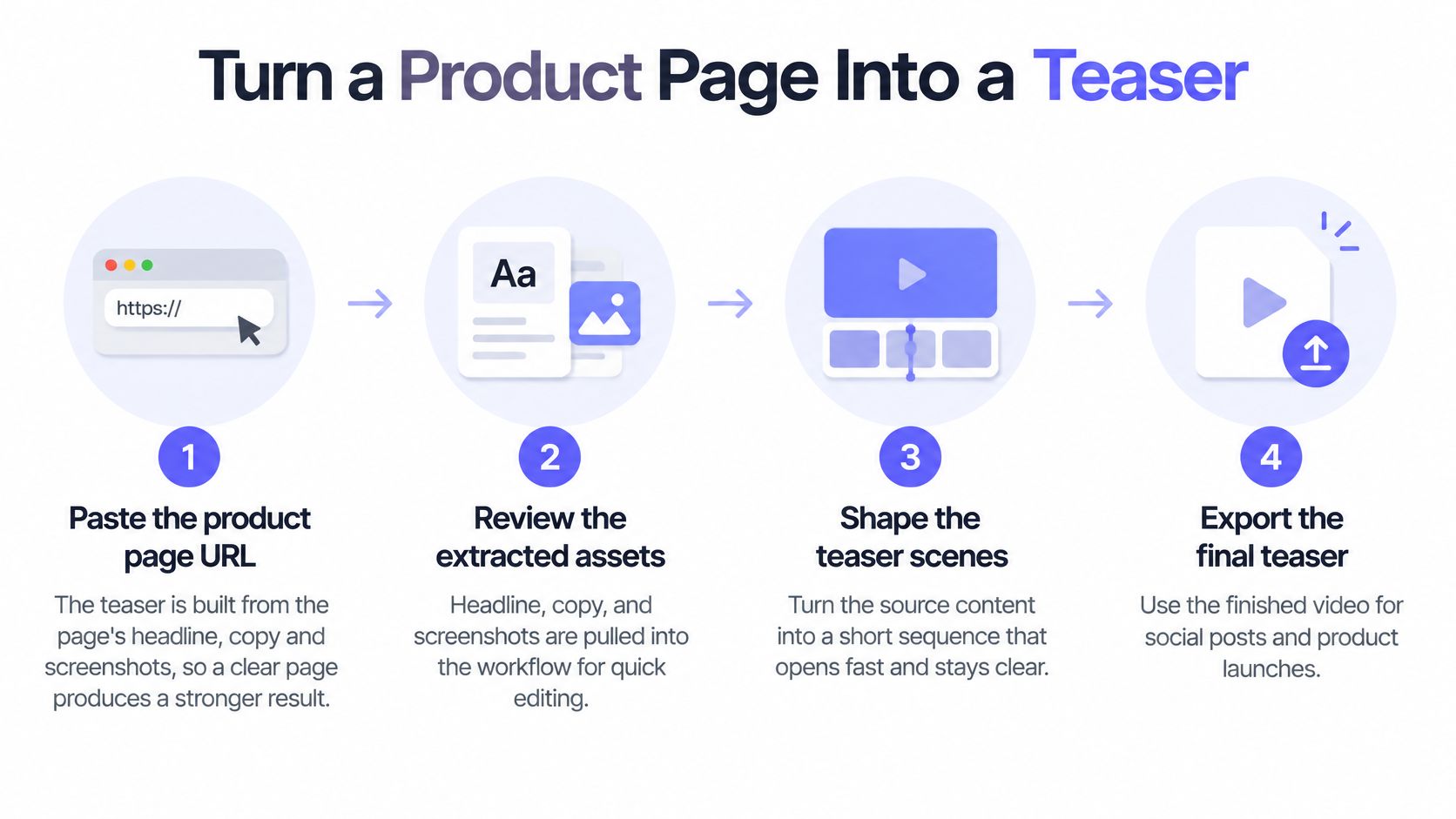
A teaser is only as clear as the page it comes from. ShipTeaser loads the product page in a headless browser to extract its colors, headline, and real screenshots. Any extra context enriches that extraction; the page remains the source for the visuals and copy.
Generate from a clear source
Paste the product page URL into ShipTeaser. Choose a public page that explains what the product does, who it serves, and the outcome it supports. If the headline could describe almost any startup, sharpen the page before generating.
Choose the ratio for your first publishing channel. Set 16:9, 1:1, or 9:16 before generation so the composition suits its intended placement.
Start generation and allow about two minutes. ShipTeaser produces a downloadable 30-second, 1080p MP4. No editor or text-to-video prompt is required.
The page supplies the story's raw material. Use a plain product description and screenshots that show the experience you want visitors to recognize.
Every line of video copy comes from the page you paste, word for word or clearly derived from it. ShipTeaser does not invent copy to fill gaps, so vague source messaging can produce a vague teaser. The product video script guide can help you tighten the page's story before you generate.
Review the story before downloading
Compare the result with the live page. Check the opening claim, each screenshot, and every line of on-screen text. Product-derived copy can still be selected or presented in a way that misreads your brand, so review the full video before publishing.
Inspect the first frame on your phone with sound off. Make sure the product name and core benefit are clear immediately. A viewer scrolling past should not need to pause to understand the opening.
Download the MP4 and prepare the post. Give viewers one clear next action, such as visiting the product page or trying the software. Keep the call to action focused.
For example, if a founder's page promises a specific way to create invoices, the teaser should preserve that promise from its opening onward, rather than broaden it into a generic claim about productivity.
The video uses five beat-cut scenes: hook, problem, solution, proof, and call to action. Each scene has a distinct role, but the sequence should tell one product story.
A teaser should earn the next click. It should not replace the product page.
Why the First Three Seconds Decide the Launch
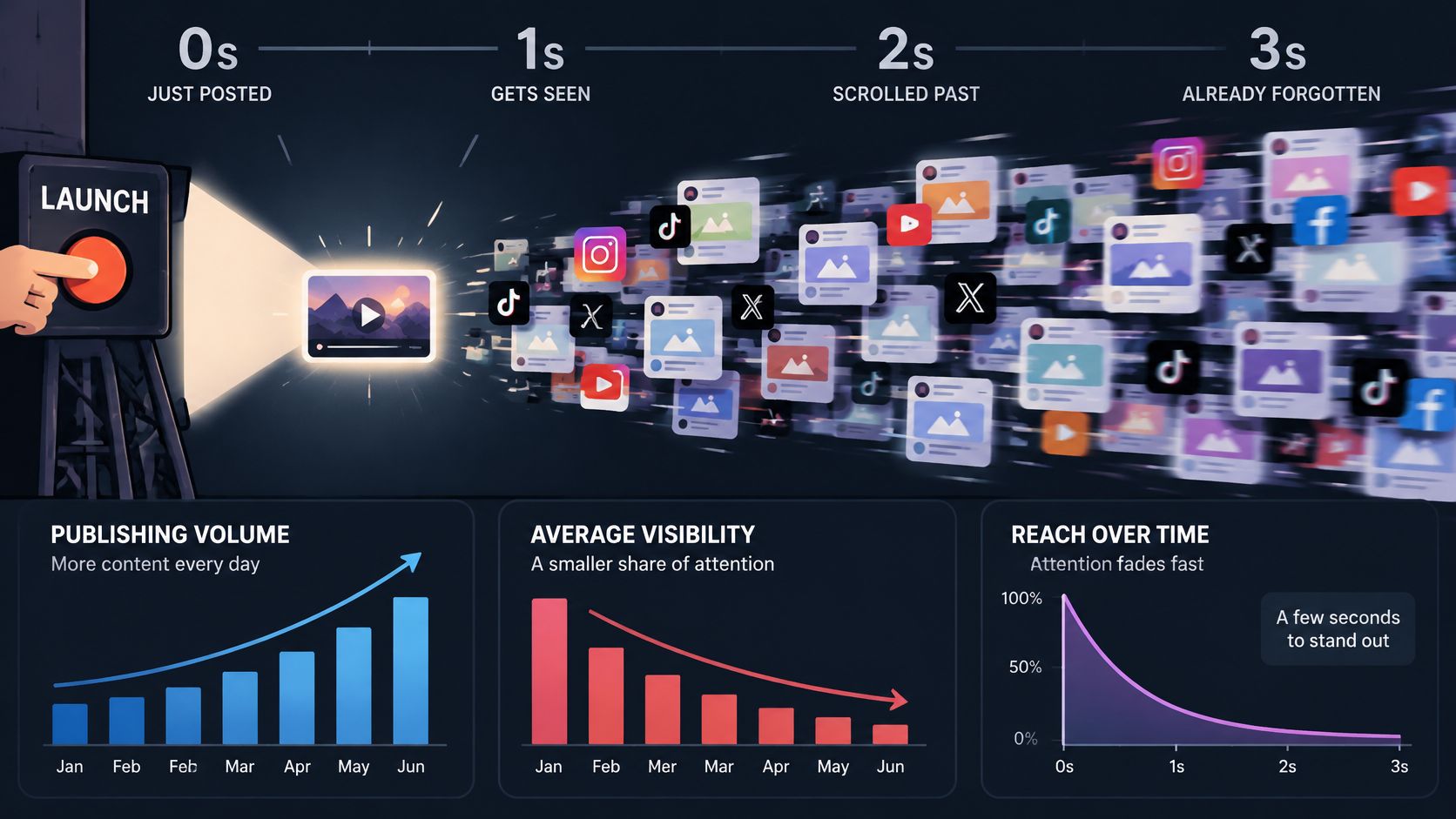
Publishing more doesn't guarantee more attention. An analysis of nearly 6 million short-form videos from more than 582,000 accounts, covered by Net Influencer, found that publishing volume rose 71% year over year while reach declined 31%; the same analysis reported an average TikTok video length of 41 seconds, average viewing of 3.75 seconds, and completion by just 4% of viewers.
Those findings describe a difficult attention environment, not a prediction for your launch. They do make one recommendation clear: don't accept a coherent teaser as proof of an effective opening.
The illustration captures the practical problem: your announcement enters a feed where viewers already have more content than they intend to watch.
Test a promise, not a transition
Develop alternative opening concepts from the same landing page. These are a testing method, not a claim that ShipTeaser provides a dedicated hook-variant editor.
- Lead with the outcome. Show the result the user wants, supported by the page's actual claim.
- Try recognizable product evidence. Open with an interface view that makes the software's purpose obvious.
- Test the customer problem. Name a frustration specific enough that the intended user recognizes it immediately.
Write down the single promise each opening makes. Then show each opening muted and ask a stranger what the product helps someone do. Don't explain the answer beforehand.
A useful response names the outcome. A response about colors, animation, or a nice-looking dashboard tells you the visuals registered but the value didn't. Use the three-second hook guide to sharpen the opening claim before expanding production.
Separate attention from useful traffic
Judge results using different measures for different questions:
- Three-second hold rate: Did viewers stay through the opening?
- Completion rate: Did viewers reach the final ask?
- Click-through rate: Did the teaser create enough interest to act?
- Qualified visits: Did visitors resemble the users the product serves?
Record the page URL, opening promise, screenshot choice, channel, and destination alongside the result. Keep other conditions stable where possible so you don't mistake a different audience for a better hook.
Choose the opening that attracts likely users, not the opening that attracts the most miscellaneous attention.
Pick a hook for each platform after testing. A familiar interface may work for a technical audience, while a clear customer problem may work better for viewers who don't yet recognize the category.
Check Claims and On-Screen Text Before Publishing
A polished teaser can still mislead a launch audience. ShipTeaser's videos may contain factual errors or misread your brand, so review the finished video before publishing. Check whether every claim matches the product as it exists today, including features, integrations, and outcomes.
ShipTeaser creates silent motion graphics using your brand, and its video copy comes from the product page you provide. That makes your page the source for the message, but it does not make every claim accurate or every asset yours to publish.
Check claims, visuals, and rights
- Product claims: Confirm that each statement describes a current capability. A planned feature should not appear as available.
- Screenshots: Make sure they show the experience a new user will encounter, not a retired design.
- Visual implications: Reject scenes that suggest an unsupported integration, automated workflow, or guaranteed result.
- Asset rights: Confirm you have permission to use the page copy, screenshots, logos, and other materials shown in the video.
Keep the promise precise. “Helps users work faster” should not become a guarantee that every customer will achieve a specific result. A third-party logo should not suggest a partnership that does not exist.
Approve meaning and disclosure
Read the video as a new customer would. Could someone mistake a feature limited to one plan for a standard feature, or interpret a prototype as a live workflow? Correct the copy or visuals before publishing.
Your right to publish the video depends on your rights to the source-page material and assets. Generating a video does not grant permission to use content you do not own or have permission to use.
Check whether the platform or jurisdiction requires disclosure of AI-generated video, and include it when required. If the video uses language intended for a different audience, have a fluent reviewer check the wording and product terminology.
A quick review protects the launch message from avoidable errors. Publish only when the claims, visuals, and permissions hold up.
Pick a Maker and Publish Your First Teaser
A polished export can still fail in the feed. Choose a product promo video maker by whether its opening earns attention with the sound off, not by how elaborate its effects look.
Skip a URL-based teaser maker if your launch needs narration, an AI avatar, stock footage, screen recording, subtitles, translation, clip trimming, or a timeline editor. Use a recorder, editor, or designer for those jobs. Actor-led performance ads need a different production approach, too.
ShipTeaser makes silent motion graphics from your product page, without an editor, prompt, or voice-over. It renders a 30-second, 1080p MP4 with five scenes: hook, problem, solution, proof, and call to action. The video uses your brand and page-derived copy, and is built for launch content rather than actor-led ads with multiple hook variations.
Buy a cadence you can use
Choose a monthly allowance you can fill with distinct, meaningful updates and still review before publishing.
ShipTeaser plans
| Plan | Videos per month | Price per month |
|---|---|---|
| Starter | 4 | $99 |
| Growth | 8 | $199 |
| Studio | 16 | $299 |
Growth includes three revisions per video, no watermark, a view counter, and cancellation at any time. Studio includes those features, plus a priority render queue and a public page without the ShipTeaser badge. Starter also includes three revisions per video, no watermark, a view counter, and cancellation at any time.
A free demo video may be removed at any time, so don't rely on it as a permanent launch asset. Match the plan to the number of videos you can put to work, not the number you could theoretically publish.
Make the first publication a controlled test
- Check that the product page is live and specific. ShipTeaser extracts its copy, colors, and screenshots, so a clear page gives the video a stronger source.
- Generate one teaser for your first channel. The URL-based process takes about two minutes and returns a downloadable 1080p MP4.
- Test the opening with the sound off. Review the full video for accurate copy, brand treatment, and a clear call to action before publishing.
- Publish and record the hook. Note the channel and intended audience so you can judge whether the opening attracts people who understand the product.
Write the accompanying post to add context the video cannot fit: who the release serves, why it matters, and where readers can try it. Then judge the result by whether the right people want to learn more, not by how polished the file looks.
If your product is clear on its page and you can review the output, publish one teaser as a real feed test. Use what the opening communicates to decide what to make next.
FAQ
Can one product promo video serve every platform?
One promotional concept can travel across platforms, but don't assume one exported file will fit every placement. Choose 16:9, 1:1, or 9:16 for the destination rather than cropping blindly. A wide screenshot can lose interface details in a vertical frame, and a CTA near the edge may disappear. Keep the promise consistent, then check the composition in each platform's preview.
Does ShipTeaser include a voice-over?
No. ShipTeaser makes silent motion graphics with no faces, voice-over, or narration. Its 30-second video is built for silent feeds, so viewers should understand the product and CTA from the on-screen presentation. If your software needs spoken explanation, use a narrated format instead.
Do I need to edit the video afterward?
ShipTeaser provides a downloadable 1080p MP4 designed to be ready to post after review. It requires no editor, timeline work, or export settings. Check the claims, screenshots, brand interpretation, and readability before publishing. For precise manual cuts or a detailed interactive walkthrough, use a production workflow built for those controls.
Who owns the rights to the generated video?
Your right to publish a ShipTeaser video depends on your rights to the page material and assets used to make it. Check screenshots, logos, images, and copy before posting, especially if the source page includes third-party material. Generating a video does not grant permission to reuse assets you aren't authorized to publish.
ShipTeaser reads your product page and renders a 30-second, 1080p MP4 in about two minutes. Review the video, then test its opening on a muted phone before you post. Visit ShipTeaser to make a teaser for your launch channel.