A launch teaser can look polished and still fail: an invented feature, unreadable phone-sized text, or hours of fixes can make it unusable. For a solo software founder, judge a generator by what you can safely publish and the time it takes to get there, not visual polish alone.
ShipTeaser uses an existing product page to generate a short teaser. Other workflows start with a written scene prompt, a presenter script, or editable templates. Choose based on what your launch needs: a concise summary of a live product page, a scripted explanation, visual experimentation, or hands-on control. A video that misstates the product or obscures its message is not ready to post, however polished it looks.
Which Type of Generator Fits Your Launch
Most software launches need a short, repeatable asset, not a film. Choose the wrong generator type and you'll spend launch week directing scenes instead of explaining your product.
Quick-pick guide to AI product video generator types
| Type | What You Provide | What You Get | Best For |
|---|---|---|---|
| URL-to-video teaser (ShipTeaser) | Product URL | 15-second silent teaser, 1080p, in 16:9, 1:1 or 9:16, about 2 minutes to render | Solo builders and early-stage founders launching software |
| Prompt-based text-to-video | Written scene prompt | Generated clip that changes between runs, so you judge several variants | Teams with a clear visual concept and time to regenerate |
| Avatar presenter tool | Script and presenter choice | Presenter-led video built from your script | Founders comfortable with an on-camera presentation format |
| Template editor with AI assist | Templates and your own assets | Layout-based video you adjust by hand | Teams with a designer or editor on hand |
These rows describe the default workflow, not every feature available within each category.
A URL-to-video generator starts with messaging you've already published. That's the sensible route when your product page explains the benefit clearly and you don't have someone available to edit.
Prompt-based generation starts with your visual direction. Choose that route when you can describe the scene you want and judge whether each output communicates the right idea. Don't choose it merely because a sample clip looks cinematic.
Match the format to the job
An avatar presenter makes sense when an explanation needs a face and a script. A template editor makes sense when you need exact layouts, carefully timed screenshots, or a reusable brand asset.
Video itself isn't the unusual choice: 89% of businesses used video marketing in 2025, according to Wyzowl's survey as reported by HubSpot's video marketing statistics. Your decision is which format you can sustain alongside product development.
Use the product demo versus teaser comparison to settle the scope before generating anything. A teaser earns attention; a demo must show how the product works.
My recommendation: if you ship every few weeks and have no editor, start with URL-to-video. Move to prompts or templates only when you have a visual concept or design help worth spending time on.
Output Quality Checks That Matter Before Publishing
Use this acceptance rule: a stranger should understand the product within the first three seconds with sound off. That's a review standard, not a promise that every short video will hold attention.
The muted test matters because approximately 85% of social video views reportedly begin with sound turned off, according to Sendible's social video specifications guide. ShipTeaser produces silent promotional videos with an optional music bed, so judge the on-screen message rather than expecting narration to explain missing context.
Run the publication checks
- Hook. Put the product benefit or a provable number on the opening frame. Fail an opening that spends the viewer's attention on a logo fade.
- Silent readability. Mute playback. The problem and solution must still make sense without explanation.
- Claim accuracy. Match every claim to your live page and supporting evidence. Reject invented metrics, unsupported comparisons, and implied features.
- Brand match. Compare the logo, colors, and screenshots with the live product. Outdated interface images can misrepresent what someone will receive.
- Length fit. Keep one message across hook, problem, solution, proof, and CTA. A feature tour doesn't belong in this format.
- Visual sequencing. Watch for scene changes you can follow without audio. Fail transitions that remove text before you can read it.
- Phone-size inspection. View the vertical frame at normal phone size, not enlarged on a desktop.
- Text-layer completeness. ShipTeaser has no subtitles or captions. Every essential claim must be understandable through the existing on-screen text and visuals.
For visual credibility, Photo Speak's guide to AI photorealism is useful when judging whether generated imagery looks convincing. For software launches, convincing imagery still isn't evidence that a feature exists.
Use the on-brand video checklist to compare the output with your product's actual presentation.
Publication standard: someone who sees only the opening should be able to name the product and explain what it does.
A generator that fails the mute test isn't cheaper. You still owe the launch post a rewrite.
Disclose AI Use Without Losing Trust
Trust depends on what the video claims and whether viewers can tell how it was made. Make the disclosure clear, and keep responsibility for the product claims with a person.
Across 14 markets, more than 80% of consumers said AI-created text, images, and video should be clearly labeled, while 62% said transparency would increase their trust in a brand, according to RWS's 2025 findings. Put disclosure in the publishing process, not in a defensive reply after someone asks.
Keep the founder accountable
- Disclose the production method. If the teaser is your main visual, say in the accompanying post that AI generated it and that you reviewed its product claims.
- Keep human approval. Check the finished video against the live product page. Similar wording from the generator is not proof that a claim is accurate.
- Require evidence. Publish no metric, testimonial, customer logo, or user count unless you can document it.
Use plain language: “AI-generated launch teaser, reviewed by the founder for product accuracy.” This explains how the video was produced without suggesting that automation verified the product.
For broader publishing planning, Taja AI's guide to grow your brand with AI content can help you decide where automated content fits. Keep approval stricter than production: a quick generation process does not lower the bar for what you publish.
Disclosure cannot fix a misleading demonstration. If an animation shows your software completing a task it cannot perform, change the visual or remove the claim. A clear caption is no substitute for an accurate video.
If a skeptical buyer would feel misled after learning how the video was made, change the claim, not just the caption.
How to Get a Teaser From One Product URL
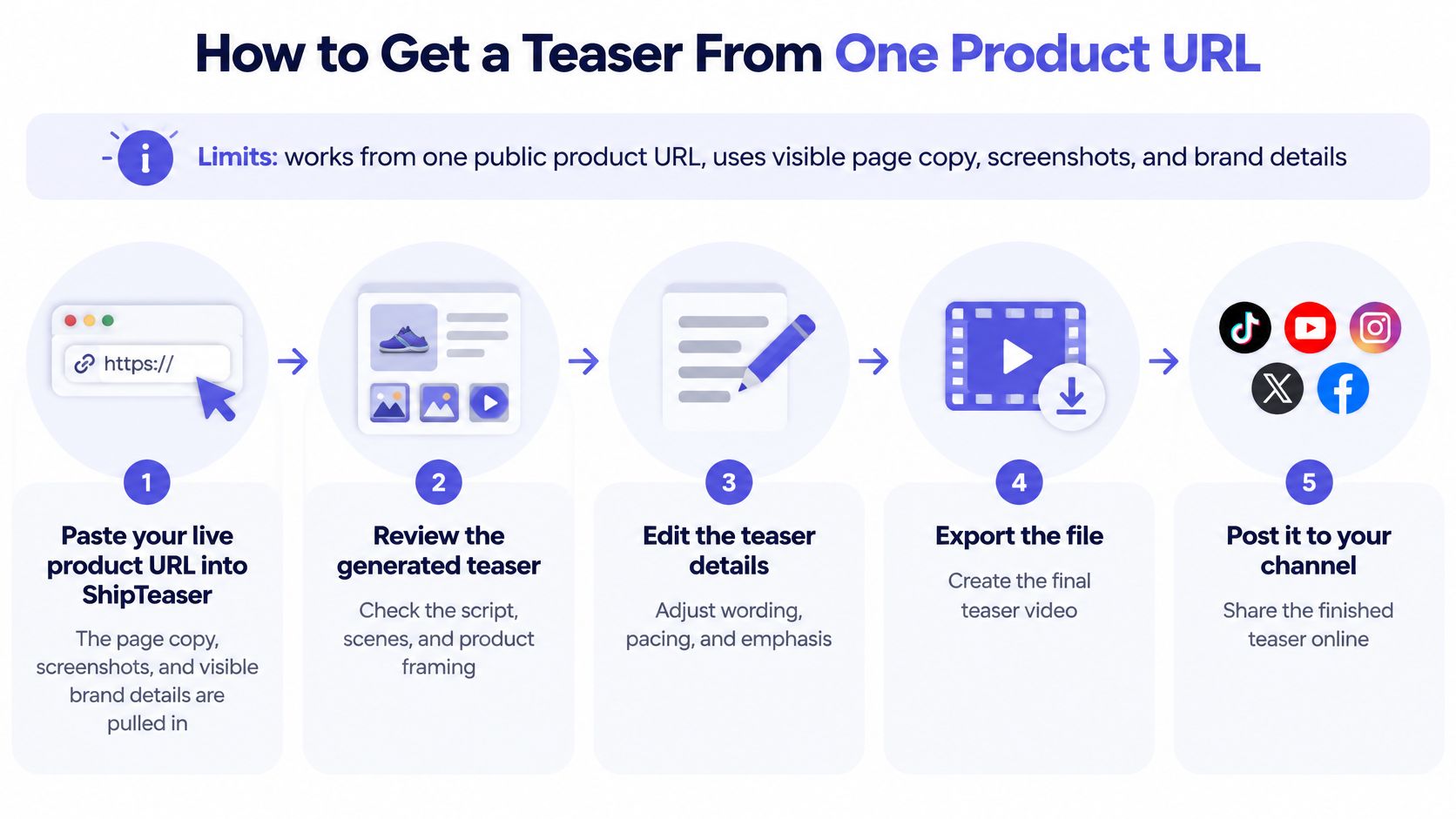
ShipTeaser starts from a public product URL, not a written scene prompt. The visible page copy, screenshots, and brand cues supply the material, so prepare the page before you generate the video.
The workflow below follows the path from source page to publication. Any adjustment to wording or emphasis must happen through the source page and regeneration, not through an in-app timeline.
Generate and review
- Paste your live product URL into ShipTeaser. Use the page that best describes the release, rather than a vague homepage that mixes unrelated products.
- Wait about 2 minutes for rendering. Treat that as generation time, not the complete time required for approval.
- Review the five scenes. Watch hook, problem, solution, proof, and CTA in order, then test whether the opening communicates the product immediately.
- Correct the source page when a claim is wrong. ShipTeaser has no timeline or trimming tools, so fix the page and submit the URL again.
- Choose the publishing ratio. Use 9:16 for Reels, Stories, TikTok, and Shorts; 1:1 for feeds; and 16:9 for wide placements, following the conventions explained in PPC Land's aspect-ratio guide.
- Prepare the download for posting. Choose the optional music bed if wanted, download the 1080p file, and publish with a clear caption and destination.
A practical source-page check saves wasted generations. Put the main benefit near the top, use current screenshots, and remove obsolete launch claims before asking the generator to interpret the page.
Know the boundaries
ShipTeaser has no avatars, voice-over, or narration. ShipTeaser also has no video editor, screen recording, stock footage, text-to-video from a prompt, dubbing, subtitles, translation, or clip trimming.
Those boundaries are acceptable for a launch teaser because the job is narrow: introduce a benefit and invite the viewer to learn more. The same boundaries become a problem when someone needs to follow a workflow, hear a detailed explanation, or inspect a sequence of interface actions.
Don't turn a teaser into a substitute for product evidence. If your main selling point depends on showing exactly what happens after a click, create a separate demonstration with the appropriate recording and editing workflow.
Control and Speed Compared Across Generator Types
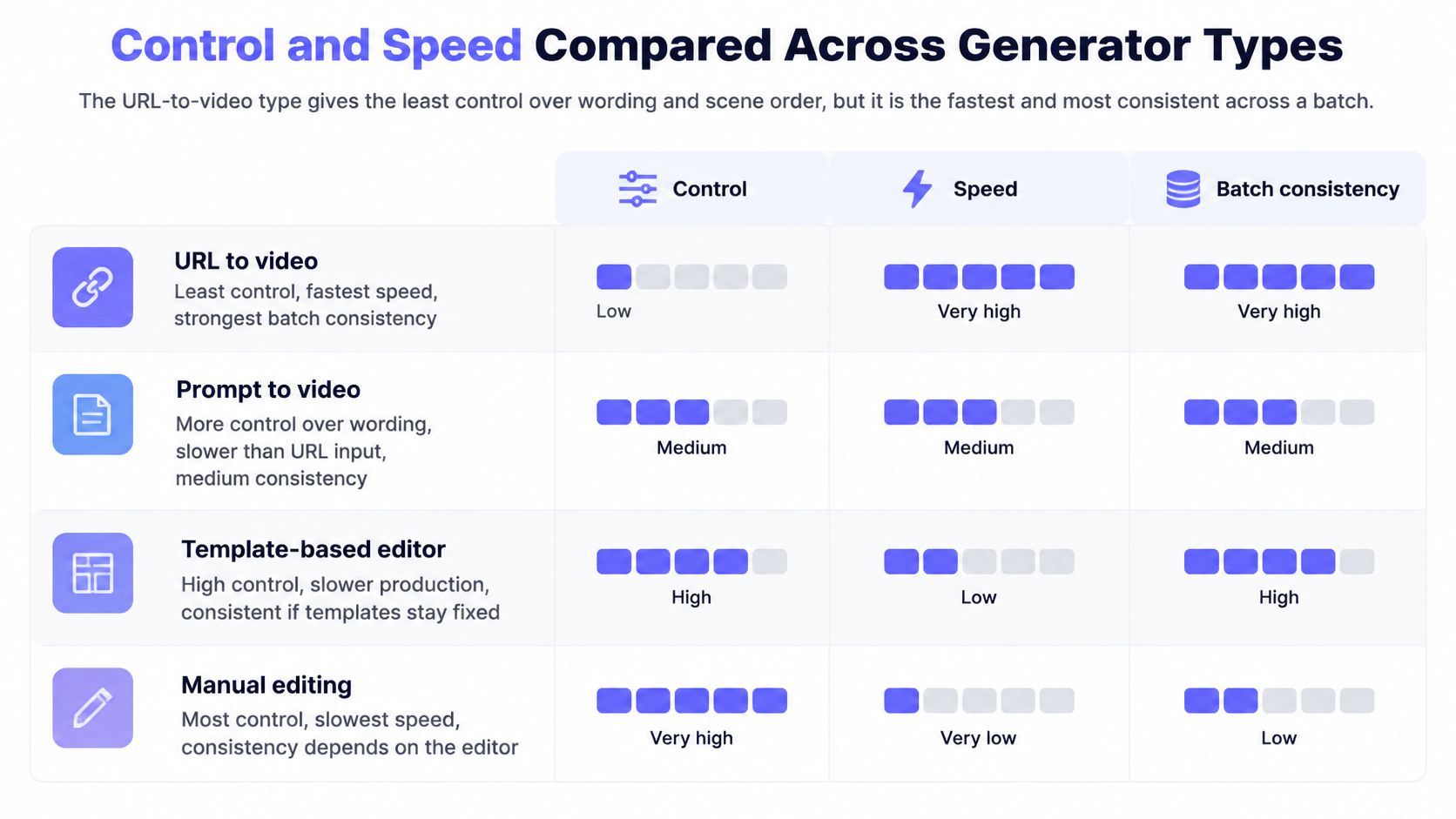
More control means more decisions before publication. URL-to-video gives you limited control over wording and scene choice, but ShipTeaser's approximately 2-minute render keeps generation short enough to fit between other launch tasks.
Use this visual as a broad control-versus-speed guide. The working comparison beneath it includes presenter-led workflows as a separate choice.
Budget for approval, not just generation
Control, time and consistency by generator type
| Type | Control | Time per Video | Consistency |
|---|---|---|---|
| URL-to-video teaser (ShipTeaser) | Low control over wording and scene choice | About 2 minutes to render; budget about 1 hour including review as a planning estimate | Same five-scene structure every run |
| Prompt-based text-to-video | High creative freedom | Budget for generation, comparison, and repeated attempts | Output changes by run; use a five-variant test |
| Avatar presenter tool | Script control, little frame-level control | Budget for script approval, rendering, and presenter review | Repeatable presenter format when settings stay fixed |
| Template editor with AI assist | Full manual layout control | Several hours per hand-edited video as a planning estimate | Consistent once the template is locked |
A prompt-based generator offers the widest room for visual invention. Test that advantage by generating five variants, then count how many you would publish. This is an evaluation exercise, not a claimed success rate.
An avatar workflow shifts effort into scriptwriting and delivery review. A template workflow shifts effort into layout, timing, and asset preparation. Neither removes the founder's responsibility to approve the message.
Consider a hypothetical founder who needs four launch videos in a month. Budgeting one hour per URL-based teaser, including review and posting, produces a four-hour planning allowance; budgeting several hours for each hand-edited video creates a larger production commitment. These are planning estimates, not measured results or performance guarantees.
Choose the smallest amount of creative control that lets you publish an accurate, useful video.
If a precise scene treatment matters to the launch, spend the time. If the goal is a recurring release announcement, don't buy an editing workload you never wanted.
Pricing Math for a Weekly Launch Cadence
Compare cost per usable video, not the subscription price alone. A rendered file only counts as useful when you approve it and publish it.
The following capacity calculation assumes four weeks per month. It's planning arithmetic, not a claim about billing-period length or unused-capacity rules.
ShipTeaser plans and cost per video
| Plan | Videos per Month |
|---|---|
| $99/mo plan | 4 |
| $149/mo plan | 8 |
| $199/mo plan | 16 |
The division is straightforward:
- One video per week. $99 divided by 4 gives $24.75 per video.
- Two videos per week. $149 divided by 8 gives $18.63 per video, rounded.
- Four videos per week. $199 divided by 16 gives $12.44 per video, rounded.
Those figures assume you use the planned capacity and publish every video. Rejected outputs and unused slots increase your effective cost.
Count the posts you'll publish
A founder launching one product each quarter doesn't need a high-output subscription merely because the nominal unit price looks attractive. The $99 plan covers that production cadence, but ongoing payment still needs to make sense for the founder's release schedule.
A team publishing distinct versions across several launch channels may justify the $149 plan. Count those versions as separate deliverables when budgeting; don't assume additional ratio exports or regenerations are free unless the account terms confirm that.
Use the product video cost guide to separate production spend from review effort. For experiments, creative testing budget advice from AdManage.ai offers useful context for deciding how much learning each additional creative should deliver.
The first ShipTeaser video is free, with no credit card. Use that entry point to establish whether the format fits before comparing paid capacity.
Choose the plan that matches the posts you will publish, not the one with the lowest cost per video on paper.
Who Should Pick Which Option
A solo builder shipping weekly browser-extension updates should start with URL-to-video. ShipTeaser's $99 plan covers one teaser per week without requiring that founder to maintain an editing workflow.
Use the profiles as a starting point, but make the decision from your actual production needs.
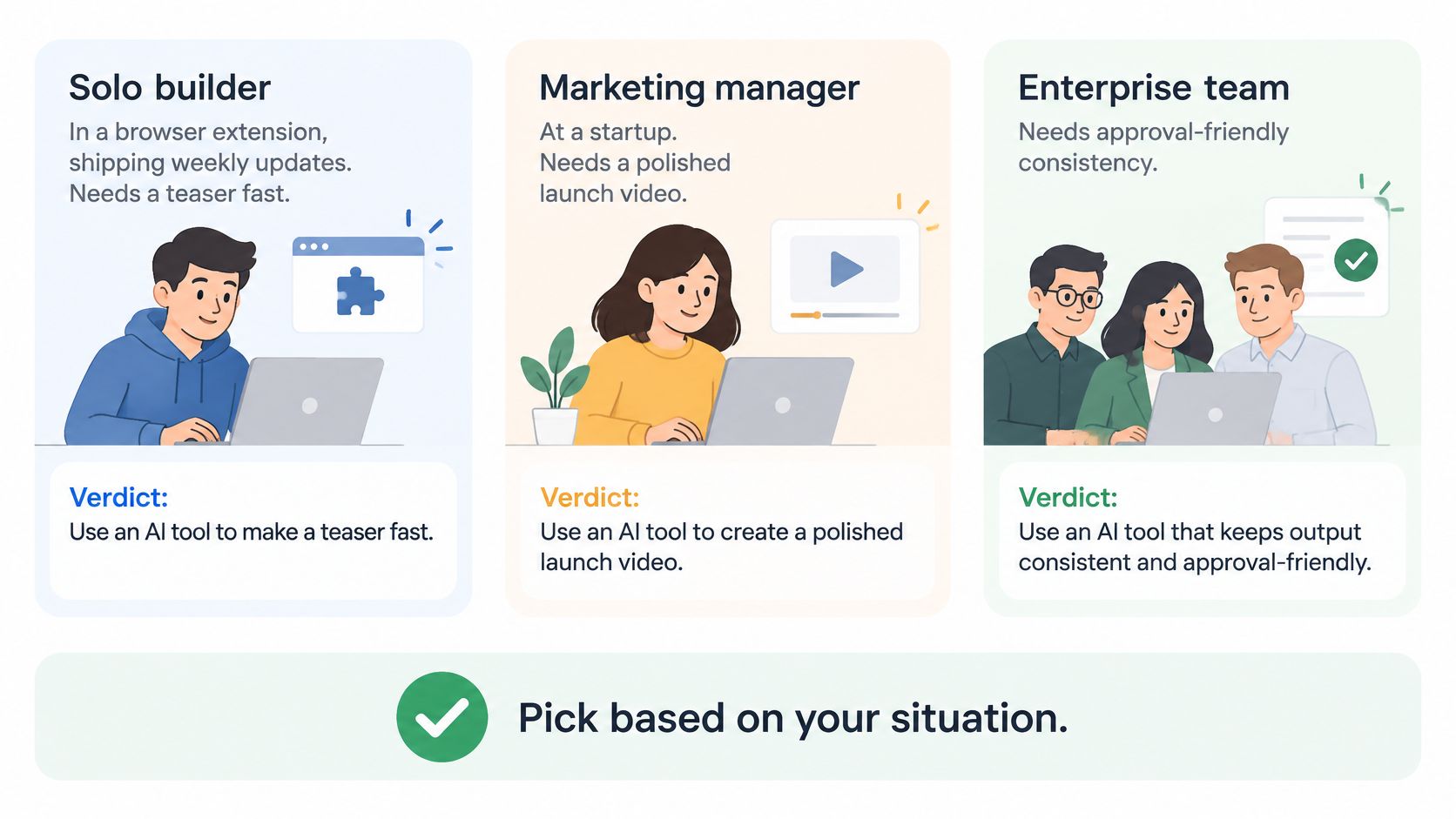
Make the situational choice
- The dashboard startup. A two-person team with a designer on retainer and a seed presentation due next month should choose a template editor. A carefully designed brand asset can serve more than one announcement.
- The explaining founder. If a face delivering a script is central to the message, choose an avatar presenter workflow. Write the explanation first and accept limited frame-level direction.
- The pre-launch concept team. If there's no landing page yet, use prompt-based generation to explore visual concepts. Apply the five-variant test before committing to a production approach.
- The recurring software release. If the job is a compact announcement from an existing page, choose a URL-based teaser rather than building a miniature film.
Accept the length trade-off
Short-form video has a strong marketing role: 49% of marketers identified it as the highest-return format in the industry summary published by Image Studio. That finding supports considering a short asset, not declaring every short asset effective.
Length still matters. 42% of video marketers identified 21 to 30 seconds as optimal, according to HubSpot's 2024 Video Marketing Report.
ShipTeaser's fixed 15-second format is therefore a deliberate hook-first choice, not the default optimum. Choose a template editor or manual edit if your message needs that longer window.
ShipTeaser suits a silent launch asset, not a talking explainer or a long product demonstration. Don't buy a narrow format and then spend your launch trying to escape its boundaries.
Run One Free Teaser Before You Commit
A generator can make a polished frame and still produce a video you should not publish. Test it with your actual landing page, then judge the complete teaser for accuracy, readability, and usefulness on its intended channel.
Use the free promotional video workflow to make the trial a real publication decision, not casual experimentation.
Follow a fixed acceptance sequence
- Generate from your live URL. Use the first teaser to assess how well the page's copy and brand cues translate into a short video.
- Test the opening with sound off. Ask someone unfamiliar with the product to explain its benefit after watching. If they miss the claim, rewrite the on-screen text so the benefit is clear without narration, then regenerate.
- Verify every on-screen claim. Check numbers against the source page. If a claim is unsupported or inaccurate, correct the page and regenerate before publishing.
- Prepare the disclosure. Say that AI generated the teaser and a human reviewed its product claims.
- Match capacity to your posting count. Use the pricing section to choose a plan that fits your intended cadence. Don't pay for more weekly output than you can review and publish.
If the opening fails twice, fix the page headline before paying for more output. A vague source message gives the generator little useful material to prioritize.
Review the whole file, not just its best-looking frame. Publish only when the message is clear, accurate, and suitable for the channel.
If you need a presenter, timeline editing, or narration, choose a generator category built for that job instead.
FAQ
What is the best AI product video generator for a solo builder?
ShipTeaser suits solo builders with an existing software landing page who need a short launch teaser. Choose a prompt-based generator for visual concepts, an avatar workflow for presenter-led explanations, or a template editor when exact layouts and timing matter.
Can ShipTeaser make a full product demo?
No. ShipTeaser turns a product URL into a fixed 15-second teaser, so it is not designed to explain a detailed workflow. For a full demonstration, use a screen-recording and editing workflow.
How can founders check whether a teaser is ready to publish?
Check that the video's claims match the landing page and that its key message is clear at a glance. Correct inaccurate wording on the source page before generating another version. A visually polished clip still needs human review before publication.
How should founders compare the cost of AI videos?
Use the plan that matches your publishing cadence, then factor in whether the resulting videos are usable. For example, ShipTeaser's $99/month plan provides one video per week. If that cadence matches your needs and the teasers pass review, it is a better fit than paying for unused capacity.
ShipTeaser turns a product URL into a 15-second, 1080p launch teaser without manual timeline editing. Visit ShipTeaser to generate your first video free, with no credit card, and judge the result against your actual launch page before choosing a plan.