A failed 15-second teaser often asks one scene to do two jobs. The viewer must process two ideas before the next frame, and neither may stick. Give each scene one clear task, then check the cut against that rule.
A 15-second product launch video template gives the hook, problem, solution, proof, and CTA fixed time slots: 0-3, 3-6, 6-9, 9-12, and 12-15 seconds. Treat it as a failure checklist, not a list of creative ideas. If a scene explains the problem and demonstrates the solution, split those jobs.
High-end production is optional. A short teaser can sit beside the founder's landing page, where the page carries the detail and the video earns attention. A product demo works when elaborate production is impractical.
Five Scenes and Timings for a 15-Second Launch Video
A 15-second launch video works when each scene does one job. Give a scene two jobs and the viewer has to process competing messages before the next cut. Keep the landing page and teaser in sync: the page carries the detail, while the video gives a software buyer enough context to consider a next step.
The Five-Scene Timing Template
Ledgerly is a hypothetical invoicing product. The example lines show how the sequence can work, not verified capabilities or customer results. Treat the hook's time claim as a placeholder until you can support it.
| Scene | Seconds | Job | Example line |
|---|---|---|---|
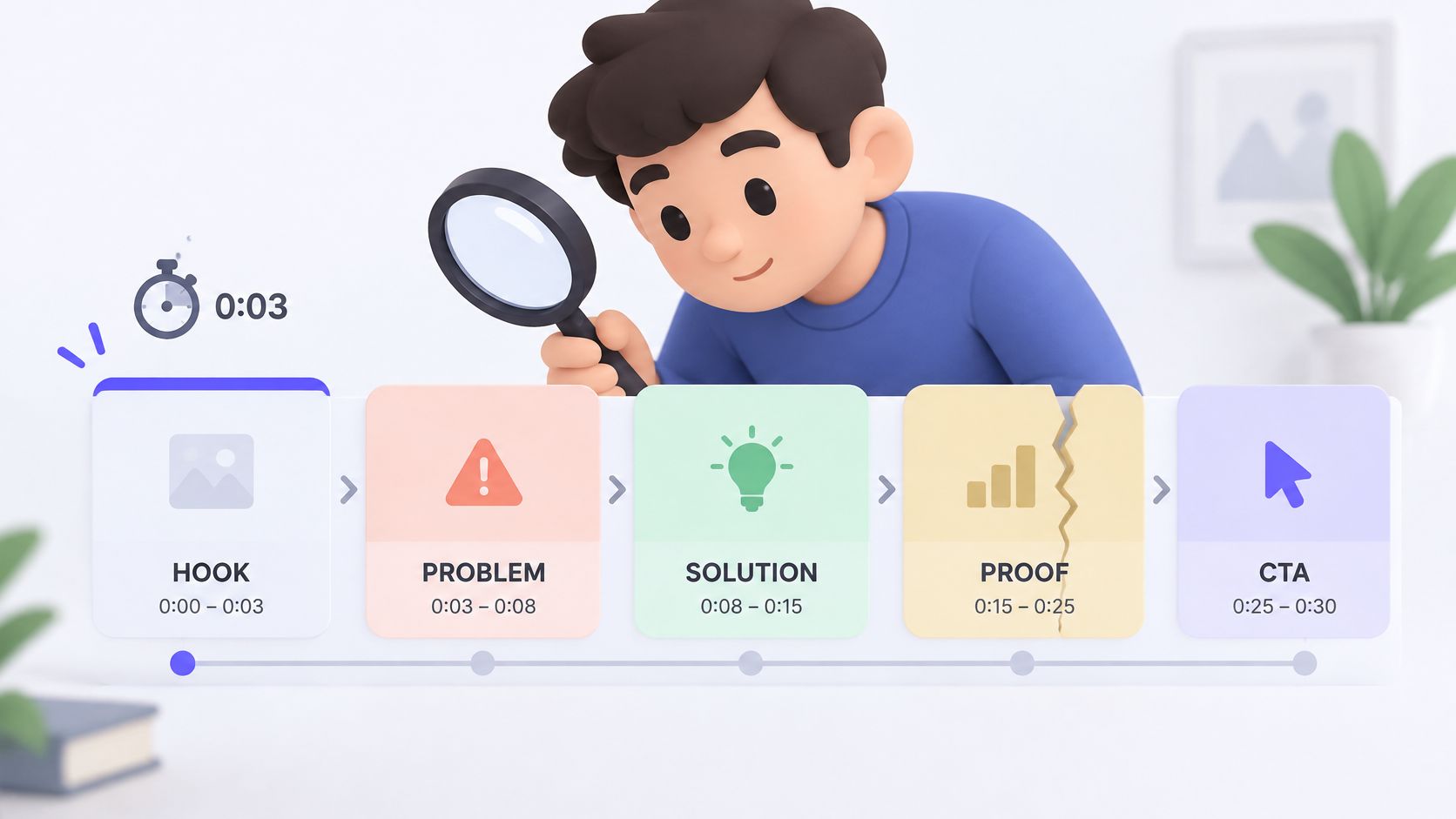
| Hook | 0-3 | Stop the thumb with the sharpest claim | Chasing unpaid invoices eats a week every month |
| Problem | 3-6 | Name the pain your buyer already feels | Reminders live in a spreadsheet nobody opens |
| Solution | 6-9 | Show the product doing its core task | Ledgerly sends the reminder and logs the reply |
| Proof | 9-12 | Show one fact the landing page already proves | Quote a customer or a count from your page |
| CTA | 12-15 | Repeat the exact button action | Start your free trial today |
Review the Job column before polishing the lines. The hook earns attention, the problem creates recognition, the solution shows an action, the proof supports the claim, and the CTA names the next step. Keep those jobs separate.
The proof row is a prompt, not finished copy. If the landing page has no evidence for the claim, leave the slot unresolved until you have a real customer quote or a supported count. An invented testimonial makes the whole video less credible.
Remove the Second Job
A crowded solution scene might introduce Ledgerly, list integrations, explain reminders, and announce a trial. Keep the reminder action in that scene. Save the trial invitation for the CTA, and leave secondary features on the landing page.
Practical rule: If a scene needs “and then” to explain its purpose, remove a job before shortening the words.
A product-demo guide recommends staying under 60 seconds and showing the product in use instead of relying on a marketing-heavy presentation. This 15-second structure fits that guidance when the product gets meaningful screen time, rather than appearing only as decorative brand imagery.
Use this product video script guide if the sequence reads like disconnected headlines. Check that each line gives the viewer a reason to follow the next one.
ShipTeaser can generate a hook, problem, solution, proof, and CTA from a product URL. Review its output against the table before publishing. Automation can draft the sequence, but it cannot validate a claim or fix a scene that tries to do two jobs.
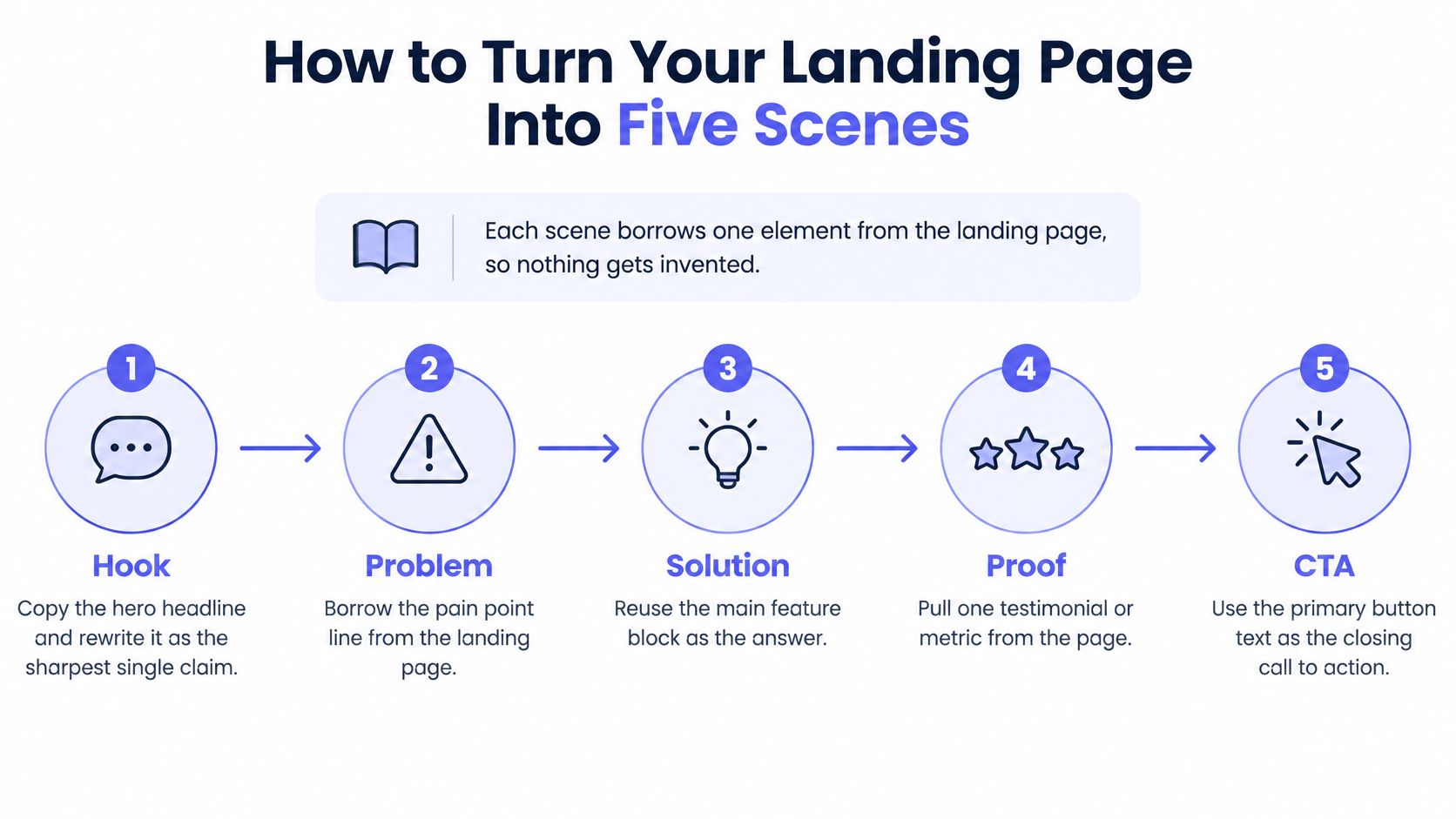
How to Turn Your Landing Page Into Five Scenes
A five-scene teaser works when each scene has one clear job and one source on the landing page. Use the page as source material and rewrite weak copy before generating. A vague headline still needs a sharper formulation, and conflicting claims need resolution first. The scene map makes those choices concrete.
Extract the Source Material
Hook from the hero headline. Start with the headline, then rewrite it as the sharpest defensible claim about the buyer's outcome. Prominent copy can still be vague. A phrase such as “work smarter” needs a more specific promise before it can carry the opening scene.
Problem from the first two pain bullets. Select a recognizable frustration from those bullets or from the description of life before the product. Choose the pain closest to the core workflow. Don't combine billing delays, reporting work, and team coordination into one complaint.
Solution from the single feature screenshot. Pick the screenshot that shows the product doing its core task, then pair it with a concrete verb. For hypothetical Ledgerly, showing the reminder action connects the product to the problem more clearly than a dashboard filled with unrelated charts.
Proof from an existing logo, quote, or count. Use evidence already published on the page, keeping its meaning and any necessary qualification intact. A customer logo presented as a performance result is a frequent error if the customer never endorsed that result. If the page has no relevant evidence, add defensible proof before publishing.
CTA from the button text, word for word. If the page says “Join the waitlist,” the video should use that wording, not “Start free.” Match the promised action to what viewers can actually do, so they don't discover that the product isn't available yet.
Read the five lines in order. Remove any line that repeats another scene, then read the sequence without explaining the product aloud. Founders often fill in missing context automatically. Ask an unfamiliar reader whether they can identify the pain, action, evidence, and next step.
Resolve Gaps Before Generation
The hard part is often deciding what to leave out. A screenshot can be accurate but still fail in a teaser if the relevant action takes up only a tiny corner. A genuine testimonial may also be too broad to support the specific claim in the video.
For Ledgerly, don't connect a general compliment about customer support to a claim about invoice collection speed. Choose evidence that supports the claim, or narrow the claim to fit the evidence. The scenes need to support one another, not just use accurate words.
If the page presents several competing messages, use the landing page video guide to settle on a core promise before summarizing it in a short video.
ShipTeaser pulls page copy, screenshots, and visible brand cues from the submitted URL. Review its draft against the same scene map, and rewrite weak source material before adding motion graphics. Graphics can make a clear promise easier to follow, but they can't make an unclear one precise.
Export Sizes for Each Launch Channel
A fifteen-second launch video has five jobs in fixed time slots, so each export must keep those jobs legible in its frame. A scene that tries to show the interface and explain the promise at once often fails at both. One master concept is efficient, but an unchanged composition across channels will fail.
Use these ratios as working choices, not universal upload requirements. Match the composition to the display: a wide frame for a landing page, a square frame for a professional social feed, and a vertical frame for short-video feeds.
Export Ratio by Launch Channel
| Channel type | Ratio | Best use | Check before posting |
|---|---|---|---|
| Landing page and wide video placement | 16:9 | Wide hero sections and longer uploads | Keep on-screen text inside the center safe area |
| Launch gallery | 16:9 | Gallery placement | Confirm current upload rules before publishing |
| Professional social feed | 1:1 | Square in-feed posts | Keep the interface readable at phone width |
| Vertical short-video feeds | 9:16 | Full-screen vertical video | Rebuild the opening scene for vertical instead of cropping |
Vertical framing needs its own composition. Cropping a wide scene can push the product action out of view, while empty space can weaken the opening. Set the key action and text for the vertical frame before exporting.
Square framing gives the viewer less horizontal room, while a wide version gives the interface more space. Choose based on what the scene must show. In either format, keep the product large enough to read.
Preserve the action the viewer needs to understand, not every pixel of the original screenshot.
ShipTeaser renders 16:9, 1:1, and 9:16 outputs from one URL. Generate the available shapes, then inspect the first second of each at its intended display size. Check that the opening promise is visible and the product stays clear of interface overlays.
Use the launch video specifications guide as a posting checklist. Confirm current requirements before publishing, especially for paid placements. Export settings remembered from an earlier launch may no longer fit.
Mistakes That Break a Teaser After Export
The mistake I'd prevent first is the unreviewed export. Fast generation is useful, but publishing an inaccurate claim or mismatched CTA only gets the wrong message out faster.
Review the File, Not the Preview Alone
Opening on a logo. The symptom is an introduction with no reason to keep watching. Branding has displaced the hook, so open with the sharpest supported promise and let the brand appear alongside it.
Using an unsupported superlative. “The fastest” sounds confident but supplies no evidence. Replace the claim with a relevant number the landing page actually supports, or use a narrower qualitative statement if no number exists.
Shrinking the interface. The product looks polished on a laptop, but the action disappears on a phone. Watch the exported solution scene full screen on a phone and remove labels or visual detail that require squinting.
The timeline below is a useful reminder to inspect the handoff between scenes, not just individual frames.
Depending on music. A forceful music bed can make weak messaging feel finished during review. ShipTeaser's silent format means no voice-over, with an optional music bed; test whether the entire message works muted.
Reusing the opening unchanged. A composition that reads in a wide player may lose its focus vertically. Adapt the opening promise and framing to the placement instead of approving every ratio from the wide preview.
Skipping the final read-through. Familiarity makes duplicated lines and CTA mismatches easy to miss. Read the actual export from start to finish before publication.
The guide to why launch videos fail can help diagnose a teaser that looks finished but communicates poorly. Fix the hook first: if the opening doesn't establish relevance, polishing the remaining scenes won't solve the immediate problem.
Testing Three Variants Before You Scale
A 15-second launch video has five jobs in fixed time slots. Test one scene at a time. When a scene tries to introduce the product and prove its value at once, results are harder to interpret. Change one variable per challenger so the test shows what affected the response.
Build Challengers Against a Control
Keep one version unchanged as the control. Create each challenger from that version, not from another challenger. Otherwise, a change to the opening can carry into a test of the demonstration.
| Variant | Change | Keep unchanged |
|---|---|---|
| A | Opening claim | Demonstration, proof, CTA, duration |
| B | Product demonstration frame | Opening, proof, CTA, duration |
| C | CTA wording | Opening, demonstration, proof, duration |
A CTA test must match the action the destination offers. For example, compare two invitations to join the waitlist, rather than testing a free-trial offer the page does not provide.
Keep the audience, placement, and delivery conditions consistent. Set the observation window before launch, such as seven days per variant, and use the same window for each. That is an example for organizing a test, not a universal sample-size rule or a promise of a decisive result.
Judge Attention Alongside Qualified Action
Compare hold duration and completion, then check clicks and the relevant landing-page action. Attention alone does not show whether the video attracted suitable users.
A marketing survey reports that marketers rank views at 67%, engagement at 63%, and leads or clicks at 52% among video KPIs (marketing statistics). Use those measures as context, not as a reason to judge a variant by views alone.
Testing discipline: Decide what would justify keeping a variant before checking which one has the biggest view count.
Compare engagement within the same placement. Platforms use different methods and denominators, so reported engagement rates do not establish which video drove more conversion intent.
Keep a winning opening, then test the next variable against the updated control. For each weekly comparison, preserve an unchanged control template so you can connect differences to the change you intended to test.
If no challenger clearly beats the control, review the landing-page copy before changing the video again. The teaser cannot communicate a clear promise the source page does not make.
Run Your First Teaser Before Launch Week Ends
A launch teaser needs five distinct jobs in fifteen seconds. Keep each scene focused on one job, and publish a defensible first cut this week instead of polishing indefinitely. Video is a common launch asset, though its presence alone does not guarantee a strong launch.
Follow a Short Release Checklist
- Submit the page. Paste the landing-page URL into ShipTeaser to generate a 15-second, 1080p, silent motion-graphics teaser in about 2 minutes.
- Check the structure. Match each scene to its assigned job and timing. If one scene explains the product and delivers the proof, split those jobs.
- Inspect the export. Check the CTA against the landing page and confirm the opening is readable.
- Download the formats. Prepare wide, square, and vertical versions for their intended placements.
- Publish with a test. Keep the control version and record the change you are testing.
Choose Capacity After Establishing a Cadence
ShipTeaser's first video is free, with no credit card required. ShipTeaser's own monthly plan prices are $99 for 1 video per week, $149 for 2 per week, and $199 for 4 per week.
For most early-stage founders, the $99 plan fits once weekly testing becomes a habit. Move to a higher-capacity plan only when the testing schedule needs more production slots. Extra output has little value if no one reviews the results.
FAQ
Is a Teaser Enough for a Software Product Launch?
For Ledgerly, show one action that makes the product concrete: a user categorizing a transaction and seeing the updated balance. If that interaction supports the launch claim, the teaser has done its job. Add a second scene only when it proves a different point. One scene doing two jobs usually makes both harder to read.
What Can Count as Proof Before Customer Testimonials Exist?
Use a product result or a direct demonstration that supports the claim. A screen recording of the relevant action can work, provided the interface is legible and the result is real. Don't imply customer approval or adoption without evidence. If you can prove only one capability, keep the promise just as narrow.
How Can I Check Whether the Video Makes Sense Muted?
Watch the opening second with the sound off, then pause. A viewer should be able to identify the product category or the problem being shown from the frame and on-screen text. If the meaning depends on a spoken explanation, replace that opening with a clearer visual or shorter label.
Can a Template Replace a Detailed Product Walkthrough?
Use the template for a concise launch message. Choose a separate walkthrough when viewers need to follow a multi-step workflow, compare configuration choices, or inspect interface behavior. Trying to fit those details into five short scenes makes the product harder to understand.
ShipTeaser turns a product URL into a five-scene teaser. Generate your free first video at ShipTeaser, then check that each scene has one clear job before publishing.