A strong happy anniversary video for an early-stage software product uses one specific milestone, visible product proof, and a clear next step in a short silent sequence. The best format is a focused 15-second message, not a crowded timeline of every launch, feature, and customer win.
A founder can post a video that says little beyond congratulations, then wonder why nobody remembers it. A sharper version shows what changed, who benefited, and what viewers should do next. The seven examples below cover founder impact, product progress, customer gratitude, employee recognition, user contributions, metrics, and the next roadmap step.
Each format includes a short script, visual direction, strategic use case, trade-off, and production action. A practical reference for broader launch concepts is this guide to video ideas to grow your business.
The best happy anniversary video uses one clear milestone, concrete product or people proof, readable on-screen copy, and a focused CTA. ShipTeaser turns a product URL into a 15-second, 1080p, silent motion-graphics teaser in about 2 minutes. Its five scenes are hook, problem, solution, proof, and CTA, with exports in 16:9, 1:1, and 9:16.
1. Milestone Montage with Product Evolution
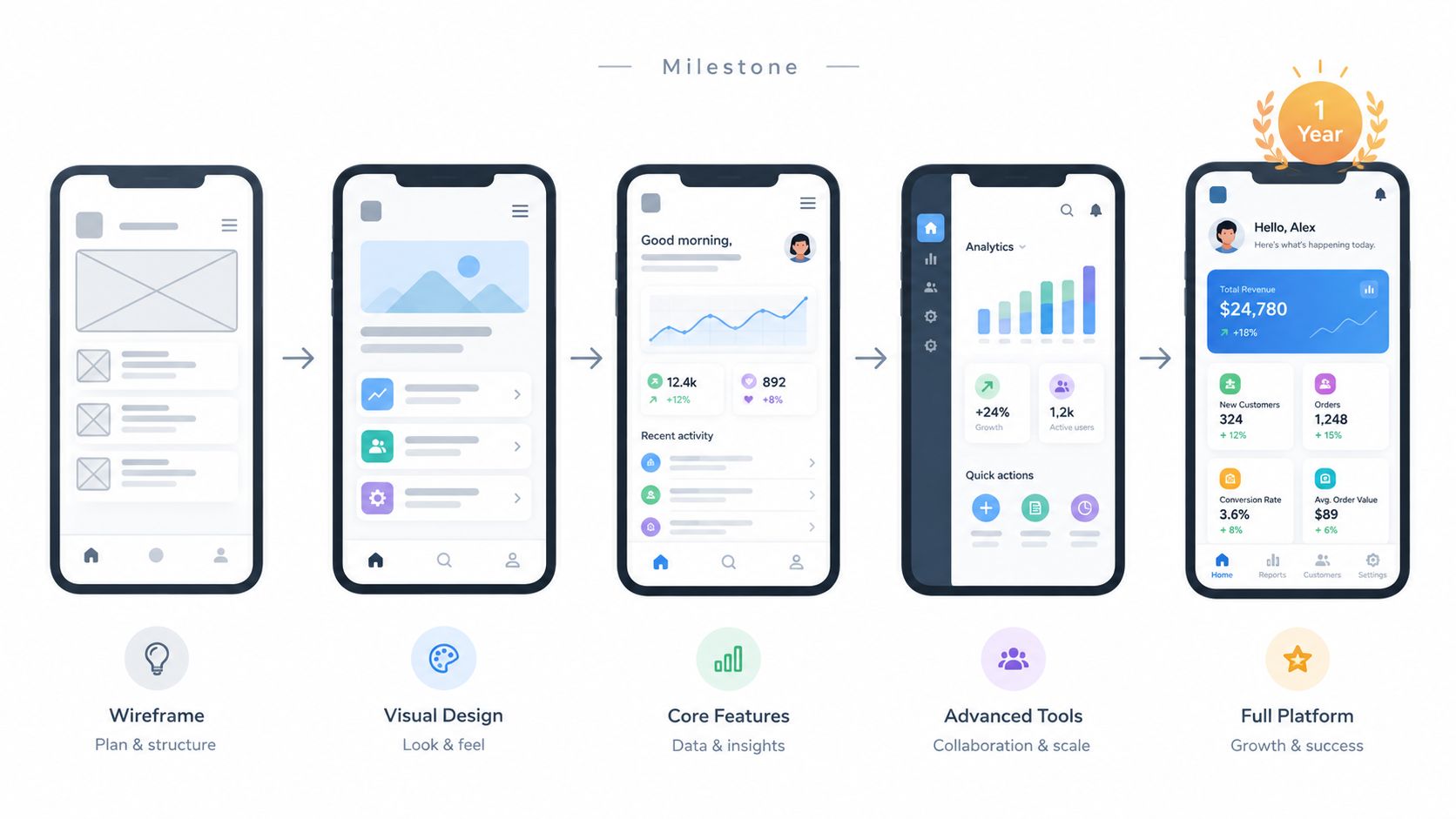
Your anniversary post needs more than a launch date. Show the product changing from its first usable version into the product customers can use today. This format gives potential buyers a fast reason to believe that the team ships, learns, and improves.
A SaaS founder celebrating a second year might open with the original dashboard, cut to the current interface, and end with a line such as “Two years of building with our users”. An indie app maker could show an early app icon beside the current icon, then reveal feature growth from 5 features to 25 features over 18 months. Those product details come from your own launch history, so keep the claims accurate and easy to verify.
Practical rule: Show product change, not just product age.
The silent script should stay simple:
- Hook: “From our first release”
- Problem: “The workflow was limited”
- Solution: “We kept shipping”
- Proof: “New screens, features, and customer milestones”
- CTA: “See what's new”
Use clean screenshots with visible dates or release labels. ShipTeaser can use those landing-page inputs as visual proof and sequence the product story into a short video montage. Add the optional music bed if you want a celebratory tone, while keeping the message silent and free of voice-over.
Publish all three formats for reuse. Use 16:9 for LinkedIn, 1:1 for an Instagram feed post, and 9:16 for Instagram Stories. These ratios match common viewing contexts, with 16:9 suited to wide-screen viewing, 1:1 suited to square feeds, and 9:16 designed for vertical mobile viewing according to Grabyo's aspect-ratio guide.
Action: Add dated screenshots to your landing page, then create one montage and pair it with a written Product Hunt or blog update that explains the anniversary milestone. For music selection, review these Satura AI song tips.
2. Customer Win Highlight Reel
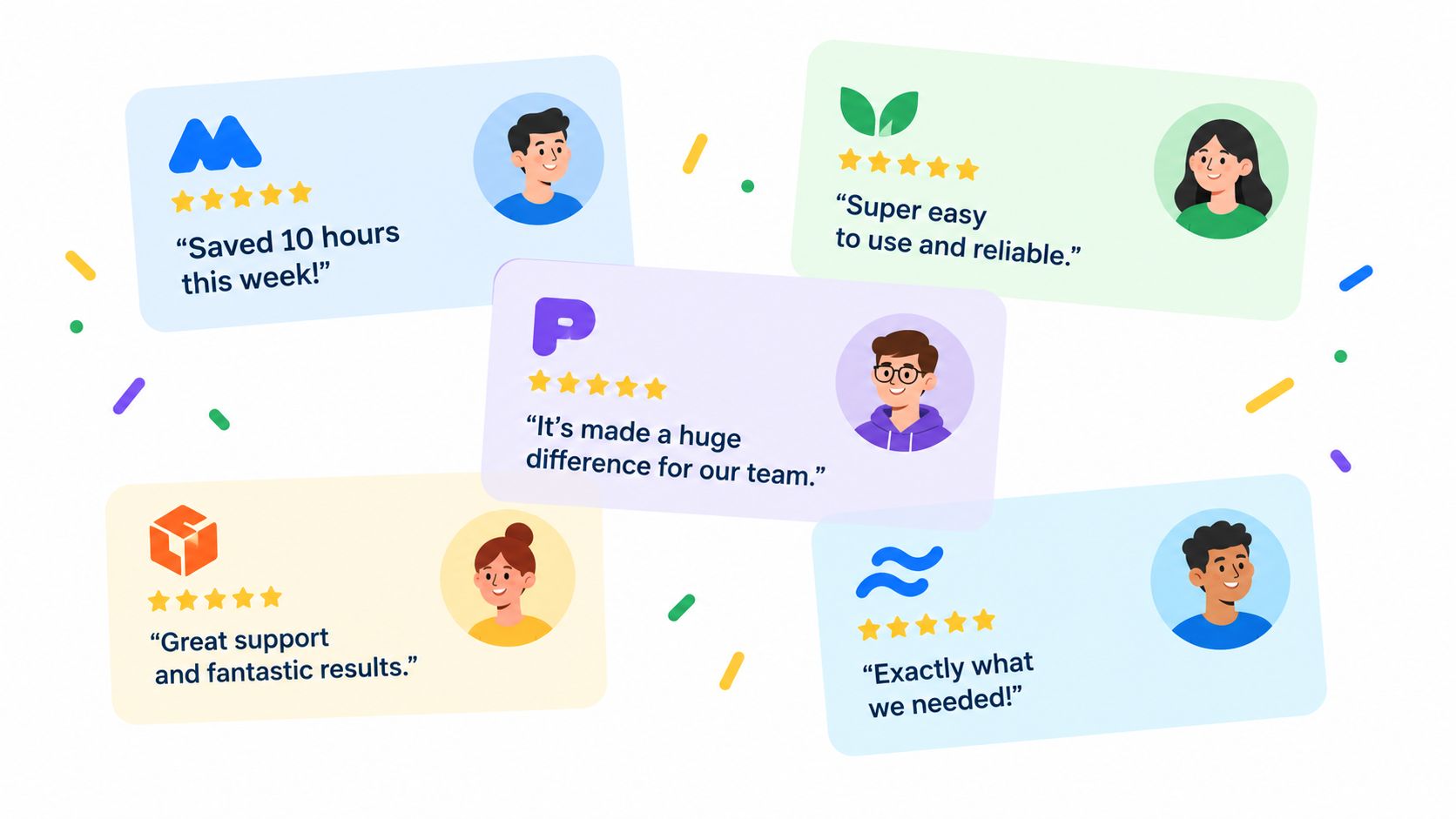
A customer thank-you video works best when gratitude includes evidence. Generic praise sounds interchangeable. A short sequence of specific customer outcomes makes the anniversary about the people who use the product and the problems the product helps solve.
Open with “One year built with our customers”. Follow with customer logos, names, or profile images, then show concise statements such as “Built my SaaS in 3 weeks” or “Saved my team 10 hours per week”. A project management product could feature five customer companies, from an indie team to a mid-market business, with one short quote from each. Keep every testimonial approved and exact. Never improve a customer's wording for dramatic effect.
The visual treatment should feel like a sequence of thank-you cards. Give each customer one clear frame. Use a consistent background, readable type, and one problem-specific result. A quote about reducing a painful manual process is stronger than a broad line such as “Great product.”
Use this silent script:
- Hook: “One year, built together”
- Problem: “Teams needed a simpler way to work”
- Solution: “Customers built better workflows”
- Proof: Customer names and approved outcomes
- CTA: “Join the community”
ShipTeaser can draw visible testimonial copy and brand cues from your landing page. Refresh the selected testimonials monthly if you plan to reuse the anniversary asset in later community posts. An optional music bed can provide a warm, celebratory rhythm without adding narration.
“Celebrate the customer outcome, not the company's ego.”
Post the finished version to LinkedIn and X when your audience is most likely to see it. Then send contributors a direct copy they can share. Credit people clearly in the on-screen text, and avoid presenting an isolated testimonial as a universal result.
Action: Choose three to five approved testimonials, including at least one specific problem solved, and add them to a dedicated customer-proof section on your landing page.
3. Founder Impact Statement with Before-and-After Comparison
Founders often explain why they started, but the story becomes persuasive only when viewers can see the original problem. Pair the mission with a before-and-after comparison. This approach gives a personal anniversary message a practical business purpose.
An automation founder might write, “I built this because my team wasted 20 hours per week on manual tasks.” The video then shows a crowded spreadsheet, a repetitive workflow, and the automated result. A design-platform founder could say, “Non-designers shouldn't struggle to create beautiful work.” The visual sequence moves from a blank canvas to a finished design using templates.
Use the landing page hero or About page as the source for the hook. If the founder's reason for building isn't visible there, add one direct mission sentence before generating the video. ShipTeaser can use that copy alongside product screenshots in a compact startup video format.
The script needs a clear contrast:
- Hook: “We built this for one painful reason”
- Problem: Show the old manual or confusing process
- Solution: Show the product handling the task
- Proof: Display a verified customer, usage, or workflow outcome
- CTA: “Try the simpler way”
Avoid stuffing the frame with founder biography. The audience needs the reason, the problem, and the visible answer. If your landing page includes a concrete problem metric, use it only when you can substantiate it. If you don't have a verified figure, describe the cost qualitatively.
A 1:1 export suits a square feed announcement, while a 16:9 version works better on a website or desktop-focused post. Keep the text large enough to read without sound. The video should still make sense when viewers watch without sound.
Action: Write one mission sentence, add one before screenshot and one after screenshot to your landing page, and make the founder's impact the opening scene.
4. Feature Showcase Carousel with Anniversary Highlight
A product that has changed substantially needs a format that shows breadth without becoming a product tour. Use a rapid feature carousel, then finish with one anniversary release or bonus. The sequence should make the product feel active, not overloaded.
A task management tool might show a collaboration board, automation rules, time tracking, custom reporting, mobile access, and a new anniversary feature. A note-taking app could show markdown editing, quick capture, search, sharing, templates, and offline access. These examples work because each frame communicates one benefit.
The silent script can run like this:
- Hook: “A year of product progress”
- Problem: “One workflow wasn't enough”
- Solution: Feature screens appear in order of user value
- Proof: A current release or customer-facing result
- CTA: “Explore the latest version”
Give every feature a short overlay of 2 to 3 words, such as “Faster capture”, “Shared workspaces”, or “Offline access”. Those labels are editorial recommendations for readability, not performance claims. Start with the feature that matters most to your audience. Don't sort the sequence alphabetically.
ShipTeaser can assemble a visual tour from feature sections, screenshots, and callouts on your landing page. Prepare each screenshot carefully. A filled-out workflow communicates more than an empty template, and a visible result communicates more than a menu of settings. See the guidance on creating a feature announcement video for a related product communication approach.
A different accent color can mark the anniversary feature, but don't hide the product interface behind decoration. Use a clear launch date rather than a vague celebration label. The anniversary should explain why viewers are seeing the video now.
Action: Rank your features by customer impact, place the strongest one first, add one anniversary release last, and publish the video on the actual product anniversary.
5. User-Generated Content Montage with Anniversary Callout
Your users can show possibilities that your own landing page cannot. A community montage turns the anniversary into a public thank-you and gives prospective buyers concrete examples of how other builders use the product.
A template marketplace might show productivity dashboards, content calendars, CRM workflows, and budget trackers. A low-code platform might show an internal tool, a client delivery project, a side-hustle SaaS, and a nonprofit management system. Add the creator's first name when permission is clear. The label gives each screenshot context and rewards participation.
Start the video with “Look what our community built.” Then use quick screenshots, each with a short description. End with “Build yours next.” This structure keeps the focus on users rather than turning the anniversary into a feature list.
Collect submissions through X, email, or your user community before the anniversary. Tell contributors exactly what to send, which image format to use, and whether you may display their name or branding. Don't make the submission process vague. Clear requirements produce cleaner source material.
Use this sequence:
- Hook: “Built by the community”
- Problem: “People needed flexible ways to work”
- Solution: Show different workflows
- Proof: Name each creator and use case
- CTA: “Share what you build”
Publish the video to contributors first in a private user community. Their early reactions can help you catch missing credits, unclear screenshots, or permission issues before the public post. Then adapt the same video for social feeds and your anniversary email.
Action: Create a user spotlight request, gather approved screenshots, credit every contributor on screen, and place the strongest community example in the proof scene.
6. Growth Metrics Reveal with Anniversary Moment
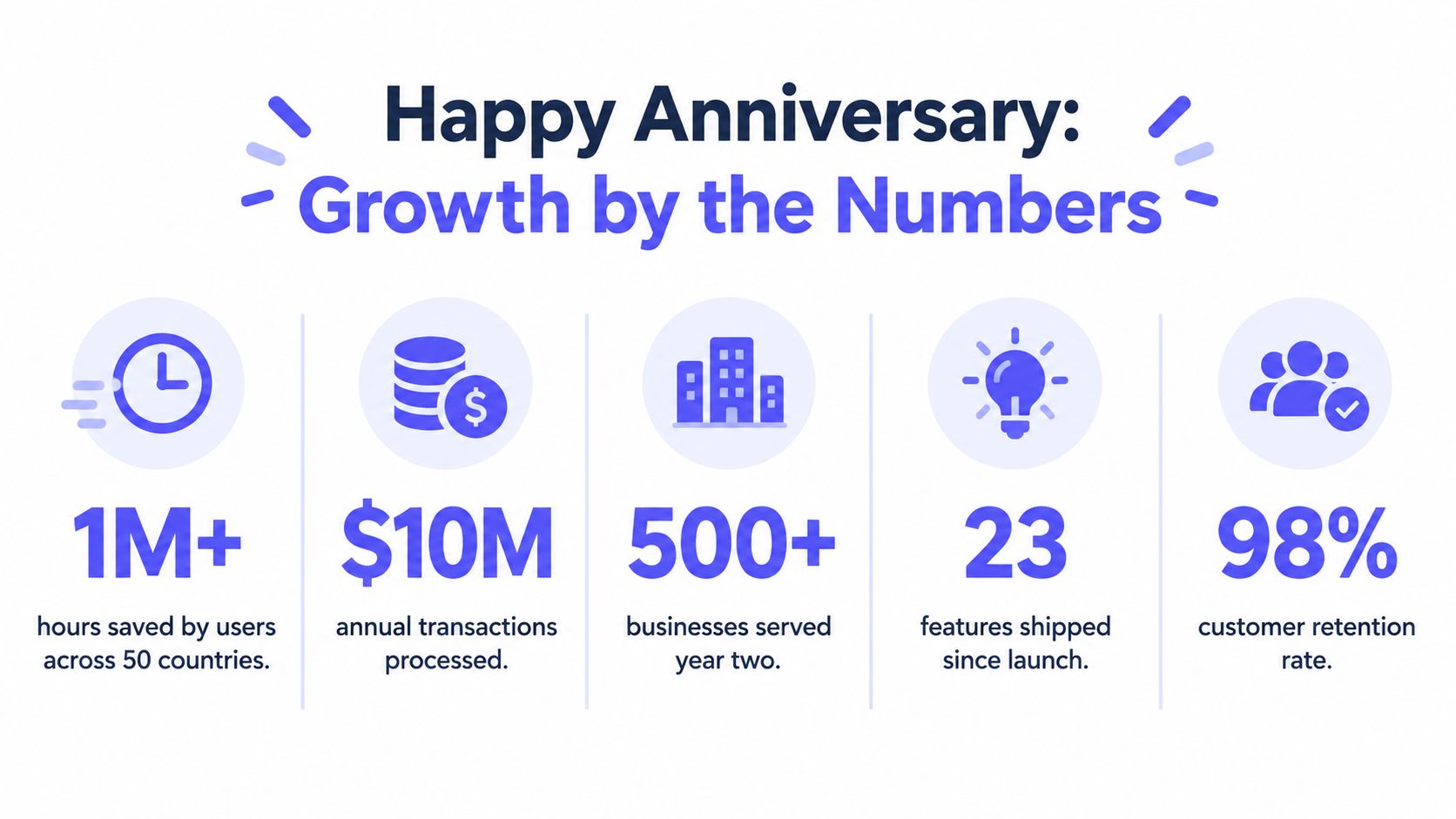
A viewer who sees five numbers in three seconds remembers none of them. Build the anniversary video around one verified result, then show how it changed a customer's work or expanded the product's use. This turns a metric into proof instead of decoration.
A payment product could reveal transactions, businesses served, and the anniversary milestone. A productivity app could show time saved, completed workflows, or how its feature set grew. Use figures from records your team can check. Keep the original precision. A rounded figure or internal estimate weakens trust.
Make the 15-second sequence easy to follow:
- Hook: “One year of building”
- Problem: “The first version solved a narrow need”
- Solution: Show the use case expanding
- Proof: Reveal one or two verified metrics
- CTA: “See what we're building next”
Match the tone to the audience. A customer-facing video should foreground time saved or completed work. An investor or partner audience may care more about transactions, retention, or businesses served. Choose the proof that answers the viewer's question, “What changed because this product exists?”
Use one supporting metric only when it clarifies the main result. If a number requires a paragraph of context, move that explanation to the landing page. The video should create interest, while the page provides the full record and definitions.
Publish the teaser with a written breakdown of what drove each growth stage. Use product launch notes, a changelog, or this product launch metrics guide as inputs for the page. When sending the video by email, use a cloud link vs file attach approach to reduce delivery friction.
Action: Select two or three verified metrics, assign each to a specific audience need, and prepare the supporting landing-page copy before placing the strongest figure in the video.
7. Roadmap Preview with Anniversary Reflection
An anniversary should recognize shipped work without pretending the future is finished. A roadmap preview gives existing users a reason to stay engaged and gives new viewers a clear reason to join now.
A design product could show collaborative editing as a completed release, then preview design suggestions as a future direction. A scheduling product could show calendar sync as the past milestone, then tease a mobile app or Slack integration. Label future work clearly. A mockup must never look like an available feature.
Use a distinct visual treatment for upcoming work. Lower opacity, a different accent color, or a clear “Coming soon” label separates shipped proof from planned work. The current product should look solid and usable. The future section should look intentional, but not promised as complete.
A concise script might read:
- Hook: “One year shipped”
- Problem: “Users needed more connected workflows”
- Solution: Show completed product improvements
- Proof: Show the current feature in use
- CTA: “Join before the next release”
Only include roadmap items your team can realistically deliver soon. A public roadmap link gives viewers a place to find details and lets your team correct expectations outside the short video. Send the video to existing users before posting publicly. They deserve the first look at the next direction.
Don't cram every planned feature into the anniversary asset. Pick one future step that follows naturally from the past year's work. That connection makes the preview credible.
Action: Choose one shipped milestone and one clearly labeled roadmap item, add both to your landing page, and link the CTA to your public roadmap or waitlist.
7-Point Comparison: Anniversary Video Concepts
| Format | Implementation Complexity 🔄 | Resource Requirements ⚡ | Expected Outcomes 📊⭐ | Ideal Use Cases 💡 | Key Advantages ⭐ |
|---|---|---|---|---|---|
| Milestone Montage with Product Evolution | 🔄 Low, automated screenshot extraction & sequencing | ⚡ Minimal, existing landing page screenshots; optional music | 📊 High credibility; ⭐ Visual proof of sustained growth | 💡 1–2 year anniversaries; early-stage SaaS; Product Hunt posts | ⭐ Shows tangible progress; fast, multi-aspect-ratio ready |
| Customer Win Highlight Reel | 🔄 Moderate, pulls quotes/logos; permission handling may be needed | ⚡ Moderate, testimonials and up-to-date logos/avatars | 📊 Strong social proof; ⭐ Builds emotional trust with prospects | 💡 B2B SaaS, customer milestone celebrations, sales enablement | ⭐ Leverages third‑party credibility; minimal new content |
| Founder Impact Statement with Before-and-After Comparison | 🔄 Low, extracts hero/mission copy and pairs with screenshots | ⚡ Minimal, concise founder copy + clear screenshots | 📊 Authentic engagement; ⭐ Clear problem→solution narrative | 💡 Solo founders, origin stories, LinkedIn/Twitter posts | ⭐ Personal, persuasive storytelling; easy to produce |
| Feature Showcase Carousel with Anniversary Highlight | 🔄 Moderate, sequences 4–6 feature screenshots rapidly | ⚡ Moderate, clean feature screenshots; brief overlays | 📊 High awareness; ⭐ Conveys product breadth quickly | 💡 Visual products (design tools, dashboards), Product Hunt | ⭐ Attention-grabbing; gives broad product overview fast |
| User-Generated Content Montage with Anniversary Callout | 🔄 High, collects, curates, and secures permissions for UGC | ⚡ High, user submissions, curation, incentives, editing | 📊 Strong community engagement; ⭐ Highly shareable authenticity | 💡 Community-driven platforms, template marketplaces, No‑code | ⭐ Drives loyalty and word‑of‑mouth; authentic representation |
| Growth Metrics Reveal with Anniversary Moment | 🔄 Moderate, extracts metrics and creates animated reveals | ⚡ Low–Moderate, requires published metrics and design emphasis | 📊 High credibility and newsworthiness; ⭐ Demonstrates traction | 💡 VC-backed startups, funding/press announcements, growth updates | ⭐ Concrete proof of product‑market fit; memorable numeric reveals |
| Roadmap Preview with Anniversary Reflection | 🔄 Moderate, blends past wins with teased future features | ⚡ Moderate, roadmap content, teaser graphics; careful wording | 📊 Builds anticipation; ⭐ Encourages pre-signups/waitlist conversions | 💡 Teams building in public, product updates, community emails | ⭐ Mixes gratitude with forward momentum; drives future interest |
Choose the Proof Your Audience Cares About
One anniversary video cannot serve every audience equally. Choose the proof that answers the question your viewer is already asking. A prospective customer wants evidence that the product works. An existing user wants recognition. A founder's audience may want the reason behind the product and the next direction.
Use founder impact for a personal anniversary. Use customer wins when gratitude is the main message. Use product evolution when credibility matters. Choose metrics when your records show meaningful progress. Use user content when community participation is the strongest proof. Choose a feature showcase when the product has broad functionality. Use a roadmap preview when forward momentum matters most.
Keep the video narrow. One milestone is easier to understand than a forced combination of every achievement. A silent format also needs readable copy, strong screenshots, and visual contrast because viewers may watch without sound. Optional music can add rhythm, but narration isn't part of the format.
A reusable planning sequence looks like this:
- Choose one audience: Founder peers, prospects, customers, or users.
- Select one proof type: Progress, outcome, community, product breadth, or future direction.
- Write the silent script: Hook, problem, solution, proof, and CTA.
- Prepare the landing page: Add the copy, screenshots, testimonials, metrics, and brand cues the video needs.
- Export by channel: Use 16:9 for widescreen placements, 1:1 for square feeds, and 9:16 for mobile-first short-form placements.
Industry guidance supports concise short-form choices. Videos under 60 seconds generate 2.5 times more engagement per impression than other content types, while videos under 30 seconds achieve the highest completion rates, according to this short-form video playbook for funded startups. A focused 15-second teaser fits that completion-oriented use case. For broader context on channel formats, Wistia confirms that 1:1, 16:9, and 9:16 are valid options across major social platforms, including Instagram, TikTok, Facebook, and LinkedIn in its aspect-ratio guide.
ShipTeaser creates a 15-second, 1080p silent motion-graphics teaser from a product URL in about 2 minutes. The five-scene structure is hook, problem, solution, proof, and CTA. ShipTeaser doesn't add voice-over or narration, and the optional music bed supports the visual sequence without changing its silent format.
The first video is free, with no credit card required. Paid plans are $99 per month for 1 video per week, $149 per month for 2 videos per week, and $199 per month for 4 videos per week. Those plans suit founders and solo builders who need a repeatable launch and anniversary content cadence without managing a timeline or manual editing workflow.
FAQ
What should a happy anniversary video include?
A happy anniversary video should include one specific milestone, visible product or people proof, readable on-screen copy, and one clear CTA. For a software product, use a screenshot, customer outcome, community example, verified metric, or shipped feature that supports the anniversary message.
How long should an anniversary video be?
A focused anniversary message often runs 20 to 60 seconds, a shareable reel can be around 45 seconds, and a personal keepsake can run 2 to 4 minutes, according to anniversary video format guidance. For an early-stage software launch or product update, a 15-second teaser is the stronger choice when the goal is quick understanding and a clear next step.
Does ShipTeaser add narration?
ShipTeaser creates silent motion-graphics teasers and doesn't add voice-over or narration. An optional music bed can support the visual sequence, but the message relies on on-screen copy, screenshots, motion, proof, and the CTA.
Which aspect ratio should I choose?
Choose 16:9 for websites, YouTube, desktop, and horizontal placements. Choose 1:1 for square in-feed social posts. Choose 9:16 for TikTok, Reels, Shorts, and Stories, where vertical smartphone viewing fills the screen as Adobe explains in its aspect-ratio guide.
ShipTeaser turns a product URL into a 15-second, 1080p silent teaser with five scenes, optional music, and exports for 16:9, 1:1, and 9:16. Prepare one anniversary milestone and the matching product proof, then visit ShipTeaser to create your first video free with no credit card.