The best product promo videos for software launches include problem-first teasers, walkthrough demos, founder stories, and vertical cutdowns that read clearly without sound. Early founders should choose a repeatable format before spending time on cinematic polish.
Your launch post is ready, but its preview shows a tiny dashboard and a headline nobody can read on a phone. Strangers have seconds to understand why your product matters before they scroll on.
Choose from eight formats: problem-first teasers, walkthrough demos, founder stories, animated explainers, testimonials, launch announcements, before-and-after comparisons, and vertical cutdowns. Match the structure to the job, then build a silent teaser that makes the product's value clear on a muted feed.
Short doesn't mean complete. A teaser should earn the next click, not explain every setting or integration. If the product depends on a complex workflow, pair the teaser with a full demonstration.
Short-form video is a strong format for return on investment, lead generation, and engagement. HubSpot's video marketing report found that 83% of surveyed video marketers used short-form video and ranked it highest for those outcomes.
Judge a promo by whether a stranger understands the product and knows what to do next, not by how many transitions you can fit into the edit.
1. Problem-First 15-Second Teaser
Start with the frustration your buyer already recognizes. Don't open with a logo animation or a claim about innovation.
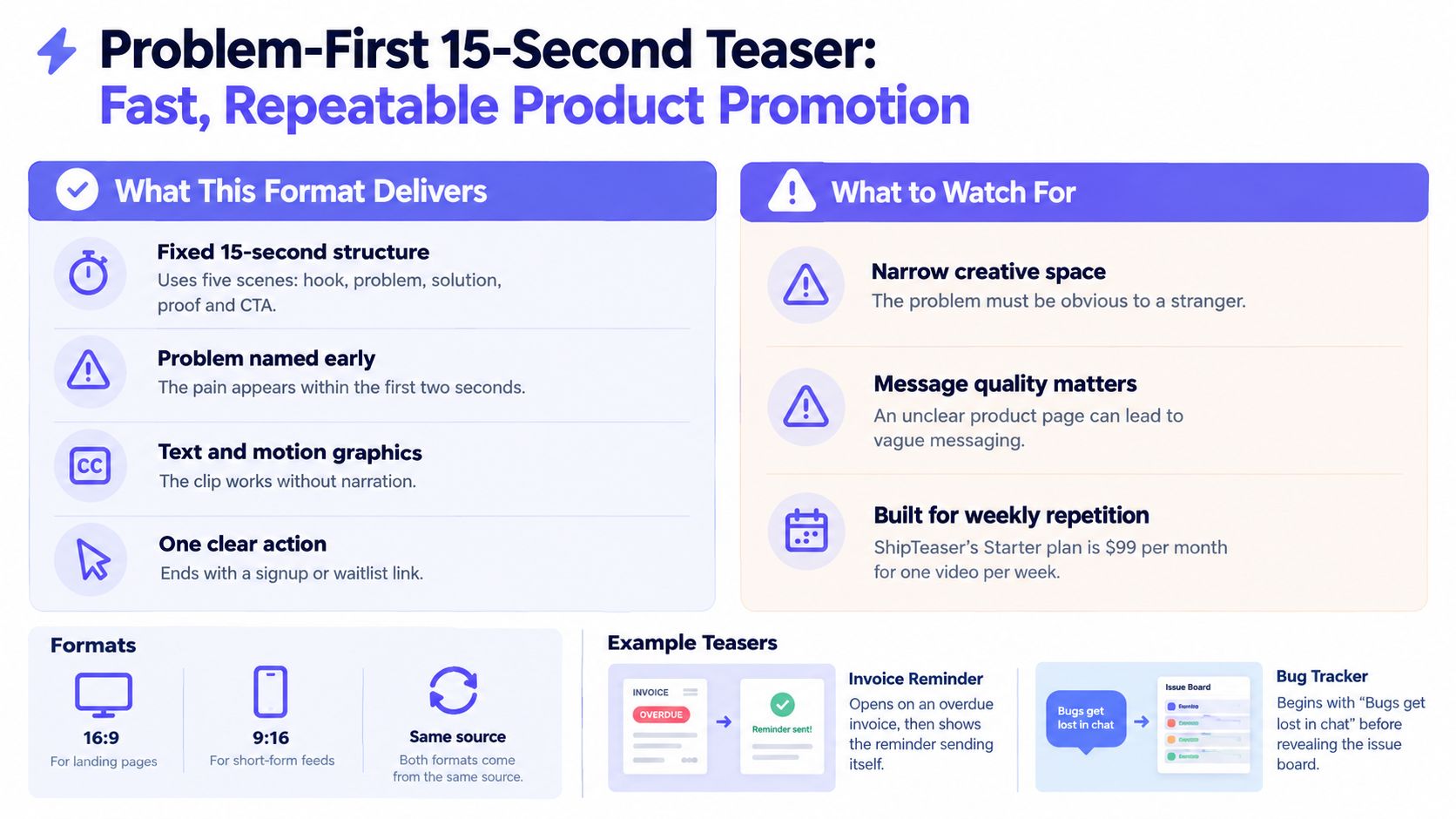
Consider a hypothetical invoice-reminder product. Show an overdue invoice, introduce automatic reminders, display the reminder status, and invite the viewer to try the workflow. For a hypothetical bug tracker, begin with the sample hook, “Bugs get lost in chat,” then show how an issue becomes a tracked task.
These are suggested creative scenarios, not customer results. The important choice is the same: show a problem that the product can visibly resolve.
Build around a fixed narrative
ShipTeaser's SaaS launch video workflow turns a product URL into a 15-second teaser using five scenes: hook, problem, solution, proof, and CTA. ShipTeaser uses the landing page's copy, screenshots, and visible brand cues rather than requiring a separate storyboard.
- Hook: Write a sentence a prospective user would say. Remove jargon and introductory language.
- Solution: Show the relevant product state, not an unreadable view of the entire application.
- Proof: Use an observable outcome or a genuine statement already supported on your page.
- Action: Ask viewers to start a trial, inspect the workflow, or visit the launch page. Pick one.
A problem-first teaser is my default recommendation for a founder's first launch asset. The structure is easy to repeat when the product gains a feature or serves a new use case.
Review the opening frame while muted. If the problem isn't obvious without narration, fix the message before adding more animation.
2. Product Walkthrough Demo
A walkthrough earns its place when a buyer needs to see a real task completed before deciding to try your software. A form-builder founder can show a form being created and published. A developer-product founder can show a successful API setup, with sensitive credentials removed.
Use the actual interface. A polished mockup cannot prove that the product works. Keep the demo focused on one task, and show the result before the steps.
A product demo video versus teaser serve different jobs: the demo explains how the product works, while a teaser gives viewers a reason to investigate. Early founders should keep the full walkthrough for buyers who need detail and make a separate, silent teaser for discovery. Don't turn a feed video into documentation.
Show a complete task
Start with the finished result, return to the starting state, then show the actions that produce it. Keep cursor movements deliberate and cut unrelated navigation.
- Choose a meaningful task: Demonstrate something a new user wants to do.
- Make the interface readable: Enlarge the relevant panel rather than showing the entire desktop.
- Support muted viewing: Add written explanations in your recording and editing workflow.
- Maintain the recording: Replace outdated footage after meaningful interface changes.
Test the length against the viewer's purpose. One published case study reported that cutting a product video from four minutes to 90 seconds raised landing-page conversion from 2.1% to 8.3% (case study summary). Treat that as a case-specific result, not proof that every video should be shorter.
Keep enough detail for buyers evaluating the workflow. For discovery in a muted feed, make a separate teaser that shows the product's payoff quickly. ShipTeaser turns a product URL into a short teaser, while the walkthrough remains focused on demonstrating the task.
3. Founder-to-Camera Story Video
A scheduling founder who missed client calls for weeks has a real reason to film a story. That reason, not the founder's face, carries the video.
Use a specific product decision as the story's center. A solo builder could show the user frustration that prompted a release. These are proposed story directions, not documented company stories. Skip the rehearsed biography. Explain what changed and why a buyer should care.

Make the story work beyond the voice
Film in a quiet place with steady light. Keep the story focused: name the frustration, show what you changed, and identify who benefits. Cut background details that do not help a buyer understand the product.
A talking head alone loses its message in a muted feed. Add accurate captions in your production workflow, show the product, and put the main idea on screen. Captions represent speech and meaningful audio, but they do not describe visual information. Text alone does not make a video fully accessible.
Practical rule: If the founder's face disappears, the viewer should still understand the product's purpose.
Pair the personal story with a visually led teaser. Give each asset one job: the founder video explains the motivation, while the teaser presents the buyer's problem and desired outcome. That separation makes the story clearer and gives a silent-feed viewer a reason to keep watching.
ShipTeaser doesn't create avatars, narration, or subtitles. Record and edit the founder story separately, then use an existing product page as the input for a ShipTeaser teaser.
4. Animated Explainer
Some products are hard to explain with a screenshot. Routing, automation, and background processing often need a visible sequence rather than a static dashboard.
An animated explainer can make that sequence concrete. For a hypothetical webhook service, show send, route, transform, deliver, with a clear object moving through the process.
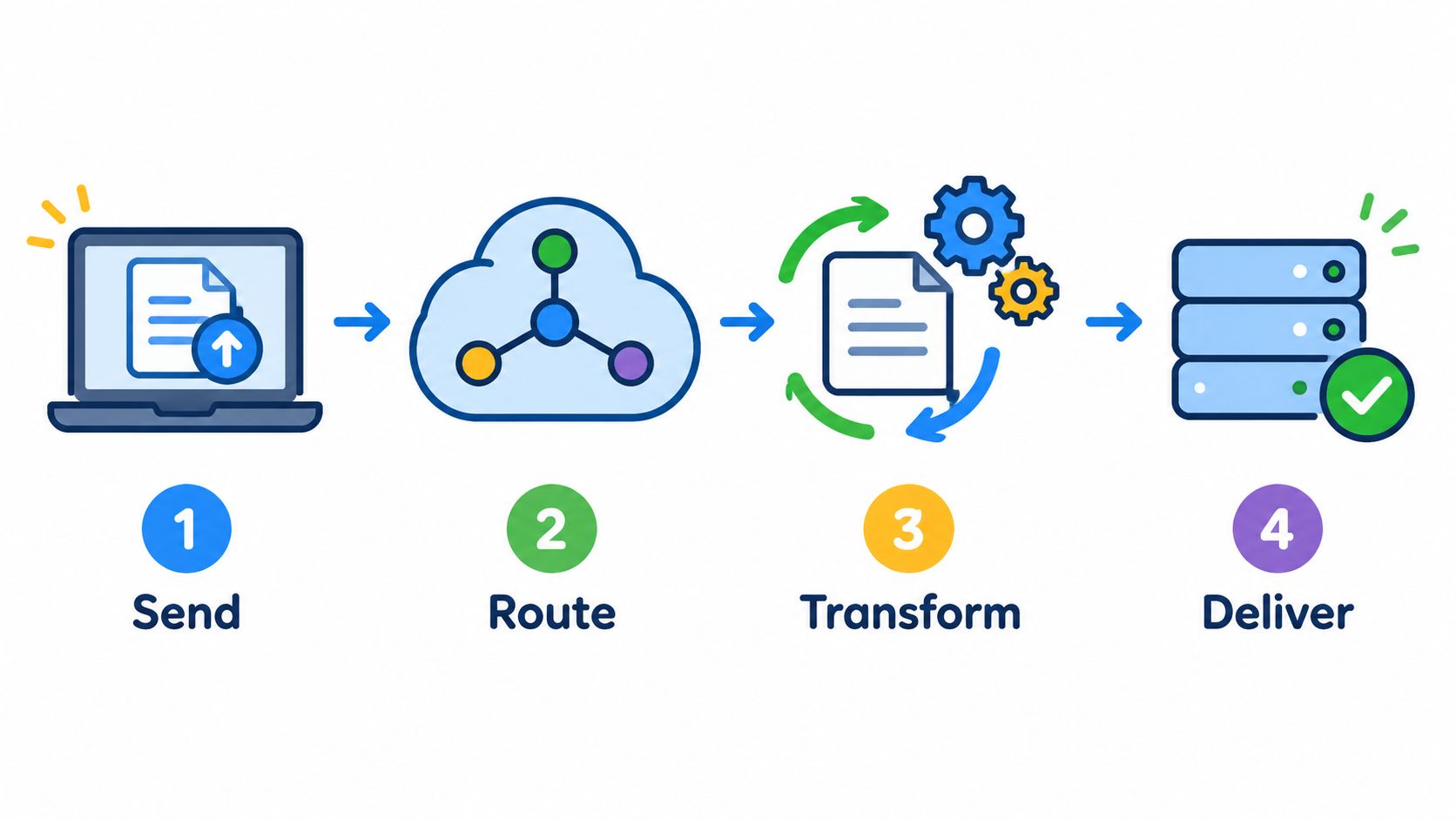
Animation should explain a relationship that would otherwise remain unclear. Floating icons and moving gradients don't count as product explanation.
Give each scene a readable job
Write the on-screen message before choosing visual effects. A viewer should understand what enters the system, what changes, and what comes out.
- Use concrete labels: Replace abstract promises with actions such as routing a request or delivering an export.
- Keep the brand recognizable: Match the landing page's colors and product imagery.
- Reduce reading pressure: Remove secondary claims instead of shrinking the type.
- Show the destination: Finish on the output users want.
For production planning beyond a generated teaser, consult media production guidance for small businesses. Keep your own production scope tied to the explanation buyers need.
ShipTeaser produces silent motion graphics with an optional music bed. Silent means no voice-over, not an absence of all audio, and essential meaning must remain visible.
For a complex product, use the teaser to introduce the outcome and link to a fuller explanation. Don't imply that a brief animated sequence proves technical capabilities that viewers haven't seen.
5. Proof-Led Testimonial Clip
A founder who asks an early user what changed after one week can get a quote more useful than any tagline. Use this format when buyers doubt the product can deliver its promised outcome. A specific result gives them something concrete to assess.
For an early product, proof can be modest. A permissioned screenshot of a successful export can show that the workflow reached its intended endpoint. A customer statement can add context, provided it reflects what the customer said.
Collect proof before designing the clip
Ask an early user what changed after using the product. Get permission to publish the response, confirm the attribution, and save the original wording. Keep the claim grounded in what the evidence shows.
- Customer evidence: Use an authentic statement with permission.
- Product evidence: Show a real completed action or output.
- Quantitative evidence: Publish a number only when your data supports that exact claim.
- Context: Explain what the evidence demonstrates without suggesting a broader result.
One consumer survey reported that 87% of consumers said a video had convinced them to make a purchase, according to research summarized in a media report. Treat that finding as context, not a forecast for your launch.
For muted feeds, put the proof on screen long enough to read, with clear attribution. A quote that flashes by too quickly cannot support the claim.
ShipTeaser's proof scene works best when the source landing page already includes a genuine result or permissioned customer statement. If you do not have a testimonial, show an observable product outcome. Keep the teaser honest, even when a customer quote would make the story more persuasive.
6. Launch-Day Announcement
Give viewers a clear reason to act on launch day. A vague promise that something exciting is coming gives them nothing to do.
For a community-driven launch on a product directory, show what is available and where viewers can inspect the product. For a public beta, state who can join and what access includes.
Prepare the creative before launch day. Test every link in the post caption and final scene on a phone, then confirm the destination page loads the same offer shown in the video.
Separate the event from the product promise
The announcement names the event. The product imagery shows why it matters.
Use a readable launch message, a concrete benefit, a supported product outcome, and a final action. Add the destination to both the post caption and final scene, so viewers have a clear next step.
- State availability accurately: Distinguish an open product from a waitlist or restricted beta.
- Match the destination: Send viewers to the relevant launch or signup page.
- Check every claim: Remove expired offers and claims the current release doesn't support.
- Retire dated assets: Stop posting launch-day urgency after the event.
ShipTeaser's product launch video maker generates a 1080p teaser in about two minutes from a product URL. It analyzes the page instead of using a text-to-video prompt.
That makes the landing page part of launch preparation. Fix its headline, screenshots, and CTA before submitting it.
Build the teaser for silent viewing. Put the event and benefit on screen, and let the actual offer create urgency. For early founders, a clear, accurate announcement beats dramatic music or vague hype.
7. Before-and-After Split Comparison
Show the old workflow beside the new one when the contrast makes your product's value clear.
For an invoice product, compare manual spreadsheet tracking with the product dashboard handling the same invoices. For a task product, show a scattered email thread beside a structured task board with the same work.
Keep the underlying task consistent. When the inputs differ, viewers can't tell whether the product improved the workflow or the comparison changed the problem.
Make the comparison fair
Choose an old method your audience uses. A contrived, frustrating process makes the product look less credible, not more capable.
Hold the new state on screen long enough to inspect. If a split screen makes both interfaces hard to read on a phone, show the before and after in sequence instead.
Compare the same job, with the same inputs, and show what changes.
For a silent teaser, label each state plainly and highlight the action that changed. Viewers should understand the comparison without narration. The narrative structure carries the comparison, and the layout itself is set in your editing tool.
Keep claims tied to what the video proves. A cleaner interface shows how work is organized, but it does not prove that the task takes less time. Make a speed claim only after measuring the same process under fair conditions.
Plan for comprehension before production. Choose readable screen states, and make sure the launch page explains the comparison in text. Keep essential meaning visible without relying on sound, so the teaser still works in a muted feed. For early software founders, a simple sequential comparison is often the stronger choice: it keeps each product state legible and makes the changed action easy to follow. Use a split screen only when both sides remain clear on a phone.
8. Vertical Social Cutdown
A dashboard shrunk into a tall frame becomes unreadable. Put the buyer's problem in large type on the opening frame, then show only the interface details that explain the solution.
Use a vertical cutdown when you have a clear message to adapt for mobile feeds. If mobile is your main launch channel, build the vertical version first. For full-screen Stories and Reels, the standard vertical format is 9:16 at 1080 by 1920 pixels, according to creative specifications for full-screen video. Recompose the message for the tall frame instead of shrinking a horizontal video into empty space.
Rebuild the frame around the benefit
Keep text clear of interface overlays and preview the cutdown in its intended placement. Show the product detail that supports the claim, even if that means showing less of the interface.
- Opening frame: Name the buyer problem in readable type.
- Middle: Show the outcome or action that addresses it.
- Closing frame: Give one clear action that matches the post.
- Loop: Make the repeated playback understandable without a spoken introduction.
For software founders, a repeatable 15-second silent teaser can follow this sequence: problem in the opening frame, one focused product action, the visible result, then a clear call to action. ShipTeaser's video format guidance describes support for 16:9, 1:1, and 9:16 outputs from a product URL. ShipTeaser generates those versions rather than trimming an uploaded master video.
Shorter does not automatically mean more viewers finish. Mobile video completion benchmarks report 68.83% for 15-second ads and 72.26% for 30-second ads. Use these figures as benchmarks, not forecasts. Judge your cutdown by device and placement, then track completed views and the action viewers take.
8 Best Product Promo Video Examples Compared
A format earns its place when it suits the buying question and the way viewers encounter it. For software founders, the useful comparison is not which video promises the biggest result. It is how much context each format needs, where it fits, and whether its core idea still reads on mute.
| Video format | Typical length | Best use case |
|---|---|---|
| Problem-First 15-Second Teaser | 15 seconds | Introduce a familiar pain and give viewers a reason to explore an unfamiliar product |
| Product Walkthrough Demo | 30–90 seconds | Show a buyer how a specific task works inside the product |
| Founder-to-Camera Story Video | 60–120 seconds | Explain the motivation behind an early-stage product |
| Animated Explainer | 30–90 seconds | Clarify an abstract process, automation, or data flow |
| Proof-Led Testimonial Clip | 15–45 seconds | Present genuine customer evidence to buyers who need proof |
| Launch-Day Announcement | 15–30 seconds | Share a launch, public beta, or waitlist opening |
| Before-and-After Split Comparison | 15–20 seconds | Show a visible change to a familiar manual workflow |
| Vertical Social Cutdown | 10–20 seconds | Adapt a message for mobile-first social feeds and stories |
Lengths are typical production targets for planning, not measured results.
Treat each length as a starting point, not a performance claim. A short teaser needs one understandable idea; a walkthrough can spend longer showing a real task. Keep the demo focused on the buyer's question rather than the entire interface.
Muted playback should shape the edit, not just the captions. Put the category, key claim, and essential context on screen. A founder story needs readable prompts or concise captions to carry its meaning without narration. Animation should label its moving parts, while testimonial clips should keep the customer's claim legible and tied to the product.
For a repeatable 15-second silent teaser, make a compact version of the format's central idea: name the buyer's problem, show the relevant product detail, state the benefit, and finish with a clear action. Use that same timing as a test across concepts, not as a reason to force every format into identical scenes. A testimonial can open with its customer evidence; an announcement can lead with what is available. Both still need to make sense without sound.
Choose based on the job the video must do. Use a longer format when buyers need context or product evidence. Use a short cut when the value is immediately visible. The comparison is a production guide, not a ranking of which format will perform best.
Pick One Format and Ship It This Week
Your first promo video should answer the question that could stop a buyer from trying your product. Pick one format, make the point clear without sound, and ship it. Early founders get more value from a focused, credible video than from producing all eight formats at once.
Match the format to what a potential buyer needs to understand. A problem-first teaser introduces an unfamiliar product through a familiar pain. A walkthrough shows a task in detail, while a founder story gives context when the reason behind the product helps buyers assess it. An animated explainer makes an invisible process visible. A proof-led clip puts genuine evidence at the center when buyers remain skeptical.
Match the format to the launch job
A launch announcement makes availability clear. A before-and-after comparison shows a workflow change, and a vertical cutdown reshapes a strong message for a vertical feed. Choose based on the job the video needs to do, not on which format looks most polished.
Technical software may need a deeper demonstration after the teaser. A focused utility can often communicate its core outcome with less context. In either case, make the silent version work: show the product or result, use concise on-screen text, and give viewers a clear next step.
- Prepare the page: Keep its headline, screenshots, evidence, and CTA consistent with the video.
- Test comprehension: Watch the actual export on a phone with sound off.
- Measure intent: Track whether interested viewers reach the intended page or begin the intended workflow.
Publishing standard: Viewers should understand the product category, benefit, evidence, and next action without sound.
Make weekly publishing sustainable
Keep a repeatable structure, then update the use case, product outcome, or evidence when the product changes. ShipTeaser lists plans at $99 per month for one video per week, $149 per month for two, and $199 per month for four, as shown on the pricing page. Choose a publishing cadence your team can support with meaningful updates and honest proof.
Judge attention separately from buying intent. Completed views show that people stayed; a visitor who understands the product and takes the intended next step shows stronger interest. When adapting distribution, use guidance to optimize short videos across platforms as a planning reference. Keep the claim and evidence consistent while adjusting the framing for each placement.
The strongest promo video for an early-stage company makes a narrow, credible promise and shows enough to earn the next step. Ship one clear version, learn from the response, and improve the next.
FAQ
What type of product promo video should a software founder make first?
Start with a problem-first teaser. Show a familiar frustration, the product outcome, and a clear next action. Use a walkthrough when buyers need to see the workflow before they can judge the product.
Can a silent product video work without subtitles?
Yes. Check silent teasers in both 16:9 and 9:16 placements, because a vertical crop can cut off a frame's message. Promotional text does not replace captions or other accessibility requirements.
Does ShipTeaser replace a screen-recorded product demo?
ShipTeaser does not replace a screen-recorded demo, so use the demo for workflow detail and the teaser for discovery.
How should founders measure a product teaser?
Track initial attention, completed views, and the intended next action separately. Compare results within the same placement and device context, and keep the destination and offer stable when testing creative changes.
ShipTeaser turns an existing product landing page into a ready-to-post motion-graphics teaser, with no voice-over and an optional music bed. Visit ShipTeaser to create your first video free, with no credit card, and test a clear problem-first message for your next software launch.