Weekly shipping is the best default for a solo builder, while bi-weekly and sprint-based rhythms suit larger or more deliberate teams. Continuous deployment should become a weekly content cadence, while quarterly, event-driven, feedback-driven, and milestone-based rhythms need supporting communication between major releases.
The popular advice says faster shipping always means better communication. It doesn't. A founder can deploy constantly and still leave users confused if every small change arrives without context. Product updates need a release rhythm and a matching content rhythm, built around team capacity, development style, and the launch goal.
These eight cadence examples cover practical choices for early-stage startup founders and solo builders. They show when to publish weekly, when to bundle work, when to wait for a milestone, and when to communicate between major releases. A repeatable process helps founders build repeatable campaigns without turning every update into a production project.
The right cadence depends on the situation. Choose weekly for frequent, small improvements from a solo builder. Choose bi-weekly or sprint-based releases when a team needs more polish. Use continuous deployment with weekly content summaries when code ships constantly. Choose quarterly or event-driven releases for major launches, then support them with previews, progress notes, and focused announcements. Choose feedback-driven or milestone-based communication when users or business events should determine the story.
ShipTeaser fits the content side of that system. Paste a product URL and get a 15-second, 1080p, silent motion-graphics teaser in about 2 minutes, ready to post. Each video follows five scenes: hook, problem, solution, proof, and CTA. ShipTeaser supports 16:9, 1:1, and 9:16 ratios, includes an optional music bed, and gives you a first video free with no credit card.
1. Weekly Product Launch Cadence
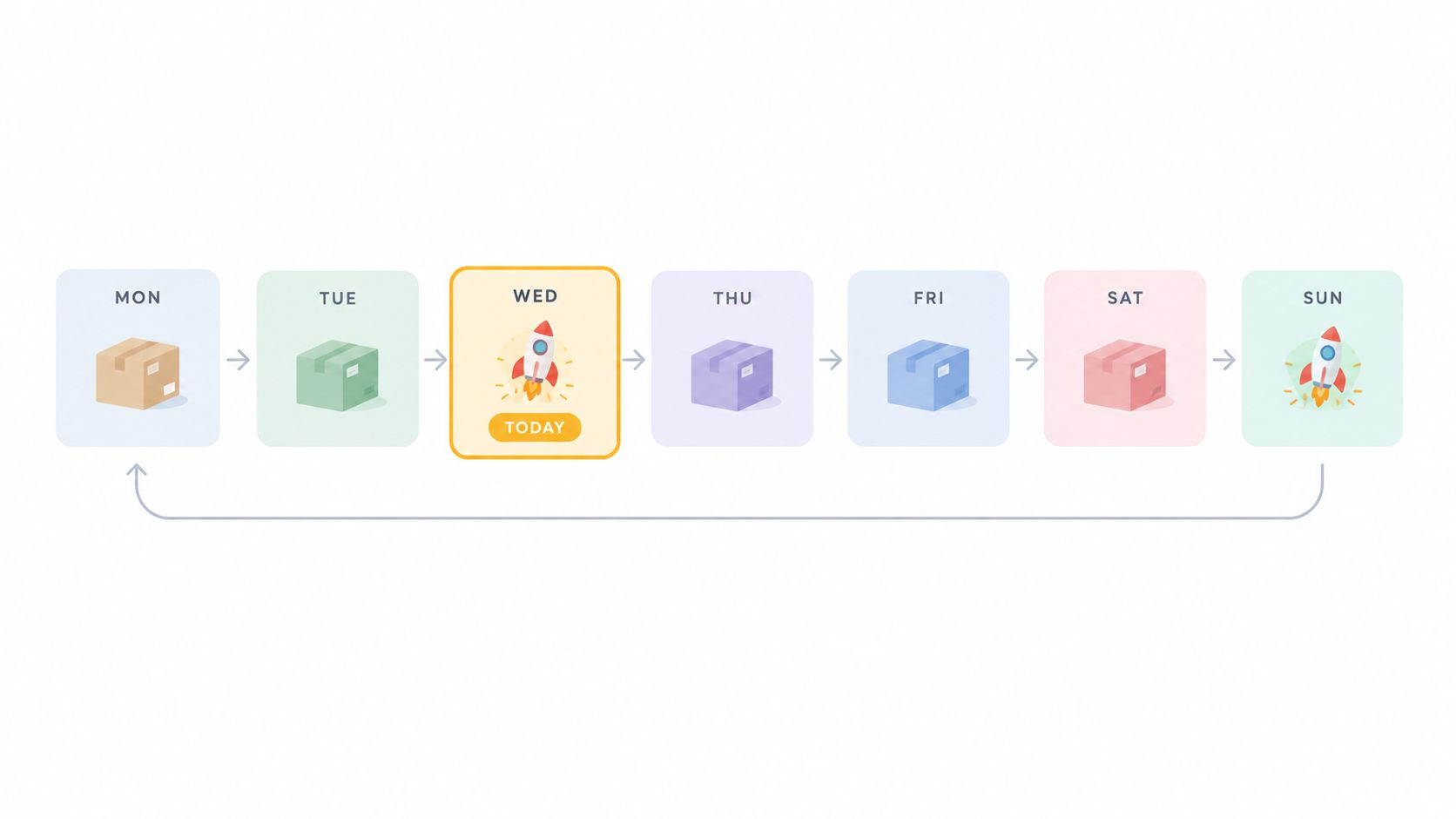
A weekly cadence works only when the release is small, clear, and repeatable. Choose it for one user-facing improvement every seven days, such as a new feature, a sharper onboarding step, a faster workflow, or a focused product refinement.
Predictability matters more than volume. Teams that publish on a fixed weekday train users to look for progress, while solo founders can combine several minor changes into one coherent update. This rhythm also creates a dependable content pipeline, so each release produces both a product improvement and a reusable launch asset.
Build one repeatable weekly loop
Set one shipping day and one publishing day. Keep them close enough for the announcement to match the current product, while preserving time to check the landing page, confirm the message, and prepare distribution copy.
Use this workflow:
- Monday planning: Select one user-facing improvement and write one sentence explaining its value.
- Midweek batching: Group smaller changes under a single theme, such as faster setup or clearer reporting.
- Ship day production: Use ShipTeaser's product launch video maker with the current product URL to create the teaser.
- Same-day distribution: Publish the video to Twitter, LinkedIn, and Product Hunt on the same weekday each week.
- Asset archiving: Save each video in a product evolution library for launch pages, investor conversations, and progress updates.
Keep the video centered on the user problem and the resulting improvement. A feature list produces a weak teaser. ShipTeaser's five-scene structure gives the update a hook, problem, solution, proof point, and CTA. A solo builder can produce that content without turning every weekly release into a separate production project.
Practical rule: If you cannot explain the update in one clear sentence, combine it with another improvement or wait.
This cadence suits solo builders and small teams with steady, manageable changes. Review actionable launch examples before planning future announcements, then adapt the workflow to your available development and content capacity.
2. Bi-Weekly Campaign Cadence
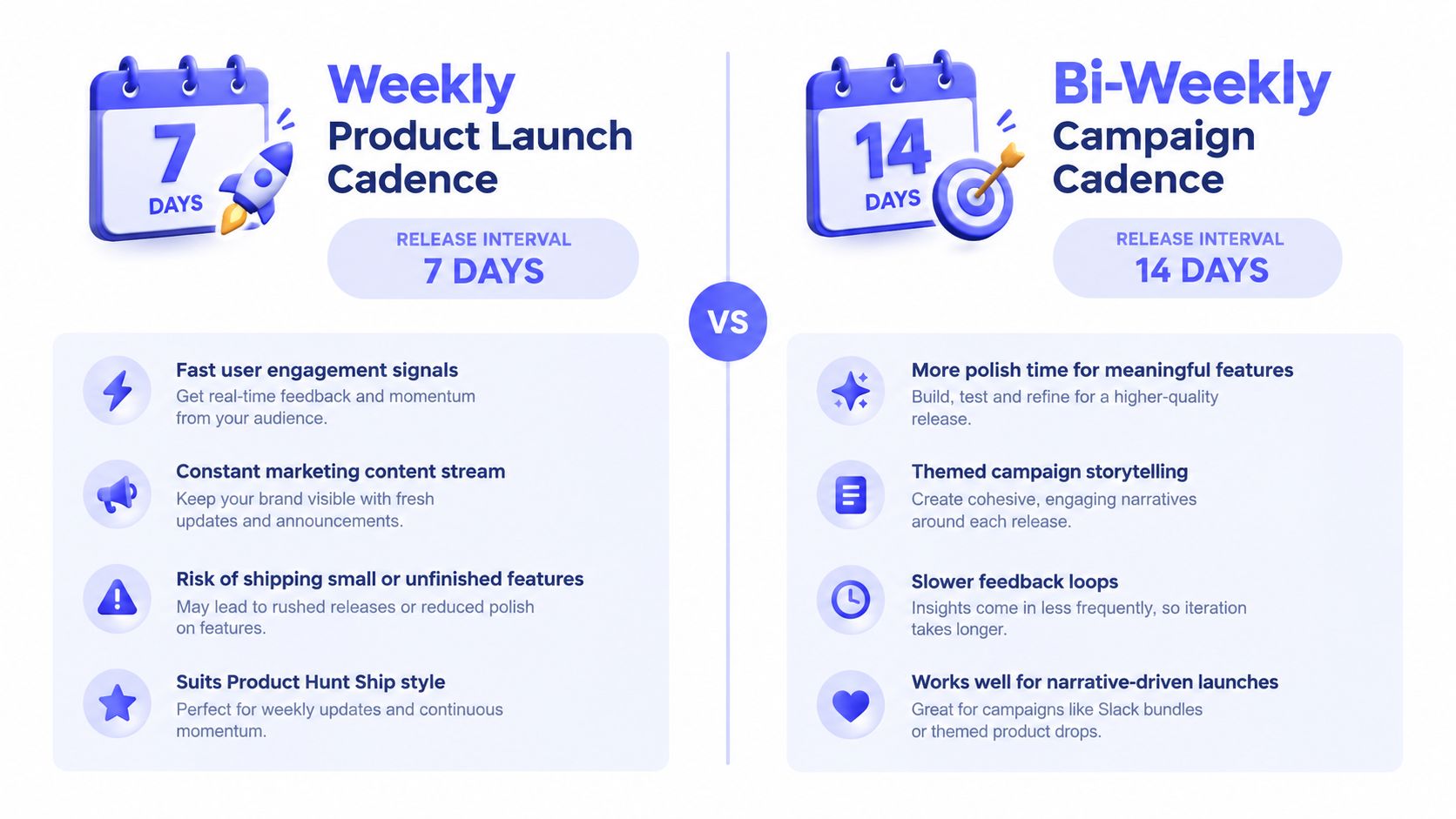
A bi-weekly cadence gives you enough time to connect related changes into one campaign. It suits a founder who wants steady momentum without producing a polished announcement every week. It also gives a small team room to coordinate product work, design, support, launch copy, and content production.
Use a clear theme instead of promoting isolated features. Feature bundles, API update campaigns, and platform improvements are easier to explain when each release addresses one user problem. The extra preparation time lets you refine the product, collect proof, and schedule the launch around the team's actual capacity.
Turn two weeks of work into one story
Start with a problem statement. For example, “New users need a faster way to connect their workspace.” Every item in the bundle should support that idea. Remove unrelated changes from the campaign.
Use the first week for product work and evidence gathering. Collect screenshots, confirm the improved flow, and identify one concrete outcome that users can recognize. Use the second week for final testing, launch writing, outreach, and video production.
ShipTeaser fits this rhythm because its product launch video maker can present the problem-solution arc instead of repeating a feature list. Paste the updated product URL, verify that the landing page matches the campaign, and create a silent motion-graphics video with the optional music bed. For an early-stage founder or solo builder, this keeps video production inside the campaign workflow rather than creating a separate project.
Set the next campaign date when the current update ships. That gives users a clear expectation and gives the team a fixed planning point without promising unfinished work.
- For product messaging: Name the user problem before naming the feature.
- For production: Use the extra time to prepare launch posts, demos, and outreach.
- For distribution: Publish the teaser with the campaign announcement, then direct traffic to the landing page.
- For planning: Maintain a visible list of candidate improvements for the next cycle.
Choose bi-weekly when weekly announcements feel rushed or repetitive. Do not use the longer cycle to hide progress. Share meaningful development notes between campaigns when users need reassurance that work continues. Review actionable launch examples before planning future announcements, then set the rhythm according to your development and content capacity.
3. Sprint-Based Release Cadence
Sprint-based releases connect public communication to the team's internal development rhythm. If a product team works in fixed sprints, publish at the end of each cycle instead of creating a separate marketing calendar.
This cadence suits teams that need engineering, product, and marketing to finish together. Feature rollouts, release cycles, and coordinated shipping weeks all show the value of a shared completion point. The release date becomes a repeatable team ritual rather than a last-minute request.
Turn the sprint review into launch material
Start demo preparation two or three days before the sprint ends. Decide which completed work deserves public attention, which change belongs in release notes, and which improvement should remain internal.
Use the sprint review to capture a focused product demonstration. Gather the current landing page, confirm the message, and create a ShipTeaser video during the retrospective while the feature is still fresh. For an early-stage founder or solo builder, this workflow keeps video production tied to the release decision instead of creating another project.
Match the announcement to the sprint's actual output. A narrow improvement needs a narrow promise. Precise messaging builds more trust than claiming a broad transformation.
A sprint ending should produce three aligned assets: release notes, a launch post, and a short video.
Link the sprint video to the relevant release notes. Users can move from a quick visual explanation to the details they need before trying the product.
Assign clear ownership before the cycle begins:
- Story selection: Choose the single user-facing improvement worth announcing.
- Product check: Verify that the live product, landing page, and video show the same state.
- Publishing: Schedule the announcement and confirm that the release notes are available.
One founder may handle all three roles, but the responsibilities still need to be explicit. This cadence works best when the team already completes work through a disciplined sprint process. It will not repair unclear scope or unfinished handoffs.
4. Daily or Continuous Deployment Cadence
Daily deployment does not require daily promotion. Code may reach production several times per day, while users need a clear explanation of meaningful progress. Announcing every small change creates feed noise, weakens the product story, and takes founder time away from building.
High-velocity engineering teams with advanced deployment infrastructure represent a development rhythm, not a content rhythm. Group related changes into a useful release story, then give major features their own launch.
Batch code changes into visible progress
Skip a ShipTeaser video for every deployment. Collect improvements into a weekly highlight video, and reserve standalone videos for features that deserve individual attention. The compilation shows momentum without sending users a stream of disconnected updates.
ShipTeaser's $149 plan supports 2 videos per week, while the $199 plan supports 4 videos per week. Use either plan for a planned summary cadence, not automatic coverage of every code change. Early-stage founders and solo builders should choose the volume their product can support with clear stories and reliable review time.
A repeatable continuous-deployment workflow looks like this:
- Deploy continuously: Let engineering ship through its normal quality gates.
- Collect highlights: Record changes that affect the user experience, launch timing, or customer questions.
- Choose one weekly theme: Group updates around speed, setup, collaboration, or another specific benefit.
- Create the teaser: Use the current product URL and the five-scene sequence.
- Reserve major launches: Give significant features their own announcement, video, and call to action.
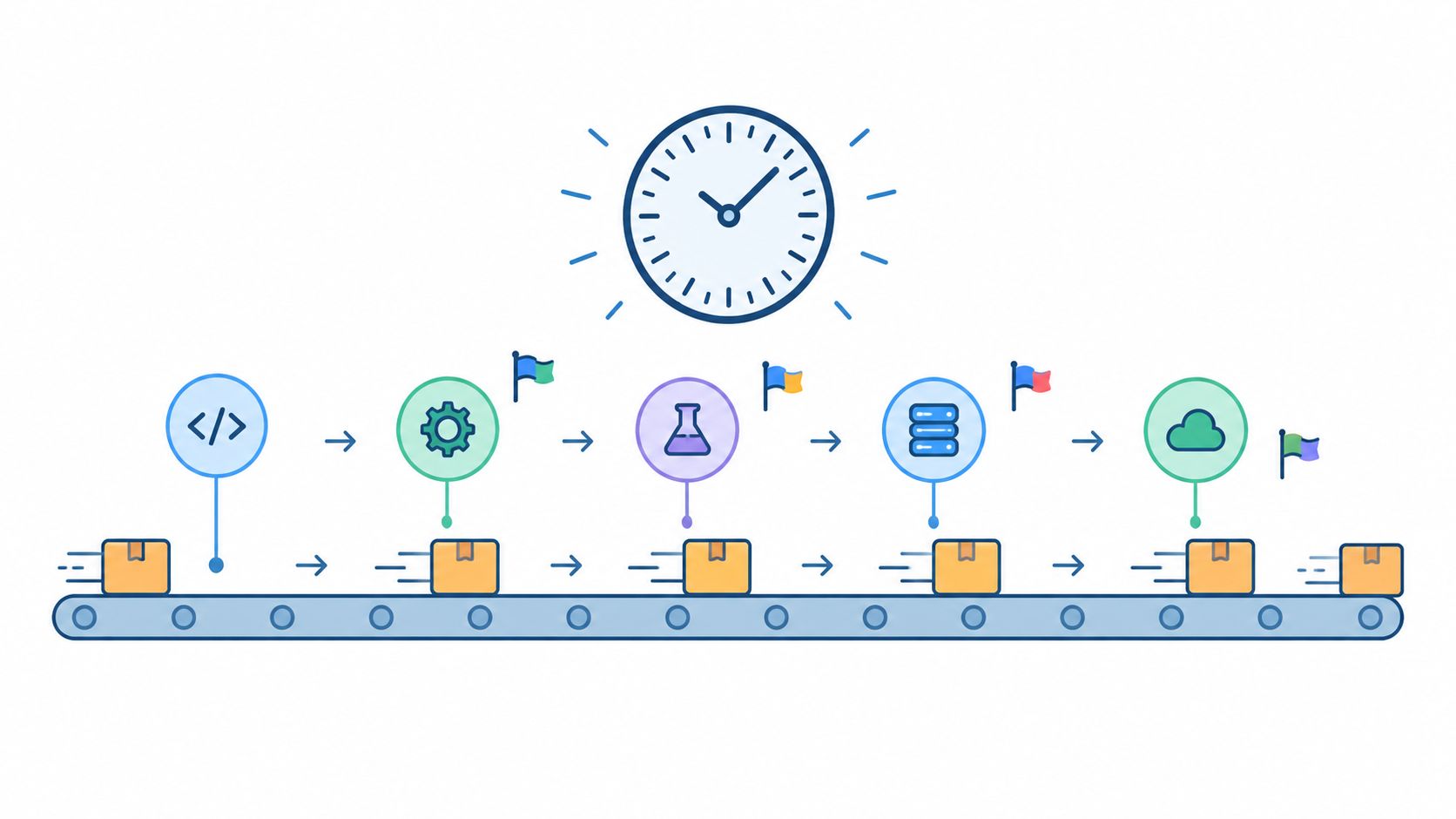
This cadence suits teams that deploy frequently and need marketing to keep pace without slowing engineering. For a solo builder, it separates internal shipping speed from external communication. Ship when the product is ready, then publish when users have a story they can understand. Use weekly ShipTeaser highlights for steady awareness, and save launch-focused videos for changes that alter the product's value.
5. Quarterly Feature Release Cadence
Quarterly cadence fits substantial features, limited support capacity, and teams that must align around one product story. Use it when the release needs coordinated product work, content production, and launch timing. A large feature can justify sustained attention, while routine fixes cannot.
Quarterly feature planning, major update rhythms, and platform expansion cycles show the structure clearly. The team sets a release window, then builds the product narrative before launch instead of rushing to explain it on release day.
Build the launch story before the feature is finished
A quarter-long cycle should produce a sequence of useful messages, not one announcement. The $199 per month ShipTeaser plan for 4 videos per week can support previews, progress stories, and launch content when the team has enough material to publish regularly. Solo builders should use a smaller, deliberate volume if four videos would reduce product work or review quality.
Set the narrative 4 to 6 weeks before launch. Introduce the user problem and the intended improvement. At 2 weeks before launch, show the product direction and clarify who benefits. At launch, demonstrate the finished workflow and send viewers to one clear destination. The product launch video guidance helps keep each video focused.
Assign every video a job:
- Problem framing: Explain the pain the feature will address.
- Progress update: Show credible preparation without presenting unfinished capability as complete.
- Product preview: Demonstrate the direction shortly before release.
- Launch video: Present the finished feature and a direct CTA.
- Post-launch explanation: Answer common questions and show practical workflows.
Coordinate the release with PR outreach, webinars, or community activity only when those channels have a clear role. Point each asset to a waitlist, product page, event registration, or release note. A teaser without a next step wastes attention.
Choose quarterly cadence for a feature large enough to sustain a story across planning, production, launch, and follow-up. Keep ordinary improvements visible through release notes or shorter updates, so users see steady product activity between major releases.
6. Event-Driven Release Cadence
Event-driven releases follow an external moment rather than a fixed interval. The trigger could be a community launch opening, a developer conference, a seasonal opportunity, or another occasion when your audience is already paying attention.
Use this cadence when the event gives the release a clear reason to exist. A software update tied to a developer conference can address concerns raised by that audience. A feature connected to a seasonal buying period can join an existing conversation, provided the product offers a specific benefit.
Build the launch around the deadline
Work backward from the event. Confirm the public date, the audience's likely concern, the product change that addresses it, and the page that should receive traffic. Set an internal completion date ahead of the event. That buffer gives the team time to test the product, revise the message, and finish the video without rushing.
For an early-stage founder or solo builder, match the production plan to available capacity. Use one focused ShipTeaser video when the event is close, or prepare a short sequence if the story needs more context. Publish when the announcement or launch page is ready. Mention the event only when it helps viewers understand why the release matters. A conference-focused video can direct viewers to a talk or demo. A seasonal video can send traffic to a focused feature page.
Create the event landing page before recording. Keep its promise aligned with the video's five scenes: establish the problem, show the solution, provide product proof, and finish with one clear CTA. The feature announcement video guide can help structure the message.
Use this workflow:
- Choose the event: Select a moment that matches the audience and product.
- Set the angle: State why the release belongs in that conversation.
- Prepare the destination: Complete the landing page before video production.
- Schedule distribution: Coordinate publication with the talk, announcement, or event calendar.
- Freeze scope: Stop adding work when the deadline approaches.
Event-driven cadence rewards preparation and clear positioning. It also exposes late product decisions quickly. If the event changes, keep the product story useful on its own instead of forcing a connection that no longer fits.
7. User Feedback-Driven Cadence
A feedback-driven cadence lets users shape release priority and timing. Support requests, community discussions, product comments, and direct mentions reveal where people experience friction. The founder still decides what fits product capacity, but user language often supplies the clearest communication angle.
This rhythm suits early-stage products where founders speak with users directly. Listen in the channels users already use, then turn repeated problems into focused product work and content. A solo builder can wait for a meaningful cluster of requests, while a small team can review feedback on a fixed schedule and reserve ShipTeaser production for changes that deserve a public response.
Start with the request, not the feature name. Tag feedback by problem, such as “need a faster way to invite teammates,” because that wording creates a stronger launch story than “team invites feature.” Track repetition, user impact, and the effort required to address each problem.
Record one focused ShipTeaser video when the improvement ships. Show the requested workflow before and after the change, thank the community without overstating its role, and paste the updated product URL so the teaser matches the current page copy and visible brand cues. Add a user quote or testimonial only with permission and accurate wording.
Publish in the channel where the request began. That placement makes the response visible to the people who shaped the work and invites useful follow-up about remaining issues or the next improvement. If feedback comes from several channels, choose the one with the clearest context instead of scattering a small team across every audience.
Use this operating loop:
- Listen: Collect repeated requests from direct and public channels.
- Decide: Choose the problem that matches user value and available capacity.
- Ship: Deliver the improvement and verify the resulting user flow.
- Close the loop: Share the video and connect the result to the original feedback.
For early users, follow this beta launch announcement framework to set expectations clearly. State who the improvement serves, what changed, and what feedback you still need. A narrow fix should stay narrow in the announcement, not be presented as a universal solution.
8. Milestone-Based Cadence
Milestone-based cadence ties a release to a product or business moment that deserves a larger story. Useful triggers include reaching a user-growth goal, announcing funding, recording a profitable month, or launching a major integration. The milestone supplies context. The product improvement gives the audience a reason to care.
Feature announcements around funding milestones, platform communication after a funding round, and growth-linked feature rollouts show how product communication can support a broader company story. Use this cadence when the release needs attention from users, partners, or investors. Do not force routine maintenance into a milestone narrative.
Build a timeline, not a single announcement
Plan 3 to 4 major features around milestones you can reasonably anticipate, such as funding, user growth, partnerships, or integrations. Define the product story before the milestone arrives. Write down the user problem, target audience, proof to capture, and content needed for launch. Plan your releases around milestones and explore the development roadmap for sequencing inspiration.
A solo founder should choose a smaller production plan. Create one focused ShipTeaser video that connects the milestone to a visible product change. A team with more capacity can produce separate cuts for the user problem, the new workflow, and the company's broader direction. Keep product facts, screenshots, and calls to action consistent across each version.
Show the old friction first, then demonstrate how the milestone feature changes the workflow. Record the video while the product state is stable, verify every claim, and archive the final asset with the release date and product context. That library supports future founder updates, investor conversations, and partnership discussions without recreating the story from memory.
Editorial choice: Treat the milestone as context, not proof. The product still has to demonstrate the value.
Use this cadence for major stories, not routine fixes. Between milestones, publish lightweight progress notes, user responses, or release summaries. That steady content keeps the audience informed while preserving milestone announcements for moments with real product significance.
8-Point Cadence Comparison
| Cadence (interval) | 🔄 Complexity & resources | ⚡ Speed & feedback | 📊 Expected outcomes / ⭐ | Ideal use cases | 💡 Key advantage / tip |
|---|---|---|---|---|---|
| Weekly Product Launch Cadence (7 days) | Moderate–high: steady dev velocity + regular marketing support | High: frequent user signals and quick iterations | Consistent engagement, visible momentum, ⭐⭐⭐ | Small teams seeking constant presence / Product Hunt-style updates | Batch small fixes for perceived value; consistent cross-channel posting; use $99/week teaser |
| Bi-Weekly Campaign Cadence (14 days) | Moderate: extra polish time, stronger marketing prep | Medium: slower feedback than weekly but more polish | Thematic, more substantial releases, ⭐⭐⭐⭐ | Narrative-driven launches, feature bundles (Slack-style) | Frame bundles around user problems; prep demos and outreach |
| Sprint-Based Release Cadence (14–21 days) | Moderate: aligns with engineering sprints and metrics | Medium: predictable demo-based feedback at sprint end | Predictable coordination; good demo content, ⭐⭐⭐⭐ | Teams using Scrum/Kanban wanting marketing-product sync | Prepare demo assets 2–3 days before sprint end; use sprint reviews for footage |
| Daily / Continuous Deployment (multiple/day) | High: advanced CI/CD, feature flags, monitoring required | Very high: immediate user feedback and rapid experiments | Fast iteration and reduced large-release risk, ⭐⭐⭐ | Mature ops teams (Netflix/GitHub scale) doing rapid experiments | Summarize deploys into highlight videos; use $149–$199 plans for weekly recaps |
| Quarterly Feature Release (90 days) | Moderate (low cadence) but high planning and resource bursts | Low: long feedback loops, big-impact releases | Newsworthy launches, perceived major progress, ⭐⭐⭐⭐ | Companies needing PR-style announcements and deep work | Tease features 4–6 weeks prior; coordinate PR, webinars, use sustained video plan |
| Event-Driven Release (opportunistic) | Variable: must be ready to accelerate work for events | Variable: timed to external attention peaks | High PR potential when well-timed, ⭐⭐⭐⭐ | Launches tied to conferences, seasonal moments, industry events | Plan calendar 3–4 months ahead; use rapid ShipTeaser assets for event windows |
| User Feedback-Driven (demand-driven) | Variable: requires strong monitoring and triage processes | Variable: reactive to user signals, quick for high-demand fixes | Strong user loyalty and product-market fit, ⭐⭐⭐⭐ | Community-led products, support-driven prioritization (Zapier, Discord) | Monitor channels closely; thank community in messaging and include user quotes |
| Milestone-Based Release (milestone-driven) | Moderate: aligns releases to business milestones and storytelling | Variable: tied to hitting targets, not time | High-impact narrative & investor-friendly announcements, ⭐⭐⭐⭐ | Releases around funding, user growth, profitability milestones | Plan features that map to milestones; craft before/after narratives and archive videos |
Choose the Rhythm You Can Sustain
The best cadence is the one your team can repeat without lowering product quality or making every announcement feel forced. A solo builder with frequent small improvements should choose weekly shipping and weekly content. A team that needs more polish should choose bi-weekly or sprint-based releases. A product with continuous deployment should summarize changes weekly instead of announcing every deploy.
Quarterly releases make sense for substantial features and coordinated platform work. Event-driven releases fit launches tied to conferences, industry moments, or seasonal opportunities. Feedback-driven releases work when user requests should shape priorities. Milestone-based releases fit major product or business narratives, but they still need supporting communication between the headline moments.
Use this checklist before choosing a rhythm:
- Team capacity: Decide how much time you can spend on product work, launch writing, video production, and distribution.
- Feedback speed: Choose a feedback-driven rhythm when users give frequent, specific requests you can act on.
- Feature size: Ship small improvements weekly, and bundle larger changes into bi-weekly, sprint-based, or quarterly releases.
- Launch goal: Use event-driven or milestone-based communication when timing matters more than a fixed publishing interval.
- Video volume: Match the number of ShipTeaser videos to meaningful stories, not raw deployment volume.
- Audience attention: Keep each announcement focused on one problem, one solution, and one next step.
ShipTeaser offers three paid production plans for repeatable video output. The $99 per month plan provides 1 video per week, the $149 plan provides 2 videos per week, and the $199 plan provides 4 videos per week. Select the plan that matches your chosen content cadence, not the speed of your engineering pipeline.
FAQ
What is the best default cadence for a solo builder?
Weekly shipping is the best default cadence for a solo builder who can deliver frequent, understandable improvements. Publish one focused update each week, bundle minor changes when necessary, and keep the same distribution day so users know when to expect progress.
How often should a team create content for continuous deployment?
A team using continuous deployment should create weekly content summaries rather than videos for every deployment. Group related improvements into one highlight story, then create standalone videos only for major features that deserve separate attention.
Which ShipTeaser plan fits a regular launch cadence?
The $99 per month ShipTeaser plan fits one weekly video, the $149 plan fits two weekly videos, and the $199 plan fits four weekly videos. Choose according to the number of meaningful product stories you can publish, not the number of code changes your team deploys.
How can a quarterly or milestone-based cadence maintain momentum?
A quarterly or milestone-based cadence should use previews, progress updates, user feedback, and supporting launch content between major releases. A consistent stream of smaller communication keeps users informed while the team prepares the next substantial product story.
Pick one cadence today and assign its next release date. Paste your current product URL into ShipTeaser, create the teaser that matches the update, and publish it where your early users already pay attention. Review the rhythm after a complete cycle, then keep it, tighten it, or move to a cadence your team can sustain.
ShipTeaser turns a product URL into a 15-second, 1080p, silent motion-graphics teaser in about 2 minutes, with 16:9, 1:1, and 9:16 exports. Start with the first free video, no credit card, and use the result to build a product update cadence you can repeat.