Most founders follow the wrong advice about launch video. They open a full editor, record every screen, collect assets, learn a timeline, and spend days polishing a video that will play without sound in a feed. That approach makes sense for a detailed tutorial. It's wasteful for a launch teaser.
Short-form video now leads social content performance. In 2026, marketers cited it as the most effective social media format, with about 2.5 times more engagement than long-form video, while 73% of consumers prefer short-form video when researching products. Kapwing's 2026 video statistics roundup supports a simple conclusion: founders need a fast, clear, feed-ready asset before they need a full production studio.
The best product video maker for an early-stage software launch is ShipTeaser when the job is a repeatable teaser from an existing landing page. Paste a product URL and get a 15-second, 1080p, silent motion-graphics video in about 2 minutes, with a hook, problem, solution, proof, and CTA. Manual editors remain useful for long tutorials and highly customized demos, but they're the wrong default for a founder who needs launch content this week.
Why Polished Demos Fail in Feeds
Most launch checklists tell founders to record every screen, add narration, build transitions, write captions, and complete several editing rounds before publishing. That process suits a tutorial. It is the wrong first decision for a launch teaser, where the asset must ship quickly and work in a feed that may never play its audio.
The first frame carries the opening argument. Viewers decide whether to continue before they understand the product, and many placements begin with sound turned off. A launch video therefore needs to show the product, its audience, and the outcome visually, without relying on narration or patient attention.
The format matters more than production complexity
Production effort does not rescue a vague opening. A polished recording can lose attention if the first scene hides the problem or makes the product difficult to identify. A short motion-graphics teaser can perform better when it presents a sharp problem, a recognizable product, and one direct next step.
Short-form video has become a default format for product discovery. The 2026 short-form video research supports treating short video as a primary launch asset rather than a trimmed-down version of a full demo. The point is practical: founders should create for feed behavior first, then produce a longer explanation if the product requires one.
Founder rule: Make the shortest video that explains why someone should stop scrolling and visit the product page.
Choose the production approach according to the job:
| Launch need | Best production approach | Why |
|---|---|---|
| Social launch teaser | Automated 15-second motion graphics | Fast, concise, and designed for muted feeds |
| Product Hunt announcement | Automated teaser plus a strong landing page | Adds a visual asset without delaying release |
| Weekly founder update | Repeatable URL-based generation | Keeps publishing consistent as the product changes |
| Detailed technical walkthrough | Manual recording and editing | Allows precise explanation of complex workflows |
| Customer onboarding video | Longer instructional production | Gives users enough time to follow each action |
For a SaaS launch, ShipTeaser's SaaS launch video workflow fits the first three jobs. It turns an existing landing page into a short promotional asset, so the founder can publish without building a production process from scratch.
The mistake is not using a manual editor. The mistake is using one before deciding whether the audience needs a teaser or a tutorial. Start with the distribution channel, the viewer's limited attention, and the single action you want after the video. Then use the method that matches that job.
Manual Editors Versus Automated Teaser Generators
Founders generally choose between two production paths. The first is a timeline-based workflow, where someone records the product, gathers brand assets, cuts footage, adds text, adjusts timing, and exports several versions. The second starts with a product URL and produces a finished teaser from the page's copy, visuals, and brand cues.
Manual editing offers control, but control creates decisions. You need to choose which screen to record, how long each scene should remain visible, where the CTA belongs, whether the interface is readable on a phone, and how to adapt the composition for different ratios. Those decisions are valuable for a detailed demo. They're overhead for a launch asset that needs to ship quickly.
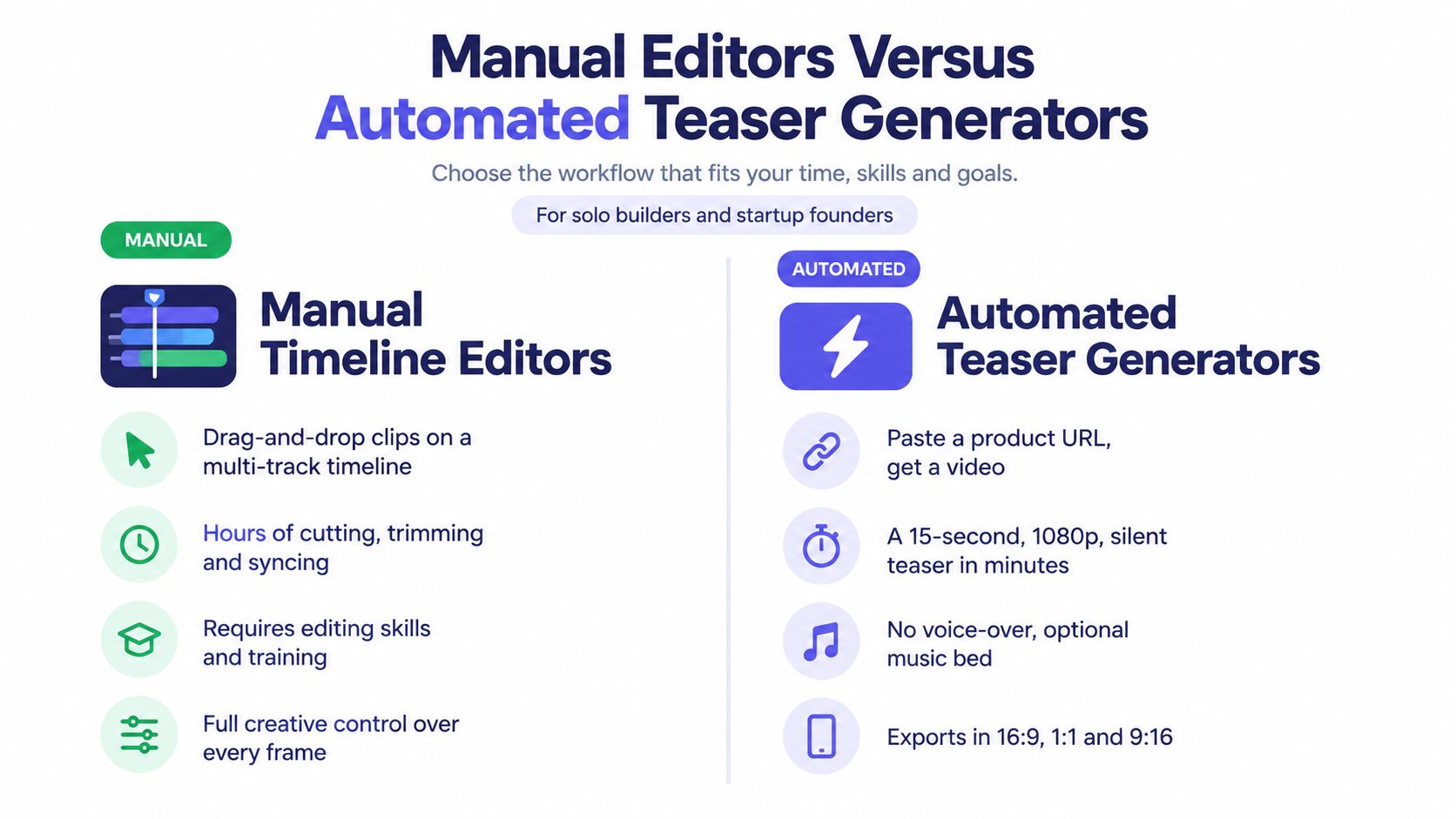
Choose based on the job, not the feature list
Manual editors suit founders who need to explain a complex workflow with real clicks and precise narration. They also suit teams that already have a person responsible for video production. They don't suit a solo builder who has a launch page, a deadline, and no desire to become a part-time editor.
Automated teaser generators suit a different workflow:
- Input: A public product or landing page URL.
- Source material: Page copy, screenshots, visible brand cues, and product positioning.
- Output: A finished promotional video with a fixed, predictable structure.
- Review: Check the claims, screenshots, readability, and CTA before publishing.
- Reuse: Publish the appropriate ratio across launch and social channels.
ShipTeaser creates a 15-second, 1080p, silent teaser with an optional music bed. It doesn't provide a timeline, screen recording, stock footage, avatars, narration, dubbing, subtitles, translation, or clip trimming. That limitation is part of the positioning. The workflow is for founders who want a concise launch asset, not editors who need to control every frame.
A broader overview of AI editing tools for marketing teams can help teams understand where automation fits into a larger content operation. For a solo builder, however, the decision is simpler. If the product page already explains the offer, use that page as the source and avoid rebuilding the same story manually.
A 2026 industry summary reports that 91% of businesses use video as a marketing tool, while videos under one minute average a 52% engagement rate. The short-form video data points toward concise assets, but the strategic lesson matters more than the number. Businesses don't need video merely to claim they publish video. They need a production method that lets them create the right asset without turning every launch into a video project.
How URL-to-Video Automation Works
A launch teaser starts with the landing page, not an editing timeline. If the page states a clear promise, shows the product, includes recognizable screenshots, and ends with a direct CTA, it already contains the raw material for a short, silent video. Improve the page first. Then use it to produce an automated video from any URL.
ShipTeaser turns that page into a short motion-graphics sequence. You submit the public URL, the system reads the page, identifies useful copy and visual cues, and assembles the scenes. Your responsibility is to make the source page communicate the product before generation starts.
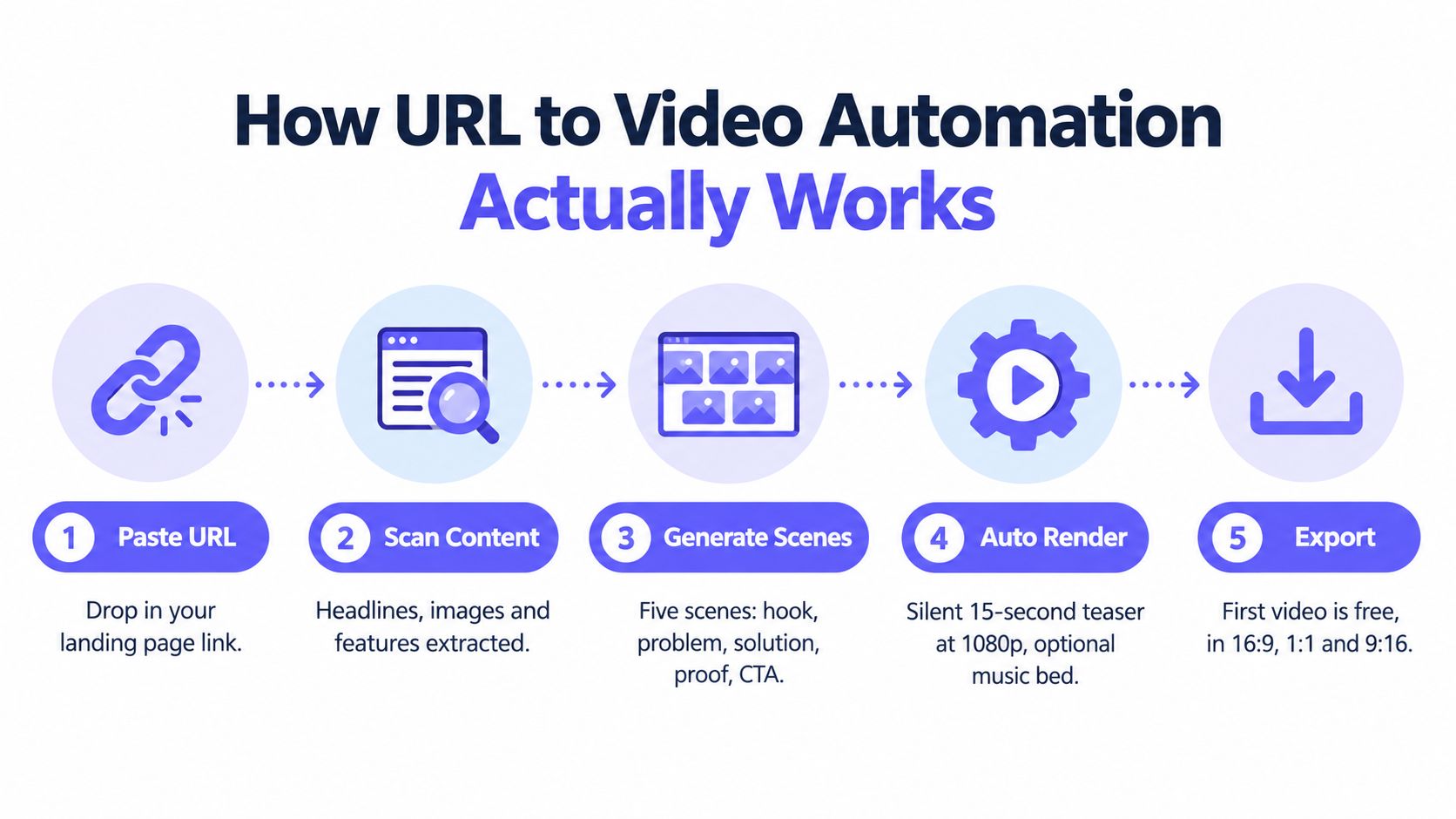
The five-step workflow
- Paste the product URL. Submit the public landing page for the current launch offer. Use a focused launch page instead of a vague homepage when one is available.
- Supply the source material. The workflow draws from visible copy, screenshots, images, and brand cues. A weak page gives the generator a weak starting point.
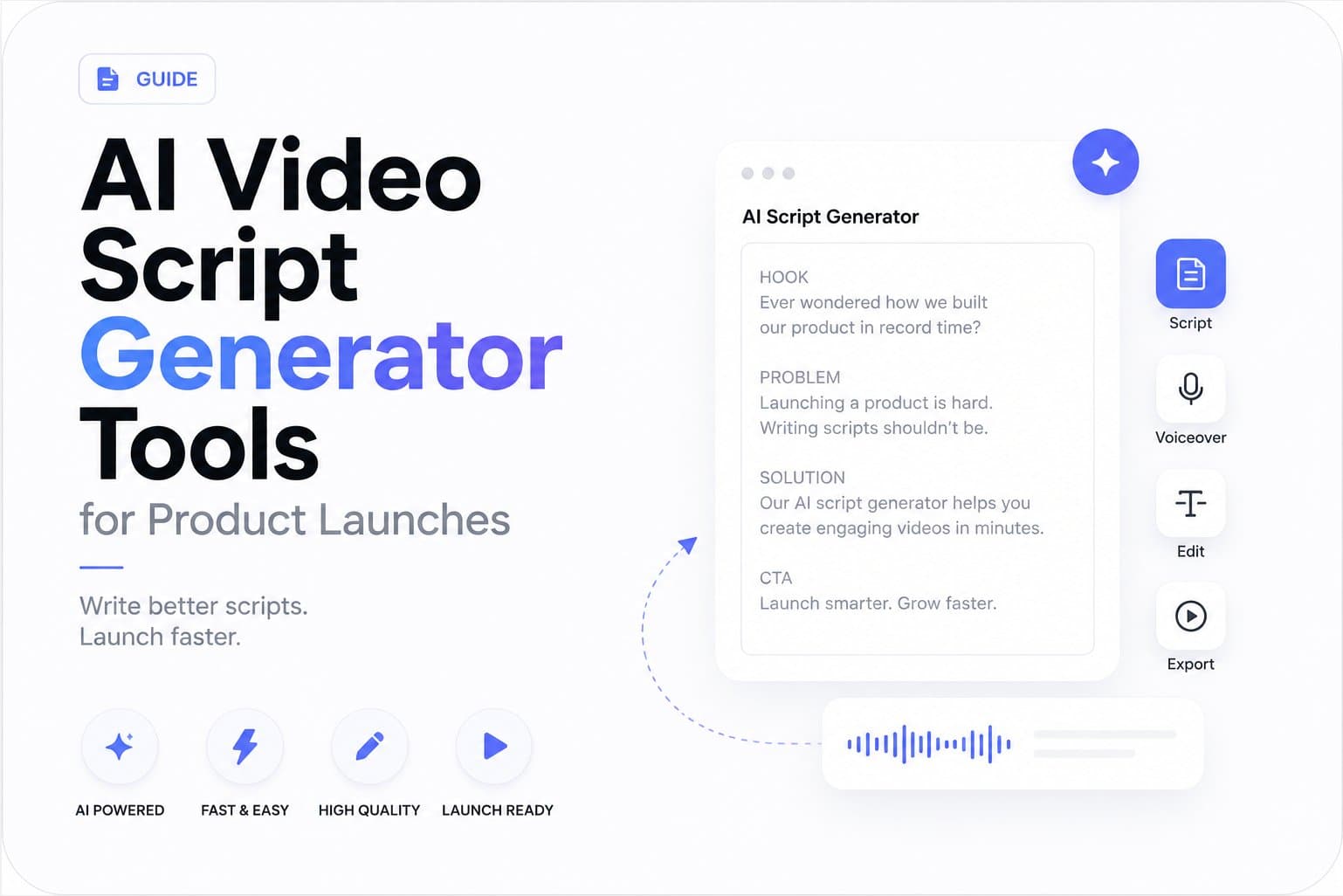
- Build the five-scene narrative. The sequence moves through a hook, problem, solution, proof, and CTA.
- Render the teaser. The output is a silent 15-second video at 1080p, with an optional music bed.
- Export the required formats. Choose 16:9, 1:1, or 9:16 based on the destination.
Each scene has one job. The hook earns attention. The problem names the pain. The solution shows what the product changes. The proof gives viewers a concrete reason to believe the claim. The CTA tells them what to do next.
Keep the message narrow. A 15-second teaser should make one promise memorable, not explain every feature. A developer tool can open with a painful workflow, show its central screen, and close with an invitation to try it. A project management app can focus on the shift from scattered updates to a visible plan.
The URL-to-video workflow uses the landing page as its briefing document. That makes page quality a production input. Rewrite unclear copy, replace weak screenshots, and sharpen the CTA before asking automation to create the asset.
ShipTeaser produces three ratios: 16:9, 1:1, and 9:16. Adobe's aspect-ratio guidance describes 9:16 as a vertical smartphone format that fills the mobile screen, while 1:1 is widely used in social feeds. Treat the ratio as a distribution choice, not a minor export setting.
Use the wide version for a website or presentation context. Use the square version for feed placements. Use the vertical version for mobile-first composition. Exporting all three lets one launch story travel across channels without forcing a single crop everywhere.
Comparing Production Costs and Timelines
Founders often compare the subscription price of a video generator with the sticker price of editing software. That's the wrong comparison. The true cost includes setup time, recording time, revisions, exports, and the hours taken away from product development.
A manual workflow can be cheap in software terms and expensive in founder attention. An agency can produce a polished asset and create a long approval cycle. An automated workflow gives you a fixed scope, predictable output, and a recurring publishing option.
Compare the complete production burden
| Method | Average Cost | Time to First Asset | Best For |
|---|---|---|---|
| Manual self-production | Software-dependent | Often several focused sessions | Founders who need detailed control |
| Freelance or agency production | Project-dependent | Depends on briefing and revisions | High-touch brand campaigns |
| Automated URL-to-video workflow | First video free, then subscription | About 2 minutes for generation | Repeatable launch teasers |
| Internal content workflow | Team time plus existing tools | Depends on availability | Teams with dedicated marketing support |
ShipTeaser's first video is free, with no credit card required. The paid plans are:
- $99 per month: 1 video per week.
- $149 per month: 2 videos per week.
- $199 per month: 4 videos per week.
These plans make sense when the founder wants a recurring content habit rather than one expensive launch artifact. The product video cost breakdown is useful for thinking beyond the invoice and accounting for the time required to brief, edit, approve, and repurpose each asset.
Treat publishing as a cadence
A single video can support a launch announcement, but a recurring workflow gives you more opportunities to test hooks and clarify the offer. Brands that publish video content at least twice per week see 41% higher engagement rates, according to short-form video publishing data. That supports a consistent publishing model, although no cadence guarantees results for every product or audience.
A sensible startup schedule starts with the launch page:
- Create one teaser for the initial announcement.
- Create another version around the strongest user problem.
- Create a feature-focused version when the product changes.
- Create a proof-focused version when you have a meaningful customer result or use case.
The point isn't to flood feeds. The point is to avoid treating video as a one-time ceremony. A product changes every week. Your launch content should keep pace without requiring a fresh production budget each time.
Why Silent Motion Graphics Win the Feed
Founders often overbuy for a launch. A full-featured manual editor looks like the safe choice, yet an automated 15-second silent teaser built from a landing page usually fits the job better. It gets the product into the feed quickly, saves weeks of production time, and gives the viewer a clear message before attention moves elsewhere.
Voice-over creates a distribution risk. In a muted feed, narration disappears while the visuals remain. A polished script cannot rescue a launch video whose opening scene makes no sense without sound.
Silent motion graphics solve that problem at the source. Text and movement carry the product promise, while an optional music bed adds rhythm for viewers with audio enabled. The story works without a voice, avatar, or spoken explanation.
Win the first visual impression
The opening scene must answer one question: Why should this viewer care? Skip a logo animation that delays the message. Lead with the problem, the outcome, or a sharp description of the product.
Build the teaser around a simple sequence:
- Hook: Name the costly or frustrating problem.
- Problem: Show the situation the target user recognizes.
- Solution: Present the product as the direct response.
- Proof: Show a product screen, concrete capability, or credible result.
- CTA: Ask the viewer to visit, try, join, or learn more.
Keep each text block short enough to read without pausing. Give every scene one dominant message. Make the product screen large enough to recognize, establish a clear visual hierarchy, and make the CTA unmistakable. Decorative motion comes after comprehension.
Distribution rule: If the launch video only makes sense after someone turns on sound, the video is not ready for a feed.
The product launch video guidance recommends captions for silent viewing in product launch videos and notes that social placements often have sound off by default. Design the message to work visually first.
ShipTeaser's AI motion graphics approach centers on a silent teaser with an optional music bed. Founders should therefore expect the message to come from scene design, product visuals, and the text included in the motion graphics, rather than narration or subtitles.
This format fits launch posts with limited context. A teaser can begin playing while someone scrolls through a professional network, product discovery feed, or founder update. If the hook appears immediately, the viewer can understand the offer without changing their environment.
Silent does not mean static. Movement can direct attention from the problem to the product, reveal a screen at the right moment, and make the CTA feel like the story's conclusion. Use motion to clarify the offer. Automated production earns its place when it makes that clarity repeatable.
Choosing the Right Tool for Your Launch Phase
The best product video maker depends on the job in front of you, not the feature list on a pricing page. Early-stage founders need a fast way to turn a landing page into a clear first asset. Later, the team may need detailed tutorials, onboarding videos, or a tightly controlled brand production system.
Choose for the next launch milestone. Buying a full manual editing workflow “just in case” adds setup time before it adds value. An automated, silent 15-second teaser is the right choice when the goal is awareness and feed engagement. Manual production earns its place when viewers must follow a complicated process frame by frame.
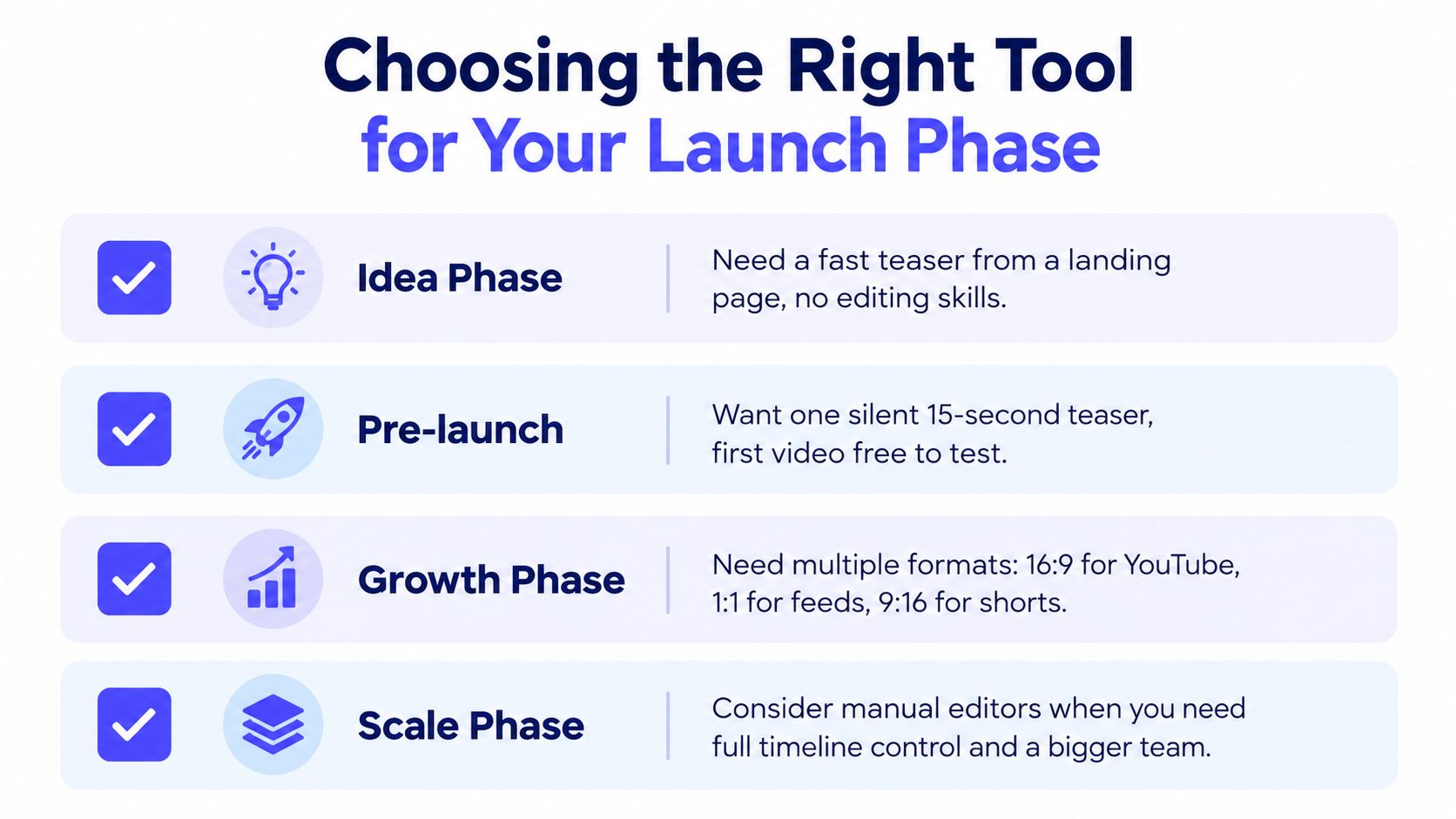
Use this decision path:
- Idea phase: Submit the landing page to an automated URL workflow. You need a quick visual expression of the concept, not a polished demonstration. Judge whether the promise is understandable before spending time on production.
- Pre-launch: Create one silent 15-second teaser. Review the opening scene, product placement, and CTA, then test the asset in the intended feed. ShipTeaser's first video is free, giving founders a practical way to assess the format before adopting a paid cadence.
- Growth phase: Produce the ratios required by each destination. A 16:9 version fits a wide placement, 1:1 suits a square feed, and 9:16 supports vertical short-form distribution.
- Scale phase: Move to manual editing when the team requires detailed screen recordings, voice-led explanation, full timeline control, or a long-form tutorial. Those requirements justify the additional production overhead.
Recent coverage identifies short-form video as the default and reports that vertical 1080x1920 uploads are up roughly 24% year over year. The video production trends coverage points to a shift from producing any video to producing the right variant for each funnel stage.
That finding should shape your buying criteria. Ask whether the tool can create the needed format from the source material you already have, at the speed your launch demands. A long feature list matters less than a reliable path from landing page to publishable teaser.
For most early-stage software launches, use two speeds. Generate an automated teaser to earn attention, then use manual editing for the detailed walkthrough that supports evaluation. Let the short vertical asset create reach while the deeper anchor video builds trust and supports conversion.
Revisit the workflow when the product, audience, or launch objective changes. One video should not carry every job.
Frequently Asked Questions
Is a product URL enough to create a launch teaser?
A product URL is enough when the landing page has a clear headline, a defined audience problem, visible product imagery, and a direct CTA. The generated teaser uses the page as its source, so improve the page before submitting it. A vague page will give the workflow less useful material to arrange.
Does a silent product video hurt landing-page conversions?
A silent video doesn't automatically hurt landing-page performance. It can work for visitors who encounter the page with sound disabled, provided the scenes explain the product through readable text and visuals. Keep the spoken explanation for a separate asset when the visitor needs a detailed walkthrough.
How should founders use a 15-second teaser in a launch sequence?
Use the teaser as the attention asset, not the entire launch explanation. Publish it with a direct post, send interested viewers to the product page, and place a deeper explanation or documentation behind the CTA. The teaser should create enough interest for the next step, not answer every possible product question.
What should founders check before posting an automated video?
Check every product claim, screenshot, brand color, scene transition, and CTA. Confirm that the page still represents the current release and that the text is readable in the intended ratio. Watch the video without sound, because the silent version must communicate the message on its own.
When should a founder choose manual production instead?
Choose manual production when the viewer must follow real clicks, understand a technical workflow, or hear a detailed explanation. Manual control also makes sense for long-form education and assets that need precise revisions. For a short launch teaser built from a clear landing page, that extra control usually adds work without solving the immediate distribution problem.
ShipTeaser turns a product URL into a 15-second, 1080p, silent motion-graphics teaser with five launch scenes and exports in 16:9, 1:1, and 9:16. Start with the free first video, test the asset in your launch workflow, and visit ShipTeaser when you're ready to publish product teasers on a recurring schedule.