Making video easier doesn't make a launch easier to understand. In Wyzowl's 2025 survey, reported by HubSpot, 89% of businesses used video marketing, yet a founder still has to decide which product promise deserves attention and which claims can survive scrutiny.
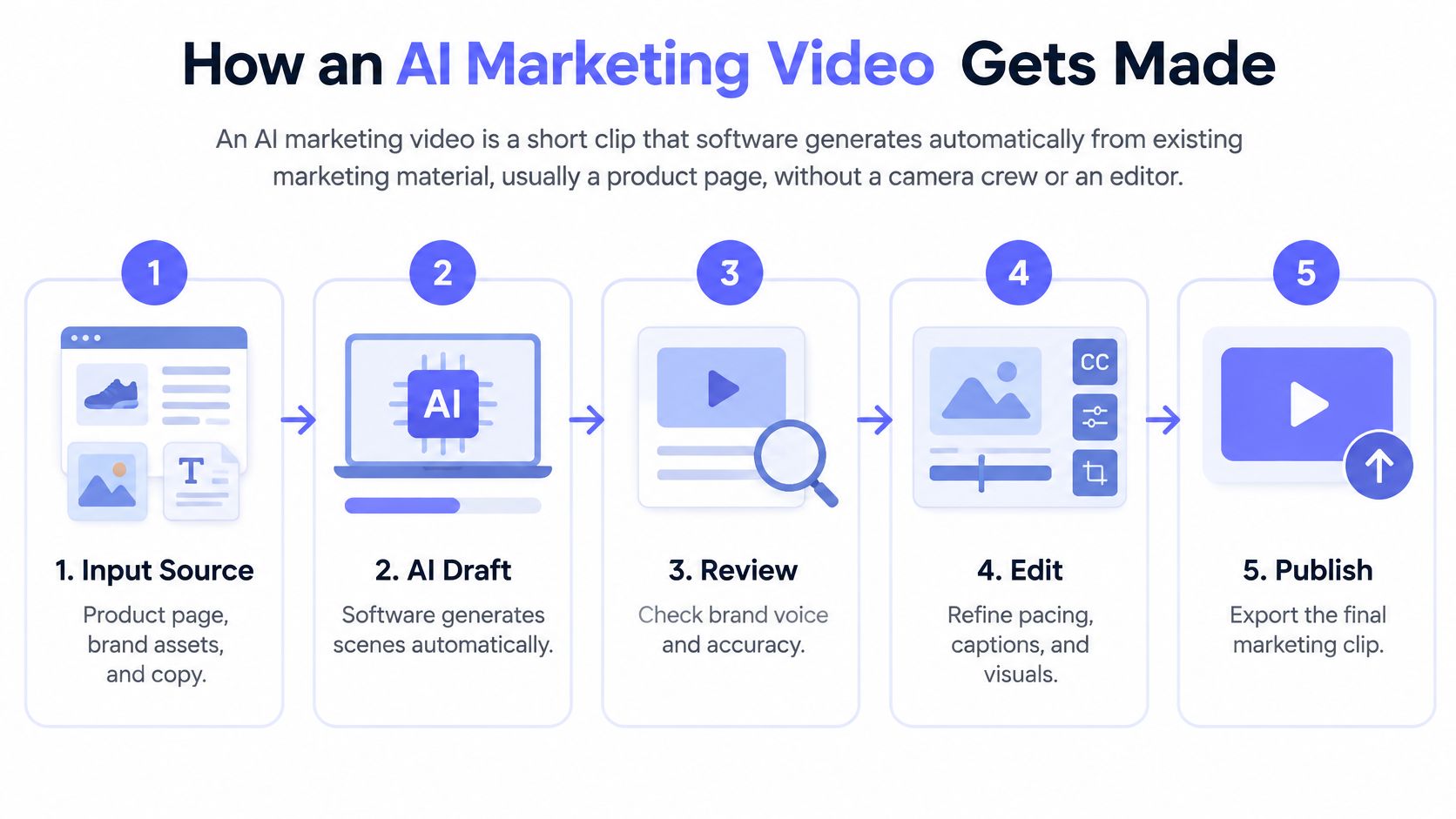
An AI marketing video is a short clip that software generates from existing marketing material, usually a product page, without a camera crew or manual editing. To make an effective AI marketing video, start with accurate page copy and current screenshots, generate a concise product story, then review the claims, opening frame and destination format before publishing. Automation handles production, but the founder remains responsible for positioning and truth.
How an AI Marketing Video Gets Made
An AI marketing video is only as clear as the product information behind it. For a feedback tool, a useful story might move from scattered requests to a prioritized product decision. Animated feature names alone do not explain why the product matters.
From product page to finished file
- Input. Submit the product URL and the feature to highlight. The page supplies the starting point; additional context can enrich what the system extracts.
- Extraction. ShipTeaser loads the product page in a headless browser to collect its headline, copy, colors and real screenshots.
- Scripting. Copy drawn from the product becomes five beat-cut scenes: hook, problem, solution, proof and call to action. Each line comes from the page, word for word or clearly derived from it, so unclear or unsupported source copy can carry through.
- Rendering. Silent motion graphics built from the customer's brand carry the story. There are no faces, avatars, stock footage or voice-over.
- Review and output. The result is a 30-second, 1080p MP4, built for silent feeds and ready for X, LinkedIn, Product Hunt or a launch page. Review every scene before publishing: generated videos can contain factual errors or misread the brand.
Before generating, clarify the product argument on the page. Use this guide to script your SaaS launch video, then check the scene sequence against this product video script guide. The video does not write new copy for you, so a vague page can produce a polished version of the same vague message.
Benefits: no editor, prompt or voice-over is required, and the five-scene structure gives the launch story a predictable shape. Limitations: ShipTeaser is built for launch content, not performance ads with actors or multiple hook variants. Review the claims and brand details before anything goes live.
Practical rule: Fix ambiguous source copy before generating a more polished version of the same ambiguity.
Why Short-Form Clips Became the Default Launch Format
A launch clip should make the product easier to understand and give the viewer a reason to take the next step. For an early-stage team working from a product page and screenshots, short-form video offers a focused way to introduce one promise without turning the announcement into a full brand production.
HubSpot's State of Marketing reporting found that 83% of video marketers used short-form video, compared with 39% using long-form and 14% using live video, and ranked short-form highest for return on investment, lead generation and engagement. HubSpot also described younger audiences discovering brands through social-video platforms. That makes a short clip useful as a discovery asset, while the product page can provide detail for viewers who want more.
Choose the clip's job before shaping its message:
- Product Hunt listing: Help visitors identify the product and its main benefit before they explore the listing.
- Feature release on X or LinkedIn: Show what changed and who benefits. Keep the focus on that feature.
- Waitlist invitation: Explain the problem the product addresses and direct interested viewers to register.
A short clip can reduce production work, but polish alone does not make an unclear promise persuasive. Keep the message grounded in what the product page supports, then review the finished video for errors or wording that could mislead viewers.
A launch clip earns its place when the next action is obvious, not when every feature appears on screen.
Match the call to action to the destination: send waitlist viewers to the waitlist, and direct people interested in a feature to a page that explains it. Start with one launch moment and assess the response before committing time to a recurring video workflow. Short-form works best when it clarifies the product's position, not because the format is popular.
Designing the First Three Seconds for a Muted Feed
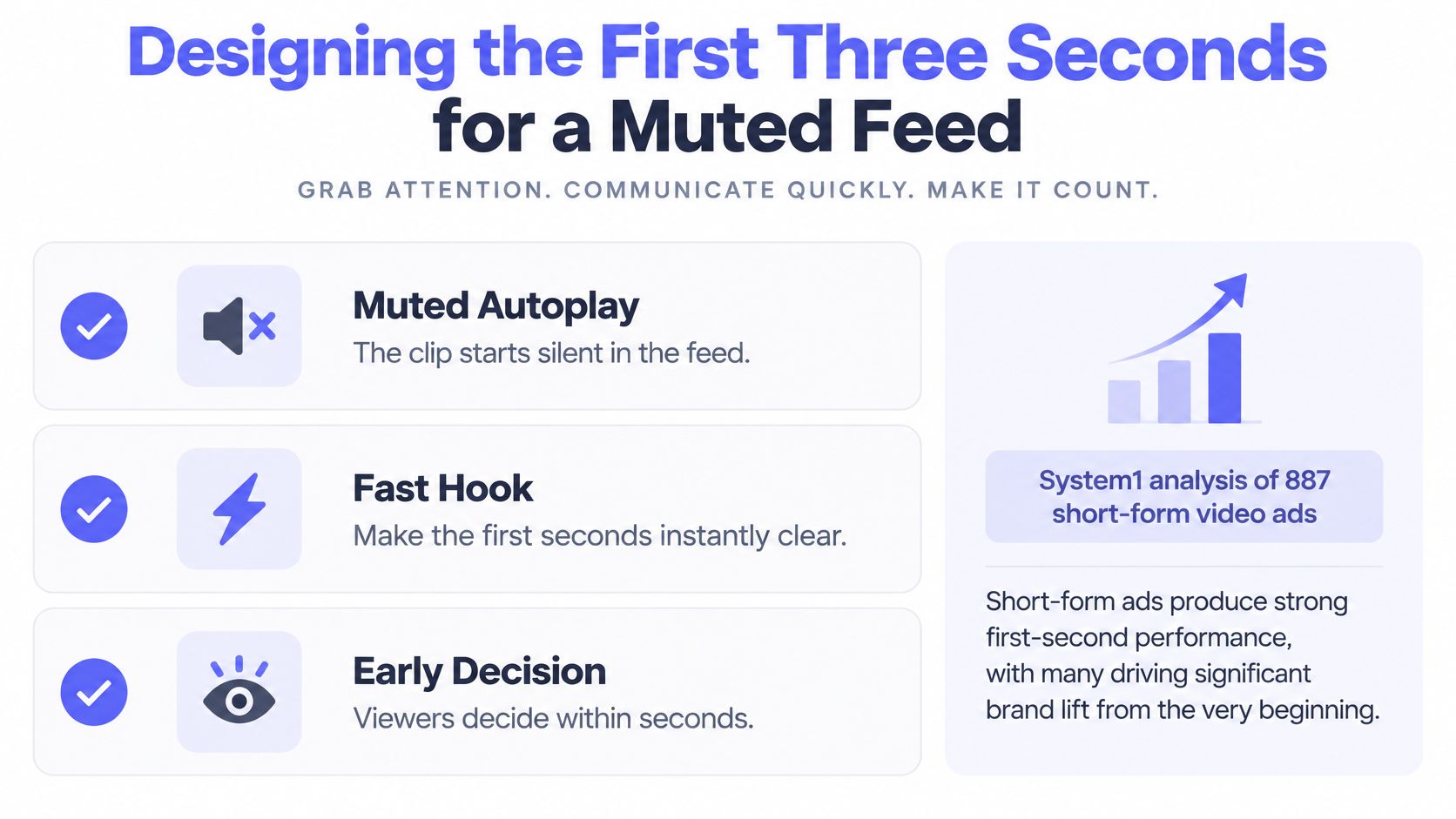
A viewer who meets a clip with the sound off needs to recognize the product and its relevance immediately. Lead with a real interface or a clear product image, then make the promised outcome legible before abstract motion takes over.
An analysis of 887 global short-form video ads reported an 88% lift in Brand Choice from first exposure. Its composite Spike Rating, which combines early brand recognition and emotional intensity, was the strongest predictor. Top-quartile entertaining ads also produced 39% higher Memory Lift and 54% higher Attention than lower-performing ads. The findings make a case for early recognition and emotional clarity; they do not establish a guaranteed result for a launch clip.
For a feedback product, “organize requests into a release plan” tells viewers more than “improve productivity.” Put one concrete outcome on screen early, in readable text with strong contrast. With no voice-over to carry context, viewers have to understand the promise from the image and copy alone.
Treat this as a working template for pacing:
| Beat | Suggested timing |
|---|---|
| Hook | First 3 seconds |
| Problem | By second 5 |
| Solution | By second 9 |
| Proof | By second 12 |
| CTA | Final 3 seconds |
Give each beat a distinct job. The hook names the product or benefit, the problem makes the need recognizable, and the solution shows what changes. Proof should support the claim, while the call to action tells viewers what to do next. The three-second hook guide offers another way to assess whether an opening communicates a benefit or only introduces a brand.
Keep the copy grounded in the product page. For ShipTeaser, each video uses five beat-cut scenes, hook, problem, solution, proof and call to action, and the video copy comes from the submitted product page. That makes review important: check that the opening represents the product accurately and that every scene reinforces the same promise.
Compare first-second retention and branded recall alongside completion rate. Ask a prospective user what product appeared and what outcome the clip promised. If they remember the animation but cannot explain the product, revise the opening before publishing.
Which Frame Ratio Goes Where
Frame ratios by launch destination
| Ratio | Google Ads guidance | Best launch use |
|---|---|---|
| 16:9 | Recommended for reaching viewers across devices | Landing page header and YouTube upload |
| 1:1 | Recommended for App, Demand Gen and Performance Max | Feed posts on X and LinkedIn |
| 9:16 | Best suited to YouTube Shorts | Full-screen mobile teasers |
Google Ads' video guidance identifies 16:9, 1:1 and 9:16 as recommended ratios across devices, recommends square video for App, Demand Gen and Performance Max campaigns, and identifies vertical video as best suited to YouTube Shorts. The launch uses above are practical destination choices, not guarantees of performance.
Choose the frame around the product
Horizontal gives a wide interface room to remain recognizable. Use a landing-page header only when the video doesn't obscure the headline or compete with the main action.
Square is useful for feed posts where a wide frame would make the interface too small. Keep the product benefit readable rather than squeezing an entire dashboard into the scene.
Vertical suits full-screen mobile viewing. Prioritize the relevant interface detail instead of shrinking a desktop screenshot until nobody can read it.
Render each ratio from the source rather than cropping an existing export. Cropping can remove interface labels, proof or the CTA.
Google's creative best-practices checklist recommends uploads between 15 and 30 seconds, placing a short teaser at the lower boundary of that range.
Keep a master for each ratio, named by destination and launch. Reuse the file organization across launches, but regenerate assets when the product or message changes.
Platform Benchmarks Show One Clip Will Not Fit Everywhere
The same product message can perform differently across feeds because each platform gives viewers a different context for discovering it. Metricool's analysis of 5,696,685 short-form videos from 582,456 accounts found that Instagram Reels views declined 59.15% while publishing volume rose 71% year over year. Its report also found that TikTok videos averaged 41 seconds, viewers watched 3.75 seconds on average, and only 4% watched to completion, according to Marketing Tech News' account of the 2025 report.
Reported performance changes by platform, 2025
| Platform | Metric | Reported change | What to change |
|---|---|---|---|
| YouTube Shorts | Likes, engagement, reach | Likes down 47%, engagement down 36%, reach down 31% | Test a different opening frame before reuse |
| Instagram Reels | Views | Views down 59.15% | Test a different opening frame and caption |
| TikTok | Average reach, engagement | Reach down 47.19%, engagement up 35.61% | Judge the clip by engagement, not views alone |
| Facebook Reels | Views, interactions | Views up 24.48%, interactions up 22.46% | Test as a growth channel for the same clip |
Source: Marketing Tech News' account of Metricool's 2025 report.
The figures describe platform-wide patterns, not the likely result for a particular software launch. They do not isolate clip length, audience fit or message quality. Use them to form a test, then judge each destination against your own audience and objective.
Adapt the opening and the surrounding post
On YouTube Shorts, check whether the opening identifies the product quickly. A different ratio alone will not address weak reach or engagement.
On Instagram Reels, pair a distinct opening frame with a caption that adds context rather than repeating the on-screen headline.
On TikTok, make the opening direct and the first-frame text clear. Assess relevant engagement and product-page visits alongside reach, so views are not the sole measure.
On Facebook Reels, test audience fit before reserving a regular publishing slot. For LinkedIn, state the product category and intended user plainly; viewers may not recognize the interface.
The drop shipping ad channel guide provides a cross-category reference for thinking about channel roles. Software launches still need their own audience and conversion criteria. Use the launch video specifications guide to check delivery requirements separately from creative choices.
Treat each destination as a review decision: adjust the opening frame, caption and CTA where the viewing context changes, then compare the results. ShipTeaser creates launch videos from a product page; platform-specific openings and captions still require deliberate positioning before publishing.
Trust, Disclosure and Review Before You Publish
Faster production isn't enough if the result makes a product harder to trust. A polished claim can still be inaccurate, and animation can make an unsupported promise look more authoritative than the original page copy.
Net Influencer's reporting on U.S. consumer research and a related IAB study found that 82.6% of surveyed consumers had watched videos they suspected were AI-generated, 36% said AI-generated videos reduced their trust in a brand, and 77.9% trusted videos featuring real people; the related IAB findings showed that more than half of Gen Z and Millennial consumers wanted disclosure, while 73% said clear disclosure would increase or not affect purchase likelihood.
Review the promise, not just the polish
The reported detection signals included robotic movement, unnatural voices and weak emotional tone. Silent motion graphics without faces avoid synthetic-person movement and voice signals, but generic copy can still feel impersonal. ShipTeaser uses the customer's own brand rather than faces.

- Verify every claim, number and customer name against the live product. Remove a claim if you can't establish its basis.
- Confirm screenshots show the current interface. Check labels, availability and any visible account information.
- Check brand voice and colors. Reject wording that exaggerates what the product does.
- Decide whether to disclose AI use. Consider whether viewers could misunderstand how the video was made, alongside applicable platform requirements.
- Add a founder-recorded element where the claim is personal. Publish that element separately if needed. Don't present a generated teaser as a founder's personal testimony.
Review standard: If you wouldn't defend a sentence on the product page, don't publish the sentence inside an animation.
Any generated teaser can misstate a claim or misread the brand. The founder should review every line before posting, including text that appears to have been copied correctly. Source material can be outdated too.
Test One Product Page Before Your Next Launch
Use one release page to test the message before setting a publishing cadence. ShipTeaser reads the product page you provide and renders a 30-second launch video in five beat-cut scenes: hook, problem, solution, proof and call to action. Its copy comes from the page, so the test is also a check that the source explains the feature clearly.
Start with a page focused on the release. Confirm its screenshots and claims are current, then review the generated video for factual errors or a misread brand before publishing. The output is a 1080p MP4 built for silent feeds, with your own call to action. It can give you a launch asset without editing, but it does not replace platform-specific opening variants or captions. Adapt those for each destination, then compare the response using consistent tracking labels.
A useful test follows the promise through the click. Use Receiver's landing page insights to assess whether the destination matches the video, and consult this conversion-rate improvement guide to examine what happens after visitors arrive.
ShipTeaser plans include Starter at $99 per month for 4 videos, Growth at $199 per month for 8 videos, and Studio at $299 per month for 16 videos. Choose a plan based on how often you need launch assets, not as a substitute for reviewing each one.
Judge the test by whether a prospective user can identify the product and its benefit from the opening, then whether the landing page carries that promise through. A polished clip is ready to review, not proof that the message works.
FAQ About AI Marketing Videos
Does an AI marketing video need a voice-over?
No. Use the opening guidance on making the first three seconds clear without narration, then check whether the finished clip communicates its point on mute.
Should a launch video disclose that AI made it?
Disclosure is an editorial judgment, subject to any applicable platform requirements. Consider explaining AI's role when it substantially generated the advertisement. Avoid visuals or wording that suggest a person gave a testimonial, demonstrated a workflow or endorsed a claim if that did not happen.
How long should an AI marketing video be?
The right length depends on how much information the viewer needs to understand the promise and next step. A concise launch teaser can introduce a product, while a detailed workflow may need another format. Treat upload limits as delivery constraints, not a reason to cram more features into the script.
ShipTeaser renders a 30-second launch video from a product page. Its five beat-cut scenes cover a hook, problem, solution, proof and call to action. The silent motion graphics use the customer's brand, with no faces, voice-over, stock footage or avatars. Every line of copy comes from the submitted page, word for word or clearly derived from it. Review the video for factual errors or a misread brand before publishing.
Can one video work on every platform?
A master file is a useful starting point, but each destination may need its own opening, caption and call to action. Keep files traceable by naming each with the product, launch and intended platform, then save the matching caption alongside it. This makes it easier to identify which version belongs with each post.
ShipTeaser returns a 1080p MP4 ready for X, LinkedIn, Product Hunt or a launch page, with no export settings to configure. For a Product Hunt gallery, upload the MP4 to YouTube, set it to public, then paste its full URL into the gallery. Visit ShipTeaser to create a launch teaser, review its claims and brand details, and publish it where it fits.