A 15-second teaser is a five-scene motion-graphics clip with a hook, problem, solution, proof, and CTA, exported at 1080p in 16:9, 1:1, and 9:16. It works because 15-second units represented 57% of ads overall and 61% on mobile, making that duration familiar across the inventory where founders launch products. IAB and Innovid benchmark data supports the format choice.
You've probably got a landing page, a launch date, and no footage. The dangerous move is spending two weeks building a polished video that explains everything and gives viewers no reason to click. A product teaser has one job: make the right person curious enough to take the next step.
A product teaser video earns clicks by compressing one product promise into five timed scenes: hook, problem, solution, proof, and CTA. Keep the video silent with optional music, put the message on screen, and make the final frame ask for one action, such as joining a waitlist, starting a trial, or visiting a launch page.
What a Product Teaser Video Actually Is in 2026
A founder spends two weeks editing a launch video. The result gets eleven likes and almost no product interest. The problem usually isn't production quality. The problem is that the video was built like a mini documentary when the audience needed a clear reason to care.
A product teaser video is a short motion-graphics clip, usually silent, built to create curiosity about a specific software product before launch or during its first days in public. It isn't a demo, a walkthrough, a logo animation, a founder talking head, or a long explainer. The job is anticipation, not complete education.
The input and output are simple
Start with four inputs:
- A product URL or brief: Give the production process one reliable source of truth.
- Three to five copy beats: State the problem, product promise, proof, and next action.
- A brand accent color: Use one recognizable visual cue instead of decorating every frame.
- A CTA target: Decide whether the viewer should join, try, visit, or follow.
The output should be an MP4 that can run without narration. For a URL-driven workflow, that means landing-page copy, screenshots, colors, and visible brand elements become the raw material for the storyboard. ShipTeaser describes its process as turning a pasted product URL into a 15-second, 1080p teaser in about 2 minutes, with the output based on those landing-page assets. See the Product Hunt launch video use case.
A useful teaser can publish in 16:9, 1:1, and 9:16 so one message fits launch pages, professional feeds, square placements, and vertical short-form surfaces. The production principle is simple: remove setup, not judgment. You still need to check every claim before publishing.
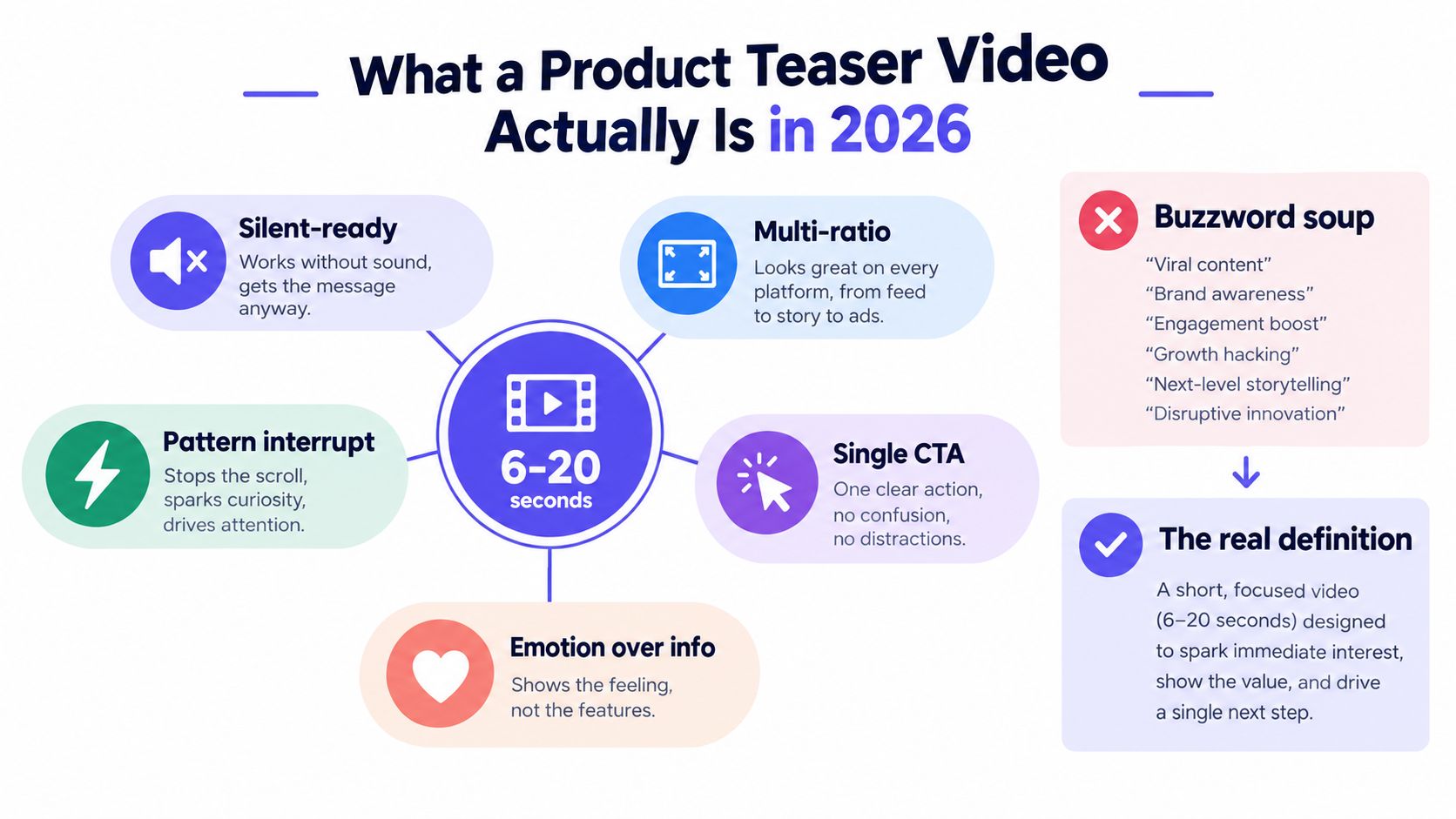
Practical rule: If the viewer needs narration to understand the first promise, the teaser isn't ready for a muted feed.
Why 15 Seconds Is the Right Length for a Launch Teaser
Fifteen seconds isn't a magic number. It's a practical constraint that forces a founder to choose the message that deserves distribution.
A 2022 Connected TV analysis found that roughly one-third of viewers paid equal attention to 15-second, 30-second, and 60-second ads. The same analysis reported that 15-second spots captured 48% of total ad-time attention in some app environments and delivered about 80% of the effectiveness of a 30-second ad. Strong creative matters more than just adding time. The attention analysis explains the ad-length tradeoff.
A separate independent attention finding cited in the available research says 15-second ads can deliver 2.8 times more active attention than 30-second ads, which reinforces the practical case for a concise launch asset. Use this three-second hook guidance when deciding what appears before the viewer scrolls.
Shorter and longer formats solve different problems
A six-second clip can interrupt the scroll and show a name. It rarely has enough room for a meaningful problem, solution, proof point, and CTA. A longer video can explain more, but explanation creates more opportunities for the viewer to leave before the product promise arrives.
Fifteen seconds gives a founder enough space to build a compact narrative without pretending the asset is a full product tour. It also matches common ad inventory. The IAB and Innovid benchmark reported that 15-second units made up 57% of ads overall and 61% on mobile, so the format is already familiar to marketers and mobile viewers. These short-form video prompt examples are useful for studying how much meaning can fit into a constrained runtime.
The market context supports the decision. Global short-form video ad spending was estimated at about $111 billion in 2025 and projected to reach $145.8 billion by 2028, with a 9.52% compound annual growth rate. In the same data set, 77% of marketers said videos under 60 seconds delivered the highest ROI, while 85% called short-form video the most effective social media content format. Review the short-form video market data.
The Five-Scene Structure That Fits 15 Seconds
Most advice says to “make a strong hook.” That's incomplete. A hook without a structure creates a fast intro followed by crowded copy. Use five scenes, give each scene a job, and protect the timing.
Scene 1 owns seconds 0 to 3
Open with one bold claim or pattern interrupt. Don't lead with a logo or product name. The viewer doesn't know why the product matters yet.
Example: “Stop guessing which headline wins.”
The frame should be readable without sound and visually distinct from the surrounding feed. One idea is enough.
Scene 2 owns seconds 3 to 6
Name the problem in second person. Make the viewer recognize the situation immediately.
Example: “You A/B test copy once a quarter.”
Avoid a feature list here. The problem scene should create tension, not explain your roadmap.
Scene 3 owns seconds 6 to 10
Reveal the product and show one action. Use a motion-graphics cut or a single product interaction. Don't stack every feature into four seconds.
Example: “ShipTeaser turns a URL into a 15-second motion-graphics test.”
The product name appears after the viewer understands the pain. That order makes the reveal feel relevant instead of promotional.
Scene 4 owns seconds 10 to 13
Use one proof element. Choose one number, one customer quote, or one logo wall. Never force all three into the same frame.
The supplied example uses: “Used by 400 indie launches.” That claim should only appear when the product owner can verify it. Generated copy must never turn an unverified assumption into proof.
Scene 5 owns seconds 13 to 15
Hold one verb and one destination. Nothing else.
Example: “Try it free at shipteaser dot io.”
ShipTeaser describes its teaser format as five scenes built around hook, problem, solution, proof, and CTA. Read the startup video content framework.
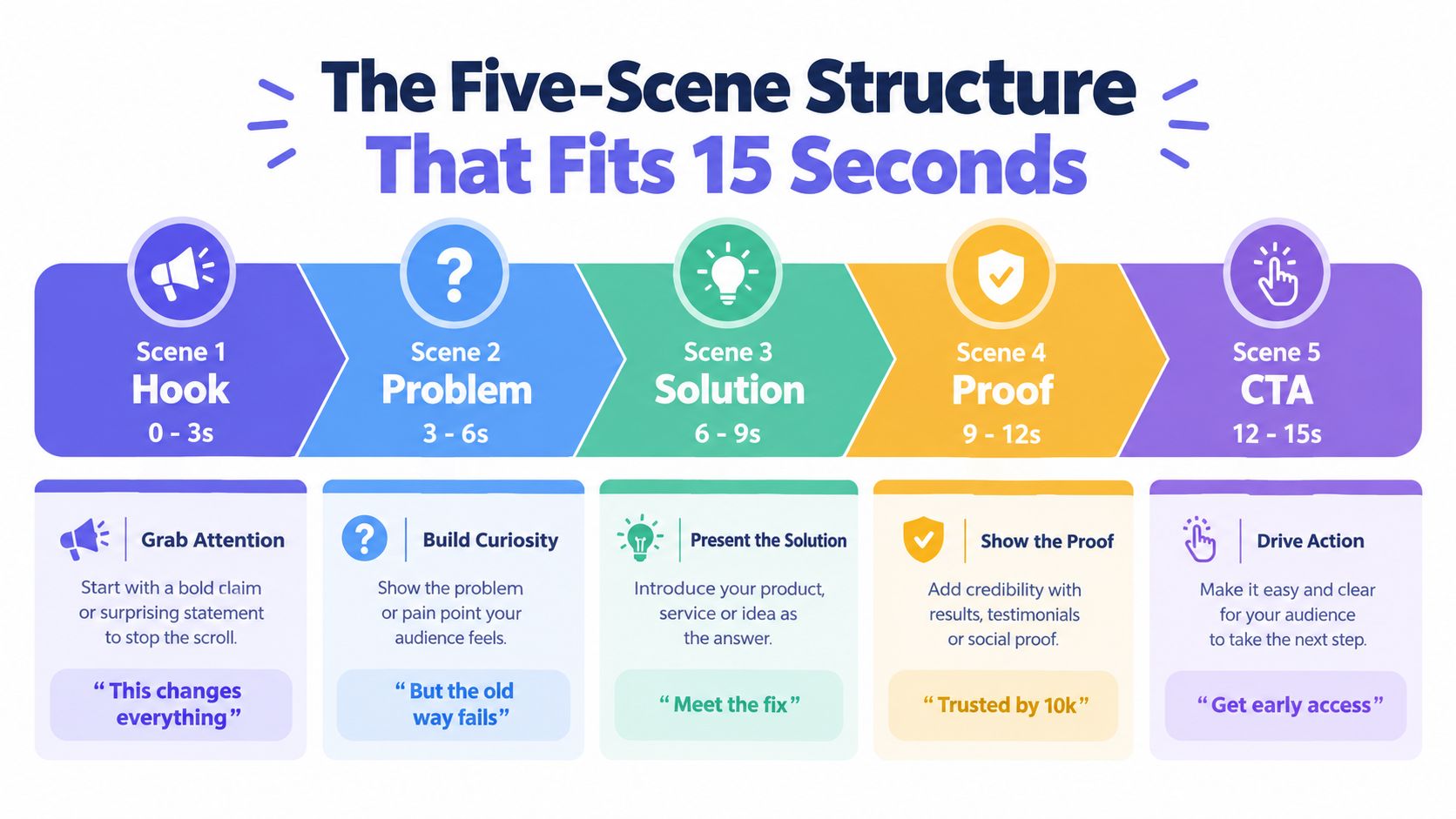
If one scene runs past its budget, another scene loses its job. Don't solve timing problems by shrinking the text until nobody can read it. Cut words, cut features, or cut proof. Keep the CTA visible long enough to act on.
Where 15 Seconds Belongs in the Funnel and What CTA It Should Carry
A 15-second teaser shouldn't explain the whole product. It should move a viewer to the next appropriate action.
The strongest unanswered question in this format isn't whether short video can attract attention. It's where the teaser belongs in the funnel and which CTA it should carry. Independent attention research suggests the format is optimized for fast engagement rather than full explanation, so the CTA must match the viewer's temperature. This analysis of 2026 video marketing data makes the same distinction between broad format popularity and practical conversion guidance.
Match the CTA to the audience
- Pre-launch curiosity: Ask viewers to join the waitlist. The product isn't available, so a trial CTA creates friction.
- Launch-week conversion: Send qualified viewers to the product page, demo, or trial. The message can assume a higher level of intent.
- Post-launch retargeting: Ask engaged viewers to return, follow the launch, or share the product with a relevant peer.
- Evergreen list-building: Offer a specific lead magnet when the product needs education before a buying decision.
“More views” is not a success metric by itself. Track clicks, leads, and signups against the goal of the campaign. A teaser that attracts attention but sends nobody to the intended destination has a distribution problem or a message problem.
Don't borrow advice built for unrelated audiences. A resource on high-impact Reels for local businesses may offer useful creative prompts, but a software launch still needs a product-specific promise and a CTA that fits founder-led growth.
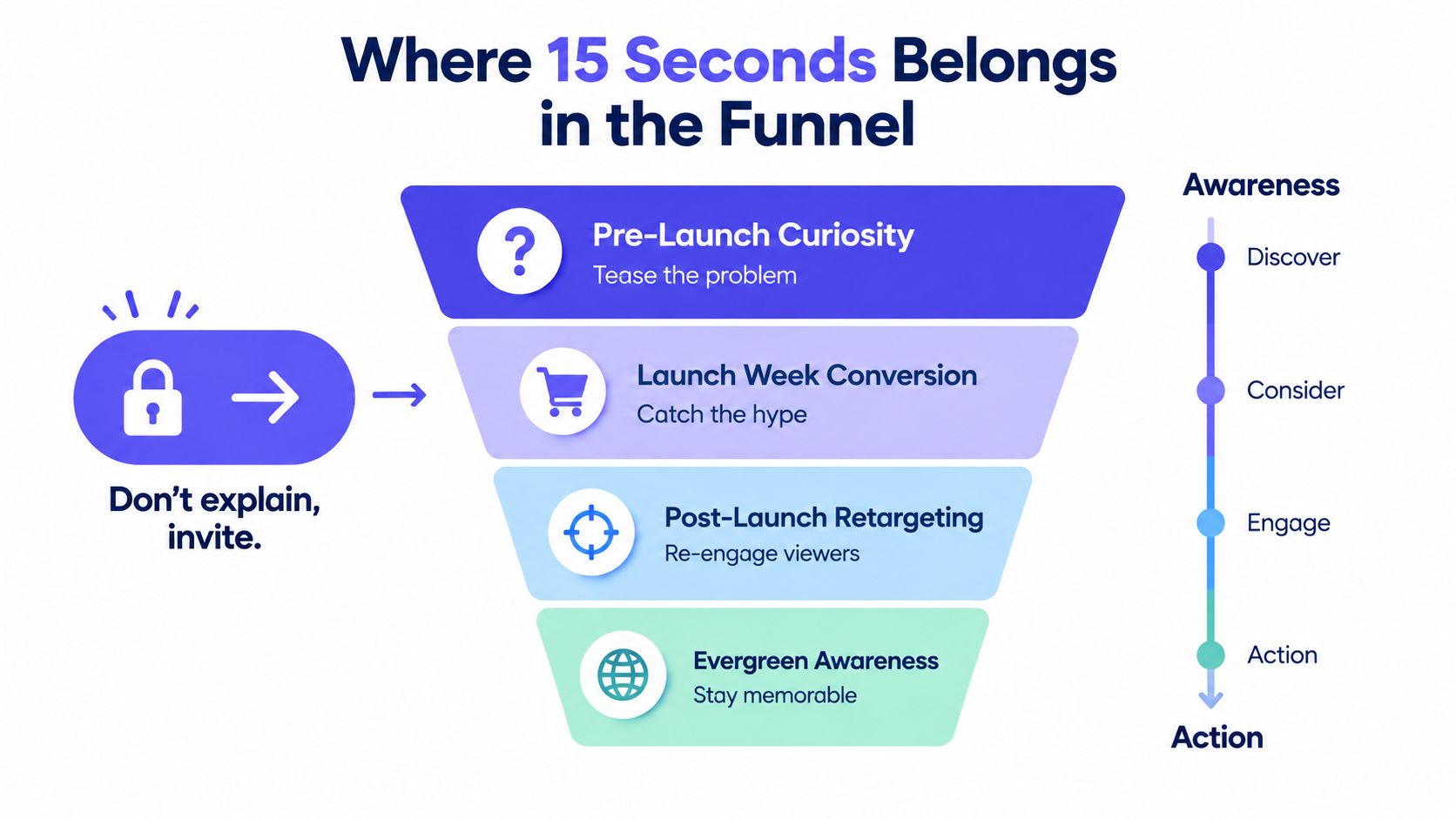
The rule: A cold viewer needs a reason to care. A warm viewer needs a reason to act. Don't give both audiences the same final frame.
Building a Teaser From a URL Without Footage or an Editor
You don't need raw footage, a timeline editor, or an agency to test a launch message. You do need a clean landing page and a human review pass.
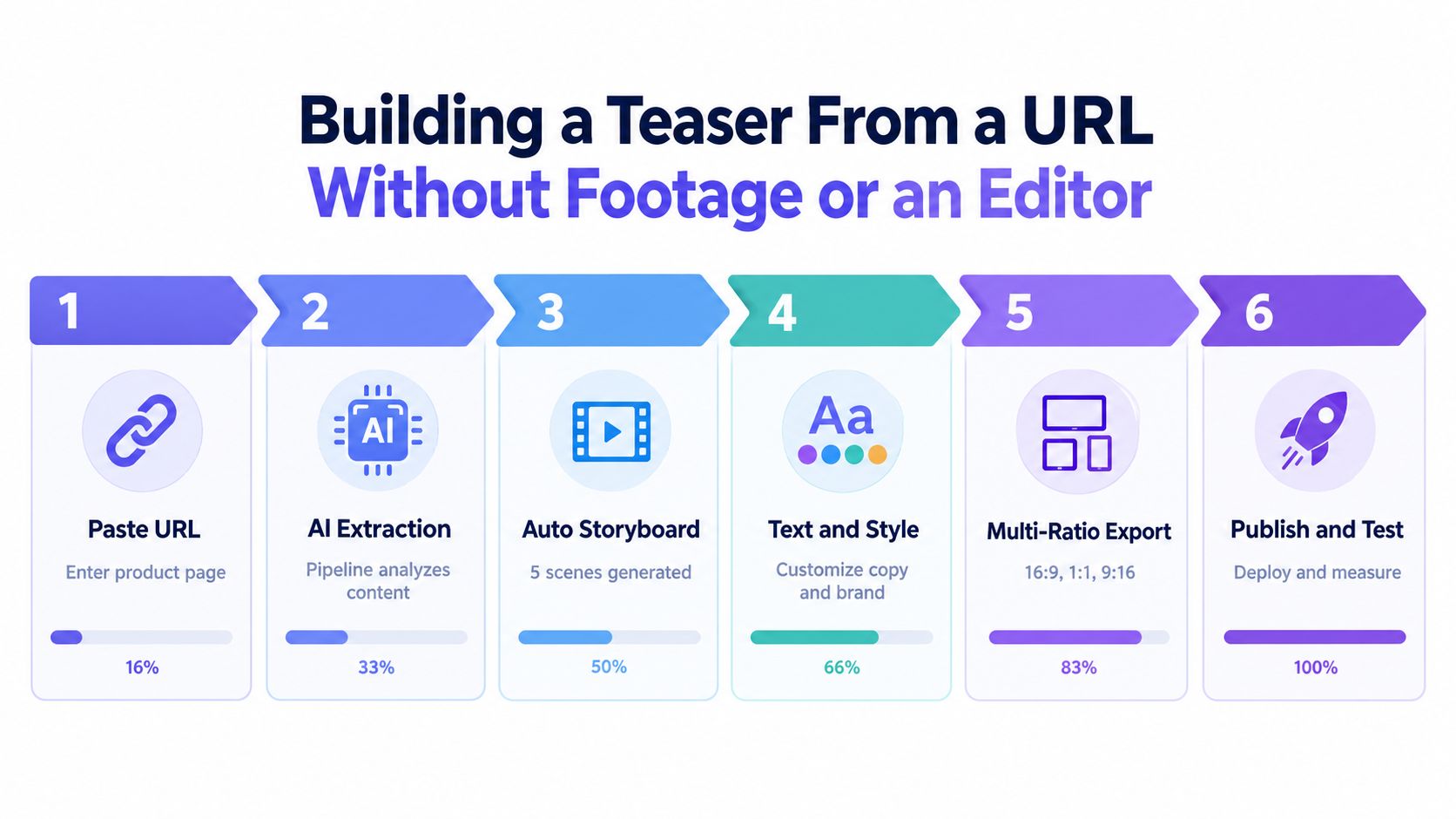
ShipTeaser's stated workflow starts when a founder pastes a product URL. The system uses landing-page copy, screenshots, colors, and visible brand elements to generate a silent, 15-second, 1080p teaser. The output follows the five-scene structure and can be exported in 16:9, 1:1, and 9:16.
Use this review sequence
- Paste the product URL. Use the page that contains the clearest promise, not a generic home page with unfinished copy.
- Review the extracted value proposition. Confirm that the generated hook describes the product you ship.
- Check each scene against the live page. Regenerate any frame that misrepresents a feature, audience, integration, or outcome.
- Inspect the proof frame. Remove unsupported numbers, invented customer references, and vague credibility language.
- Export all three ratios. Keep the message consistent while checking that text remains readable in each crop.
- Run the final claim check. Confirm pricing, feature names, destination URLs, and product availability before posting.
The pipeline shouldn't become a black box. Treat the landing page as the source, the generated storyboard as a draft, and the final export as a marketing claim that needs approval.
Check the details that create trust
- Pricing: Every amount must match the live pricing page.
- Integrations: Don't allow the teaser to imply an integration that isn't available.
- Proof: Use a real, supportable statistic or remove the proof frame.
- CTA: Open the destination URL and confirm that it resolves to the promised action.
- Screenshots: Make sure the interface shown still matches the current product.
The practical benefit is a short review loop, not permission to skip review. Guidance on converting with better product images reinforces a broader point. Visual inputs carry product meaning, so inaccurate screenshots can damage trust even when the copy is correct. Founders who want a URL-driven workflow can review ShipTeaser's URL-to-video process.
ShipTeaser Plans Compared Against the Manual Alternative
The choice isn't only about quality. It's about whether your launch process can produce enough creative to learn from. Manual production can make sense for a rare, high-stakes asset, but repeated launches need a repeatable workflow.
ShipTeaser lists three subscription options: $99 per month for one video per week, $149 for two videos per week, and $199 for four videos per week. The first video is free, and no credit card is required. The manual alternative generally involves a contractor or editor, a longer calendar cycle, and a separate production budget.
| Plan | Price | Turnaround | Best For |
|---|---|---|---|
| ShipTeaser Single | $99 per month | About 2 minutes for generation | One launch or update per week |
| ShipTeaser Pro | $149 per month | About 2 minutes for generation | Two weekly product or social assets |
| ShipTeaser Agency | $199 per month | About 2 minutes for generation | Four weekly assets across products |
| Manual production | Project-based | Often a longer production cycle | A rare asset needing custom hands-on work |
The manual path described in the planning brief can cost $2,000 to $5,000 per teaser and take two weeks of calendar time. Those figures make the comparison useful for founders who need recurring launch content, but they shouldn't be treated as a universal quote for every contractor or project.
Use launch volume as the decision rule. If you need less than one teaser per month, manual production may still fit. If you publish repeatedly, compare the cost of the workflow against the cost of waiting. Review the plan comparison before choosing based on output cadence.
The Operating Rules for a 15-Second Product Teaser
A good teaser doesn't need more effects. It needs operating rules that prevent the message from drifting.
Silent first. Feeds often begin playback without sound, so text must carry the promise. ShipTeaser's output is silent, with an optional music bed. Silent doesn't mean no audio at all. It means the viewer shouldn't need voice-over or narration to understand the product.
Hook in three seconds. Put the problem or provocative claim at the start. A logo introduction spends the most valuable part of the clip on information the viewer didn't ask for.
One message. Don't promote a new product, three features, a pricing plan, and a founder story in the same 15 seconds. Choose one promise and let the landing page handle the detail.
Three ratios. Export 16:9, 1:1, and 9:16 from the same approved message. Vertical delivery is especially important for mobile short-form content. Industry guidance has cited about 76% completion for vertical 9:16 video versus about 54% for horizontal 16:9 video on mobile. See the vertical video format guidance.
Predictable cadence. Publish weekly during an active launch window and shift to a slower maintenance rhythm when the product has no major update. Consistency gives you more chances to test hooks without turning every post into a production project.
Ship the useful version: A consistent teaser that states one true promise is more valuable than a perfect cut that arrives after the launch conversation has moved on.
FAQ
Should a 15-second product teaser run silent or use music?
A 15-second product teaser should run silent by default, with an optional subtle music bed. The viewer must understand the hook, problem, solution, proof, and CTA from on-screen text alone. Music can support the mood, but voice-over or narration shouldn't carry essential meaning.
Which aspect ratio should founders post first?
Founders should start with 1:1 for LinkedIn, 9:16 for TikTok and Instagram Reels, and 16:9 for YouTube and landing pages. Export all three versions from the approved storyboard so the message stays consistent while the layout fits each surface.
How often should a launch teaser be refreshed?
Refresh a launch teaser every seven to fourteen days during a launch when the audience is seeing repeated distribution. Change the hook, proof point, or CTA only when the new version reflects a real message test or product update. Don't rotate frames randomly and assume the audience won't notice.
Can an AI-generated teaser ship without human review?
An AI-generated teaser should never ship without a human claim-accuracy review. Check pricing, feature claims, integrations, screenshots, proof, availability, and the CTA URL against the live product page. Automation can assemble the draft quickly, but the founder remains responsible for what the video promises.
ShipTeaser turns a product URL into a silent, 15-second, 1080p motion-graphics teaser with hook, problem, solution, proof, and CTA scenes. Paste your landing page into ShipTeaser, review the claims, and use the free first video to create a launch asset before another two-week edit steals your schedule.